Satellite Exploration of Thailand > Satellite Image Resources
Point Asia
Point Asia provides alternative high-resolution images (Ikonos) of Thailand in a manner similar to that of Google Earth (Quickbird). Like Google Earth, high-resolution areas (patches) are laid out rather haphazardly - and far from covering whole Thailand - but, on the whole, its coverage seems to be more extensive than Google Earth.
1. Registration
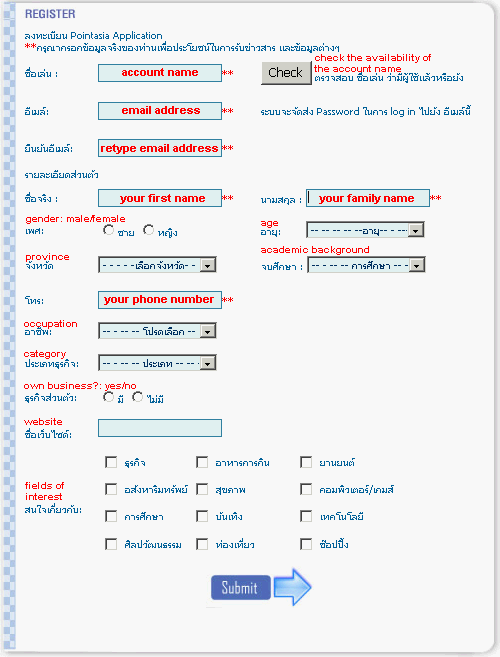
You need to register at the Point Asia website with a user-specified account name and an email address. Upon registration, a password is sent to this email address. The Point Asia's image browser requires the account name and the password to "log on" to its image server.
At the time of writing, this service is targeted at Thai users, hence all the instructions and manuals are provided in Thai language only. Provided on the right is a translation of the registration page. Minimum required fields are indicated with bold letters and double asterisk **.
2. System Requirement (announced)
OS: Windows 2000 / XP
CPU: Pentium III, 500MHz
RAM: 128MB
Available HD Space: 500MB
Graphic Card: 1024 x 768 (32 bit), V-RAM 16MB
Internet Connection 128kbps
Pre-requisite Installation: Microsoft.Net Framework 1.1, DirectX 9.0c
3. Installation notes (personal experience)
The .Net Framework 1.1 alone didn't work, and I had to install the .Net Framework 1.1 Service Pack 1 from the Microsoft website (NDP1.1sp1-KB867460-X86.exe).
The Direct X diagnosis (Start > Run > dxdiag) revealed that the Direct3D 9 was not supported with my current display driver. This problem was solved when I updated the display driver.
The Graphic Card of my computer (Compaq Presario 725AP) had only 8MB of V-RAM (shared with the 256MB main RAM), and the BIOS setting didn't have an option to increase this amount. Lack of sufficient V-RAM seems to be a critical issue, and I almost gave up using the Point Asia browser. However, on trial and error, I managed to run the browser with the display set to 16-bit color. This caused some disadvantages (disability of the CaptureScreen function, corrupt on-screen menu) - but still within the tolerance of practical use.
The internet connection speed doesn't seem to be an issue. I use the Hutch 153kbps CDMA modem, but the average transfer rate with the Point Asia image server is around 10kbps - frustratingly slow. This may be caused on the side of the Hutch, though.
The Point Asia images can be stitched with relatively high precision but, as in the case of the Google Earth images, sub-pixel translation persists.