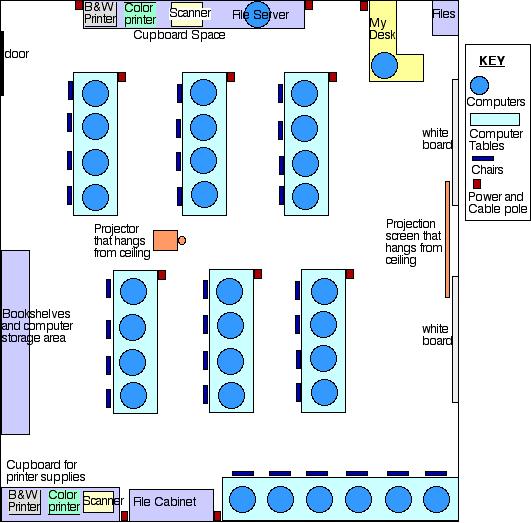
Desired Physical Arrangement of my Classroom
~ Planning ~ How
to Build a Computer Lab ~ Facility Guidelines
for learning Technology ~
~ Physical
Considerations ~ Physical Arrangement
~
Planning
NCTP(National Center for
Technology Planning)
The NCTP site is an excellent resource for finding links
for technology planning.
Developing Effective Technology Plans
Great ideas for developing a technology plan for your school. Integrating technology is more than putting computers into your school. Some ideas are presented here that may help you design an effective plan for technology.
Recipe for Success in Technology PlanningBack
What steps are needed to develop a technology plan for your school? What is a technology plan? This site will try to help you solve these questions so that you may get started on your own technology plan.
How
to Build a Computer Lab
Don't know where to start?
How do you build a computer lab from scratch? This web site can help.
Everything you need to know about building a computer lab, you can find
here. Great information about hardware, software, budgeting, physical
set up of the lab, how to staff and run your lab and much more can be found
at this site. Security devices for your lab may be necessary.
You can click on the Security Devices link to find out what equipment you will need to install three cameras with time lapse video and what it will cost.
Design
of the Facility will help you determine the needs of the lab and help
to plan for future expansion or technology change.
Staffing and running the lab will be a consideration that must be accounted for before the lab can be opened. Get some ideas for how to staff and run your lab at this site.
Facility Guidelines for learning Technology
At this website there are a variety of topics covered, including the following:
1. Arranging
Computers in the Classroom This link discusses the problems you
run into building a computer lab and ways to resolve them without changing
the structure of the room.
2. Desirable
Classroom Architecture This link gives many options when expansion
of a classroom is necessary and what to expect for price range.
3. Furniture
for Computer Requirements This link provides a number of deminsions
and specs for computer benchtops and what types of chairs are prefered
in the lab.
4. Electrical
Issues This page suggestes options when routing plugs, cable,
etc for your lab.
5. Lighting
This page discusses preferred lighting conditions for your lab.
6. Security
Generally There are many suggestions with security that you might
consider in building a lab.
Some security issues you might want to consider when building your lab are the following.Back
- Locks on the back of computers and components.
- Cameras that circulate in the lab and record all activity.
- Windows that only open a certain way.
- Blinds or coverings on windows.
- Walls that are reinforced.
- Roofs that are reinforced.
- Intruder detection systems.
- Strict visitor policies requireing them to show Id.
- Lab monitors on staff at all times.
- Known computer repair people that are trustworthy
Physical Considerations
Computer
Labs Versus Classroom Integration of Computers
The argument presented here is where should we locate
our computers to get effective use from them in our schools: in the classroom
or in computer labs. See research-based and opinion-based arguments
for phasing out computer labs and putting the computers into the classroom.
How
to Set Up Computers in Your Classroom
A classroom computer can be a motivating and powerful
tool. This site gives you some tips for setting up computers in your
classroom, whether you have one computer or several computers.
Computer
Classroom Design
The physical set-up is an important consideration for
designers of computer classrooms. This site helps with ideas for
where to put your computers, the layout of the room, what type of
chairs to use, student/computer and student/instructor interface, and technical
requirements in setting up your room.
Easing
Eyestrain for Computer Users
Children, as well as adults, spend hours on computers.
Visual skills in children are not fully developed, which may lead to Computer
Vision Syndrome. See some excellent tips to help children avoid vision
problems related to extended computer use.
Desired Physical Arrangement of my Classroom