| IMAGE: CLICK TO ENLARGE DESCRIPTION: PERSONA: |
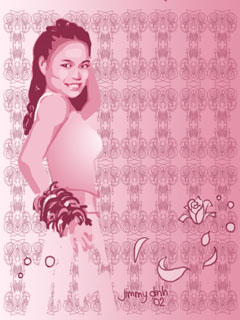
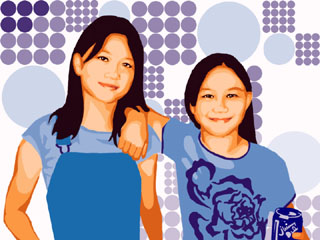
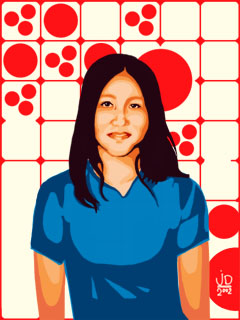
| 1- This is me and this is also the first one I've ever done. The background was added much later and here I went crazy with the color values. I was aiming for three tones but I lost control and so there's more. FAILURE! 2- I did this using one color with about five values that make up the whole face. I'm proud this came out to have the model's likeness intact. This one holds my first attempt at shirt wrinkles. 3- I get a little daring with color usage here. 2 colors, 3 values for skin. SUCCESS! Actually, this was one of the easier pictures to do and I thought the composition was fun. 4- Back to monocromatic colors with this one. First to have some outlines to fill up some voidness. This was the first one I had a nagging voice in my head saying "it doesn't look good." And so, hearing that, I decided to make it up by doing this: 5- Much better result here with her resemblance showing. The original picture was formal, so I thought I'd add fancy patterns and something flying by. 6- I had trouble at first with getting her likeness and I attempted this a coupla.times. I thought maybe it was because I knew her too well. I went a little over board what with all the props and pre-Independence Day spirit. 7- Here's an example of a mistake that worked. The coloring wasn't all that great, so I decided to leave only the line work behind. Look's simple, but this one depends a lot on line quality. 8- Another one that seems to be simple, but ONLY three colors were used to achieve the same goal as all these portraits: getting the likeness of the person. Tough feat it was. 9- Requested colors from the model, which is no big deal since I suck with colors anyway. I made the shirt logo myself with some special skewing commands from PHOTOSHOP. 10- I used skin-like tones as a first for this one, and also thought of something out-of-this-world: a BORDER!!! OH man was that a discovery of a life time. I like the original picture to start off with, so this came out nice. 11- The skin tones here came as an accident. I was aiming for two colors, orange and black, like soemthing I saw at TARGET, but well, you see the result. Frame included too. 12- I made this with the person's personality in mind. So if you look at this, you could conjure some personal stuff about this guy. I also reprodiced his image in the background which I think looks neat. 13- This one was done with the person's interest in mind. If you know what those numbers mean, I think it correlates with whatever he likes =). 14- Returning to the frames / borders roots and skin-like tones, I had this model inside a circle! Absolutely ground-breaking, isn't it? 15- Here's my first picture with more than one person present, plus an object, too! I decided to try something with patterns as an emphasis. Patterns aren't my thing, but this came out decent! 16- Another piece with some sort of pattern. There are some similarites between this and the piece before, such as skin tones, circles and outfit color. After all, they're sisters! 17- I decided to be daring with colors here, and also daring with the composition. The original photo had lighting i didn't like but I think this piece came out decent! 18- This one uses geometrical shapes to get the tones going. The colors are genius to my standard. I had trouble getting the likeness of this model at first, but the result now is great. This piece is my first at automated patterns. 19- Another double shot! This piece stands as largest in file and resolution size to anything prior and also time consumption (4 days inconsistent work). First to have Paths usage. 20- This was inspired by something I saw on a CD cover from what was it...BestBuys or Sam Goodies. The style is very simplistic and encourages multiple images to give it more interest. I've learned a lot about paths with this. 21- This one explores the paths commands further and learned I did. This was done as a Bday gift and so it's got a lot of thought put into this. There are some significant images here and that's up to you to interpret. 22- I explored the paths tool further and learned shortcuts on using selections via paths. Great function. This picture uses a lot of what I learned earlier, which is selection objects and then creating a selection from those objects. 23- I used a lot of the skills I learned from previous portraits to create this one. I had a little fun with the belt and love the colors. This is the first to have an outline of the model. 24- I used only two shades of color to try and achieve that simple cartoonish look. I used a layer effect which gave it the glow , which I originally planned to have on a differet situation. 25- I definitely had a color scheme in mind for this one. This was time-consuming because I attempted a lot of things with vain, like free-hand drawing the hand. This one is also the record breaker for highest resolution. |
| JIMMY- Here I am, just me - yea. KEN- My essay assistant! TONY N .- A hunter of other hunters! MEGAN- Look below! MEGAN- Good friend! LISA- Studious Pianist (patriotic?)! TONY D .- Regular hormone-driven guy! CATHY- Bright as her picture! HOVIK- He's got his own geek tribe! www.hovik.cjb.net JOSIAH- Envious model material =P. JOHN G. H.- Mr. artistic! www.johnhultman.com MAVERIC- Twisted dreamer! www.angelfire.com/ma4/maveric HENRY- Computer suave! www.henryong.com ANN- Hyper active! TIFFANY and CHRISTINE- Not twins, but geniuses! MICHELLE- Multi-talented! JOSEPH- Mojo Jojo! www.geocities.com/kaiserj1472 TIMMY- My fun second cousin! HOANG and MAI LAN- My brother and his good friend! JULIE- My little sister with her 9 lives! JIMMY and CARLOS- My good friend and me out side! www.geocities.com/carmitch DARIEN- Amateur videogame designer! http://divinia.sytes.net CECILIA- Bear on the loose! KIM- Hyper random-ness! TONY L .- Guess his favorite color! |
| All Images Copyright (c) Jimmy Dinh 2002 |
 |
 |
 |
 |
 |
 |
 |
 |
 |
 |
 |
 |
 |
 |
 |
 |
 |
 |
 |
 |
 |
 |
 |
 |
 |