
to download this utility go here:
|
|
|
|
|
|
|
|
|
|
|
|
|
|
|
|
|
|
|
|
|
|
|
|
|
|
|
|
|
|
|
| Okay this is real simple... first of all you have to do is download Ultra ISO which is a utility that works with media images of all types like cdrom floppy disk hard disk etc... to download this utility go here: |
||||||||||||||||||||||||||||||
| 1. | ||||||||||||||||||||||||||||||
| Google search Ultra ISO download | ||||||||||||||||||||||||||||||
| 2. | ||||||||||||||||||||||||||||||
| Once you have installed Ultra ISO you can go back to the web and go to a website called www.bootdisks.com there you will find various images. here is a link to one of my favourite boot disks: | ||||||||||||||||||||||||||||||
| Windows 98 OEM BOOT | ||||||||||||||||||||||||||||||
| 3. | You can now insert a formatted floppy disk into your drive and run the application you downloaded from bootdisk.com | |||||||||||||||||||||||||||||
| 4 | Once you have the image you can load up Ultra ISO | |||||||||||||||||||||||||||||
|
||||||||||||||||||||||||||||||
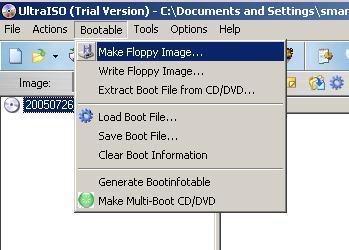
| Make sure you still have the floppy in the drive and click on "Make Floppy Image" and save it on your desktop. | ||||||||||||||||||||||||||||||
|
||||||||||||||||||||||||||||||
| 5. | ||||||||||||||||||||||||||||||
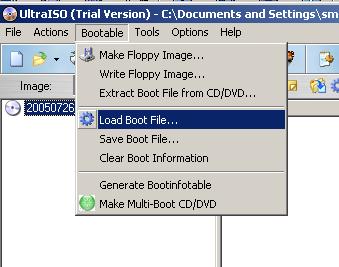
| Go down to "Load Boot File" and then select the floppy image you just created and saved on the desktop. | ||||||||||||||||||||||||||||||
|
||||||||||||||||||||||||||||||
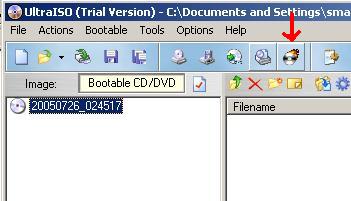
| 6. | Finally you can click on the "Burn CD option" and you will have succesfully created a windows 98 bootdisk. | |||||||||||||||||||||||||||||