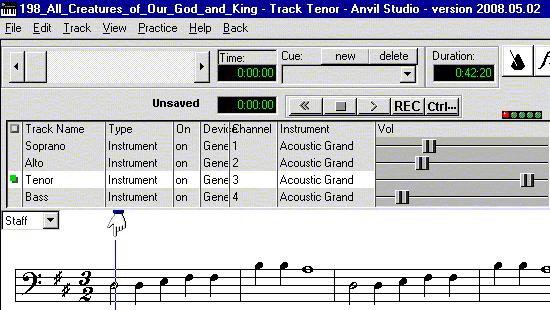
1. The notes must exactly match the hymns found in The Saint Michael Hymnal, Choir Edition. If all the verses have the same notes, just make one verse worth of notes.
2. When you create your MIDI with Anvil Studio, create a separate track for Soprano, Alto, Tenor, and Bass, by selecting Track, Create, Instrument Track, from the toolbar at the top. This allows people to turn up their part and turn down, or off, the other three parts.
Email your midi to [email protected].
Tips: You may find it easier to use the computer keyboard to compose tracks rather than your mouse. The keys between Q and ] can be used as a row of white piano keys, while the keys between 2 and = can be used as the black piano keys between them. Similarly, the keys between Z and /, and S and : can be used as another row of piano keys. Use a pencil to mark black dots on the front of black piano key buttons. They can be erased later if needed.
To change note duration from the keyboard, press keys F1 through F6. To toggle the Dotted Note checkbox, press F7.