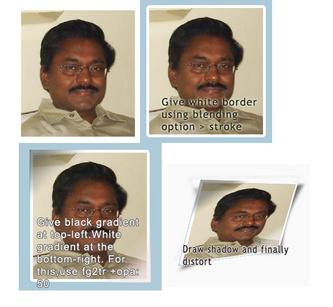
Photoshop tutorial -1 :Give photo effect to an image
Steps involved :
stroke # give black gradient highlight at top right corder and white gradient at bottom left corner. For this you have to select foreground-to-transparent with 50% opacity # How to create black shadow layer: use pen tool & dst and select around the photo with little in and out here and there after setting feather=4. Now create a new layer and fill with black and set opacity to 50% # Finally you should tilt the photo by about 15 degree to have a realistic effect #Useful links : http://www.brownbatterystudios.com/sixthings/2006/03/06/rapid-fire-1-photo-realistic/ and http://www.pstut.com/tutorial-realistic-photo-print.html