Índice
HardwareHacker
Aqui estão alguns artigos de Don Lancaster a respeito de monitores RGB e interfaceamento, estes artigos foram publicados em uma revista de eletrônica, se não me engano a 'Radio Electronics', e hoje também disponíveis na Rede em formato Acrobat® ('.pdf') no arquivo 'hackar3.pdf' (1412kb).
 RGB Video Fundamentals
Don Lancaster's Hardware Hacker, June, 1992
I have recently been working with
Dennis Carper of Redmond Cable in
interfacing all sorts of video games to
all types of leftover surplus computer
monitors. So, I guess it might be a
good time to review some of the fun-
damentals of RGB monitors.
The reasons we go to the separate
red-green-blue route in the first place
are for picture quality and for picture
resolution. Regardless of how much
trouble you go to, it is simply not
possible to glomp onto the antenna
terminals of an ordinary tv set and
display anything even remotely near
what is needed as a bare minimum for
all of today's color computer displays
or premium arcade video games. The
needed bandwidths and scan rates are
simply not there.
Unlike broadcast signals (such as
NTSC or PAL or SECAM), there are
no universal standards being used for
RGB monitors. If it has three separate
video lines on it, it is an RGB system.
Period. Thus, you will have to be very
careful what your video source and
your video monitor are capable of
before you try to connect them.
The simplest of RGB systems use
"TTL" monitors. These do not accept
video as such. Instead, they receive
digital logic signals which turn their
red, green, and blue beams entirelY off
or on. Thus you can only get eight
possible colors. All eight of which are
always fully saturated. Some TTL
monitors include a fourth brightness
line that gives you a choice of "full" or
"half" bright, upping the apparent
color total to sixteen.
Instead, on a linear RGB monitor,
all shades of all colors are possible.
Linear monitors need much more in
the areas of video amplification and
linearization (or gamma correction)
circuits. Obviously, linear monitors
are required for "rcal" video from a
cable or broadcast source, or anytime
else you need a very wide range of hue
and saturation values.
Most linear monitors are not too
fussy over accepting interlaced scans,
as get used on standard tv; or the non-
interlaced scans, as must get used on
most data displays.
But lincar monitors are extremely
fussy over their horizontal scan rates.
Ordinary tv uses the horizontal scan
rate of 15.735 kilohcrtz for color or
15.750 kilohcrtz for black and white.
Most computer scan rates are double
this, up in the 32 kilohertz range. And
premium systems can have scan rates
of 80 kilohertz or higher.
Unless your monitor is carefully
designed to be a multisyncing type, it
will only accept a very limited hori-
zontal scan rate range. Thus, there is
no way you could use an ordinary
broadcast RGB monitor to display a
Mac or VGA output. It flat out can not
operate at the higher scan rates.
One of the ruder surprises to Apple
IIgs people downgrading to a Mac LC
is that their old color monitor will no
longer work. Their IIgs monitor is a
broadcast-only style, while those LC
video scan rates are on up in the 30
kilohertz range. Fortunately, a simple
jumpering option (which we saw a few
columns back) lets the LC use an
ordinary and cheaper VGA monitor.
Thus, you have to be sure that your
intended RGB monitor is capable of
accepting the horizontal scan rates
provided by your video source. Some
combinations simply will not work.
A final major consideration is the
monitor's resolution. The resolution is
set by the video bandwidth and the
pitch of the color bars or dots on the
screen. Images will smear if you try to
view them on any monitor whose
resolution is too low for the intended
application. The results can end up
anywhere from a slight eyestrain to
totally unviewable.
So, a second rule: Make absolutely
certain you test and use any monitor in
its intended final use before you
actually pay for it.
Your video lines could be high im-
pedance cables if the runs are short, or
terminated ones (usually 75 ohms) for
longer distances. A fair amount of
power is required to properly drive a
terminated video cable. Maxim is one
good source for video drivers. Video
cables are best done either as fully
shielded, or, at the least, as twisted
pairs. If any separate grounds are
provided, they should be used as they
were intended.
If your video source has any dc
offset present (such as the emitter
follower outputs of a Super Nintendo,
then you must provide for a capacitor
coupling between your source and the
monitor. Very large capacitors are
recommended, of at least 220 micro-
farads or more. But these may already
be built in, so check first.
There are several synchronizing
options used in RGB systems. Some
systems tack sync signals onto the
green channel and later strip them off.
But most systems have separate sync
line(s) which deliver the horizontal,
vertical, or composite sync signals.
To further confuse matters, sync
lines can be smaller one volt signals at
analog levels, or can be TTL or CMOS
compatible. Others may be at TTL
levels, but end up too small for CMOS
and too weak for TTL. We saw a 'user
Nintendo workaround for this last
month using a simple 680 ohm resistor
to ground.
Typical sync lines are active low
meaning that your sync tips are at
ground. But a few (especially earlier
Commodore products) demand an
active high composite sync.
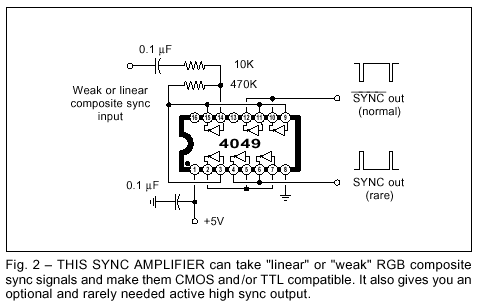
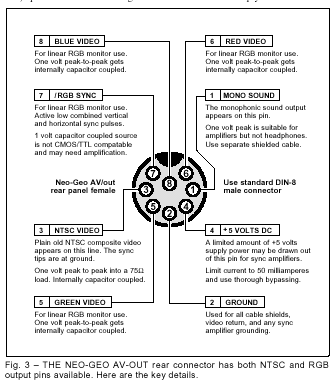
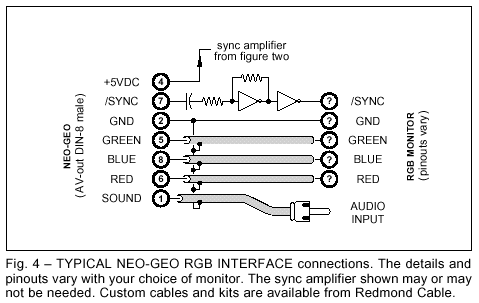
Figure two shows you how to use
several inverters to amplify low level
sync signals into full CMOS and TTL
compatibility having your choice of
either active low or active high sync
tips. Your first stage can be a biased
inverter amplifier having a gain of
twenty or more. The second inverter
further cleans up your now-digital
waveform, while the third and fourth
stages act as inverters or drivers.
If you try this linear amplifier stunt
with other CMOS gates or inverters, be
sure to use "single stage" unbuffered
(UB) versions; other buffered ones
may have too much gain and could
oscillate. More details in my CMOS
Cookbook.
Our sync separator and universal
video interface from two months back
is easily modified to provide suitable
sync amplification for the Neo-Geo or
Super Nintendo.
Sound is separately dealt with on a
RGB system. Sometimes, there will be
no sound at all. One clue here is the
absence of any volume control. Radio
Shack makes a neat little $11 lab
amplifier that can sit in for you. Other
options are monophonic sound, stereo
sound, or a multiplexed stereo sound
accepting R - L and R - L inputs. Super
Nintendo uses multiplexed sound.
If you forget to demultiplex, one
channel will sound monophonic, and
the other might sound awfully tinny
and just plain "wrong". To properly
demultiplex, you add the two signals
together to get the right channel and
subtract them to get the left one.
Regardless of your sound system,
totally shielded audio cables are a
must. Ideally, they should be totally
separate from all your video cables,
owing to the strong "hum" and "buzz"
induced by vertical rate signals.
So, what can you interface to who?
Use your oscilloscope to view all the
normal outputs of your video source
run in their intended way. Then do the
same for the "normal" inputs to the
monitor.
Some hints: To tell if a source is
capacitor coupled, briefly connect a
470 ohm resistor between the pin and
ground or +5. If the scope display
bounces around and slowly drifts on
back, you are ac capacitor coupled. If
it remains in the initial position (or
possibly gets slightly smaller), then
you are dc coupled. Be sure to note
any fixed offset voltage.
To find out your source impedance,
note that any resistive load equal to
your source impedance will drop your
output signal level to one half of the
open circuit value.
Video Sync Separation
Don Lancaster's Hardware Hacker, March, 1992
Another popular helpline topic is
video interface. And the number one
ongoing request is for a simple and
effective sync separator. The sync
separation process lets you take your
normal composite video signals and
extract those horizontal and vertical
synchronizing pulses from it.
The most obvious use for a sync
separation is to let you clearly view
video signals on your oscilloscope.
Without a field or frame reference, all
you will see is a blur. Other uses for
sync separation do involve stripping
closed captioning or other data off
specific horizontal lines present du-
ring vertical retrace, grabbing stock
quotes, inserting windows, pattern
generators, title overlays, wiping and
fades, color keying, and other special
effects. Or simply adding a pair of
crosshairs.
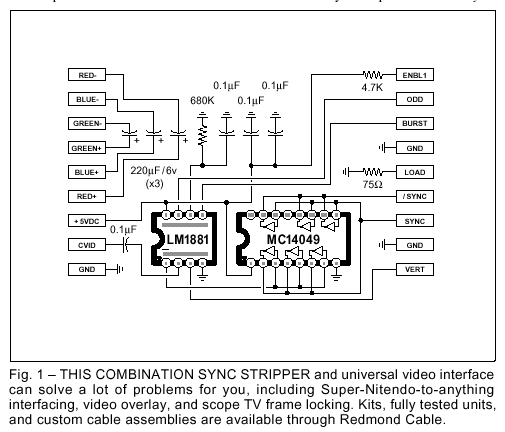
Figure one shows you a simple and
low cost circuit I’ve worked up that
can combine both an effective sync
separator and a low cost universal
video interface card. The key chip is
the National LM1881 sync separator
mini-dip. You take your usual one to
two volt positive going sync=ground
video signal and capacitor couple it to
pin 2. The chip extracts the composite
video and produces the active low
TTL/CMOS compatible composite
sync output on pin 1.
Several other pins on the LM1881
provide other functions that you may
find handy. Pin 3 gives you a vertical
sync reference as one single pulse
without the usual teeth or serrations.
This is the one you will usually want
to lock your scope to. Pin 5 is a burst
gate that gives you a slightly delayed
horizontal sync pulse that can be used
to extract any NTSC (Never The Same
Color) chroma burst info.
An RC network found on pin 6 is
intended to create a default vertical
sync in absence of a true NTSC video
input. This is handy for the "almost"
NTSC common to the computers and
video games. The time constant can
be shortened for higher scan rates; see
the National data sheet for details.
Finally, pin 7 lets you pick out the
odd and even fields of an interlaced
NTSC frame. This output is active
only when the input composite video
has a full interlace. Advanced color
editing is one possible use.
An external source of the usual five
volts DC is needed. Since the current
is only seven milliamperes, just about
any old supply will do. As usual, keep
the power bypass caps real close to
your chips.
Several other features on the circuit
are handy for special video interface
cables. The three large capacitors let
you couple red, blue, or green video
off emitter follower outputs and then
connect them to RGB monitors. A 75
ohm resistor is handy for terminating
cables. And a logical high signal is
useful for such things as enabling the
sound on certain receiver/monitors.
By itself, the inverter is handy for
converting active low sync into active
high and vice versa. While most of
the video systems do use active low
sync, Commodore and one or two of
the others may not.
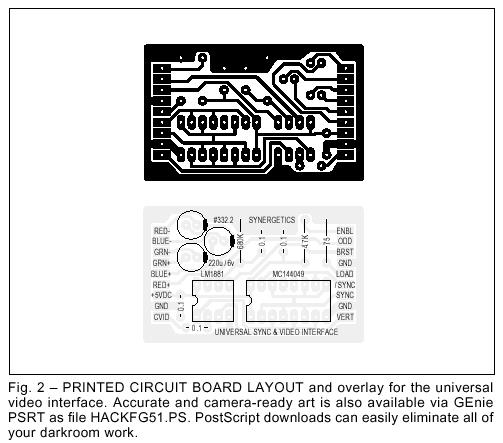
The printed circuit layout is shown
you in figure two. Empty boards, kits,
tested circuits, and both stock and
custom interface cables are available
from Redmond Cable. You can call or
write them for a current price list. I’ll
also post this layout on GEnie PSRT,
so you can easily create your own
accurate version without needing any
photo work. See HACKFG51.PS.
You may want to keep some empty
or partially populated boards on hand
to solve special cabling and interface
uses. The large runaround ground on
the outside is especially handy for
shielded cable terminations.
For this month’s contest, just tell
me about an unusual or off-the-wall
use for a sync stripper circuit. There
will be all of those usual Incredible
Secret Money Machine II book prizes,
along with an all expense paid (FOB
Thatcher, AZ) tinaja quest for two
going to the very best of all. As usual,
send your written entries directly to
me at Synergetics, rather than over to
Radio-Electronics editorial.
Let’s hear from you.
Nintendo-to-Anything Interface
Don Lancaster's Hardware Hacker, March, 1992
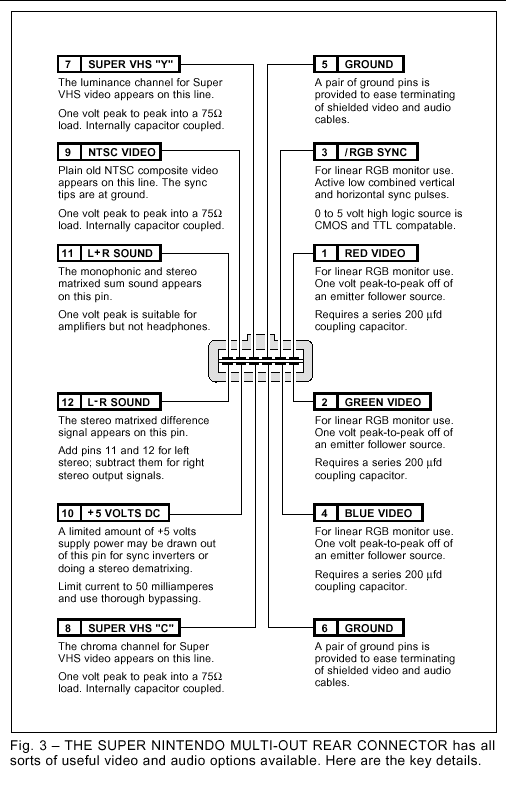
As figure three shows us, there’s a
very interesting Multi-Out connector
on the back of those Super Nintendo
game machines. This gives you lots
of alternate video and sound output
formats that you might find handy.
For instance, you can go to a RGB
monitor for sharper images and better
colors. Or add total stereo sound or
Super VHS improved resolution.
Or, you may want to hang any old
tv-compatible color monitor plus a
pair of headphones on the machine to
silence kids and keep them off your
main prime time television set.
Let us see exactly what is on this
connector and how to use it. By a
special arrangement with Redmond
Cable, all the connectors, the above
interface kit, and special and stock
cable solutions for almost any Super
Nintendo interface are available.
The Multi-out connector is really
six-over-six edge traces on a double
sided circuit board. Looking at the
rear, the traces are odd numbered
1,3,5,7,9,11 on the top, going right to
left. And the similar pins are even
numbered 2,4,6,8,10,12 on the bottom,
again going from right to left.
Both pins 7 and 8 are grounds. The
pair make terminating several shield-
ed wires much easier.
A +5 vdc output is provided on pin
10. It appears to be capable of driving
at least 50 milliamperes. But you
shouldn’t suck the poor machine dry,
and you should very carefully bypass
and filter any use of this supply.
There are a pair of sound outputs.
Pin 11 is your choice of monophonic
sound or a (L + R) matrixed stereo.
Note that "left" plus "right" equals
"both". Pin 12 is (L - R) matrixed
stereo. These signals are capacitor
coupled and are the proper size for
your usual audio inputs on a hi-fi
receiver or computer monitor.
Note that some computer monitors
have a sound capability and some do
not. The easiest way to tell is to find
an obvious volume control located
somewhere on your set. No volume
control, no sound. Other monitors
may need a special pin activated to
turn the sound off or on. We’ll see an
example of this shortly.
All your sound cables should, of
course, be shielded.
Sadly, the power levels are far too
low to usefully drive a speaker or a
pair of headphones. But Radio Shack
has an interesting beastie which no
Hardware Hacker should be without.
It is their #227-1008C mini-amplifier
and speaker. The (L + R) output eas-
ily drives this mini-amp, by way of a
standard miniature phone plug.
This mini-amp solves the problem
of a monitor that has no sound. You
can also plug headphones into your
mini-amp for any silent running. The
mini-amp is powered by your choice
of an internal alkaline 9 volt battery
or by a plug-in 9 volt dc supply.
Because of the matrix used, you
cannot get stereo directly off of pins
11 and 12. Instead, you have to add
the two signals together to get the left
channel, and subtract the two signals
from each other to pick up the right
channel. Like so...
(L + R) + (L - R) = 2L
(L + R) - (L - R) = 2R
A stereo dematrix can be done with
a quad op-amp or a transformer and
four resistors. In theory, you could
make use of a CMOS biased inverter
amplifier, but your common mode
supply noise rejection might suffer on
your right channel. More details on
biased inverter amplifiers appear in
my CMOS Cookbook.
Let me know if you need any more
info on stereo matrix extraction.
There are three different types of
video outputs found on the multi-out
connector. Plain old grounded sync
composite video appears on pin 9.
This can be routed to any standard
NTSC video input on a monitor, VCR
or television set. Note that a direct
video input will often have sharper
images and better colors than does
entry by way of some channel 3 or 4
modulator. Simply because far less
electronics gets in the way and an RF
modulation and demodulation can be
eliminated.
Super VHS or Y-C video appears on
pins 7 and 8 with that luminance "Y"
output on pin 7 and the chrominance
or "C" output on pin 8. These can be
routed to any system which accepts
Y-C video. Because of the separation
of all the color information and the
higher bandwidths, these Y-C outputs
should look far better than regular
composite video.
The best video of all, though, is
available as a separate red (on pin 1),
green (pin 2) and blue (pin 4) video.
These red, blue, and green outputs do
come off from emitter followers and
have a strong dc bias. They must be
capacitor coupled to your ultimate
destination using a 220 microfarad or
higher series capacitor on each line.
Be certain to put the (+) side of the
capacitor on the Nintendo end.
The needed RGB sync appears on a
fourth active low line on pin 3. The
active low sync is correct for Apple
IIGS, Sony, and most "standard" RGB
uses. It is the complement of what is
needed for Commodore and certain
others. The line swings ground to
+2.4, but is only weakly TTL compat-
ible. More on this next month.
Note that some connector plugs do
not have all of their pins available,
especially for the RGB sync and VHS
chroma. The Redmond plugs include
all of the pins.
Several interface circuits appear in
figure four. In each case, a partially
populated figure one circuit can be
used to greatly simplify your cables
and interface.
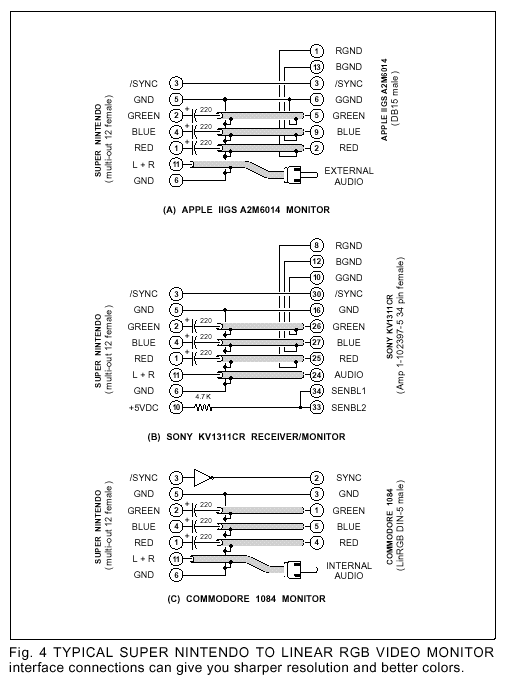
In figure 4-A, you can connect RGB
video to any Apple IIGS monitor by
using the three serial video capacitors
and the right connector on each end
of your cable. Since the IIGS monitor
has no speaker, you have to use a hi-fi
or the Radio Shack mini-amp.
Figure 4-B, shows an interface to
the older Sony KV1311-CR receiver/
monitor. Again, we have those three
serial video capacitors. This time, we
use an enabling resistor to turn on the
internal sound and eliminate any need
for a companion amplifier.
The interface to the Commodore
1084 color monitor is shown in figure
4-C. As usual, the red, blue, and green
video have to be capacitor coupled to
the appropriate pins on the LinRGB
connector. This time, an active-high
sync is needed rather than active-low,
so the inverter must get added as
shown. While the sound is internal, it
has to be routed via a separate audio
cable and phono plug that goes into
the Audio input. The size and position
adjustments on the back may also
need a slight readjustment.
Yes, we are working on VGA and
multi-sync solutions. Stay tuned or
check GEnie PSRT for availability.
Once again, some mix and match
kits, all-pin connectors, parts, and
cables are available from Redmond
Cable. Do let me know which other
interface circuits you would like to
see worked out.
Nintendo Interface Update
Don Lancaster's Hardware Hacker, May, 1992
Let's start off with an update
to those Nintendo interface
circuits we looked into last
month. For those of you who
came in late, you will find a special
connector at the rear of the Super
Nintendo machines that can let you
connect up to stereo amplifiers, head-
phones, RGB monitors, Super VHS
recorders, and bunches more.
We did look at this connector in
some detail last month and we saw
several useful and low cost interface
circuits. And we found that Redmond
Cable offers all sorts of custom and
stock video game interface kits.
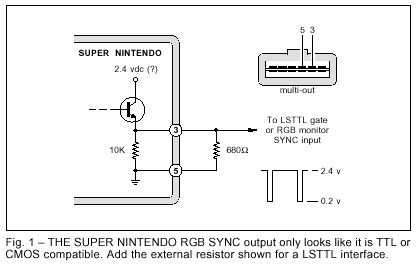
But after some further testing, the
RGB SYNC line on a Super Nintendo
connector pin three is not quite what it
appears to be. As figure one shows
you, this pin looks like it should be
both CMOS and TTL compatible, but it
is not. You can't pull it up fully for
CMOS and there isn't enough current
sinking capability for much of TTL.
Some (but not all) RGB monitors will
refuse to lock to this output.
The problem is that the output does
not come from a "real" logic gate. It
apparently arrives from an emitter
follower which has a weak pulldown
resistor. And a low supply voltage.
There seem to be several simple
workarounds you can try. The easiest
is to add the external 680 ohm resistor
shown. This should give you enough
current sinking for typical LS TTL
inputs. Use a scope to verify your
levels. There is even a place on last
month's circuit board for the resistor.
Otherwise, you should be able to
directly interface to any low cost but
rare 74HCT CMOS logic. Or you can
use the sync stripper circuit we saw
last month as a substitute, deriving
your sync from the composite NTSC
video instead.
Finally, next month we might look
at a simple sync amplifier which also
will be needed for an upcoming new
Neo-Geo interface. It should also work
and is based on adding feedback to a
4049 inverter to make it into a simple
ac amplifier.
So do stay tuned.
Índice