
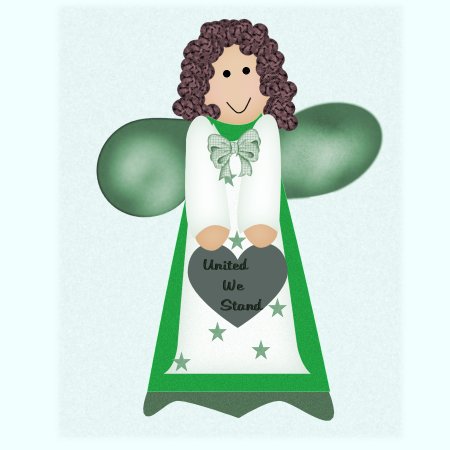
American Angel
created 7/2/02
A special thanks to Maraleah for testing her for me! Thanks so much,
For this tutorial you will need my selection files... here , unzip these and place them in your selections folder.
You will also need the tube for her hair, which was made by my buddy Nat ! Thanks, Nat ~s~ Unzip this and place in your Tubes folder.
Create a new image 900 x 900, this gives you plenty of room to work and you can resize when finished ~s~ Each selection will be on a new layer so if I don't tell you remember to do this and save often!!
OK, on a new layer, load from disk, ruffle.sel, flood fill with color of your choice I used 0807C7, de-select.
New layer, left wing selections load from disk leftwing.sel, flood fill, I used BC0603, effects, noise add 15% uniform, now grab your air brush with the following settings
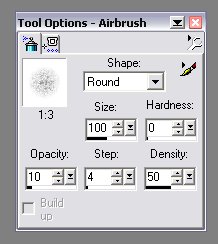
spray a small amount of white in the center of the wing, now effects, blur, blur more. Now change the color to black and give some sprays to color it a little, while still selected, effects, noise add 15% uniform. Do the same for your right wing, you can also move or rotate the wings around to get the look you want!!
New layer, load from disk, head.sel, flood fill with #EBCDB1, selections invert, effects 3-d drop shadow, using these settings and color #CD925A
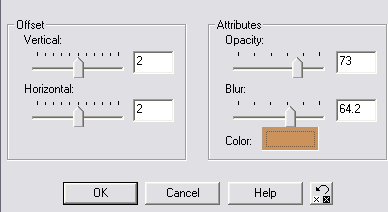
De-Select
New layer Hair, grab the hair tube you downloaded and give her some hair!!
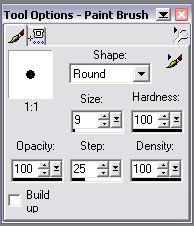
New layer, eyes, get your paint brush using black lets make her some eyes with the following settings,
now we need the draw tool, set to these settings
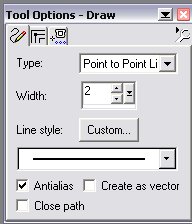
make her a mouth, you need to make 4 clicks with your mouse in a smile fashion, ( look at my smile for an idea) now right click on each node and choose node type, symmetrical, this will give her a pretty smile! Or you may also use the Bezier curve for it also.
New layer Dress, load from disk, dress.sel, flood fill with #0D05AE, or your choice of color, effects, noise add 15% uniform. De-select.
Layer new Bib, selections load from disk, bib.sel, flood fill with white , selections in-vert effects 3-d drop shadow and use the same settings as above with #0D05AE, as your shadow color, effects, noise add 15% uniform.
Layer new Heart, selections load from disk, heart.sel, flood fill with BC0603, effects, noise add 15% uniform. De-Select. (now if you want you can decorate your heart, just create a new layer and place tubes or whatever you like on that layer 8>)
Layer new left hand , selections load from disk, flood fill with #EBCDB1, selections invert, apply the same drop shadow as above for the head, now go to your layers palette and be sure your on the left hand layer, right click, duplicate, now image - mirror, you can use your mover if needed ~s~
Layer new left arm, selections load from disk leftarm.sel, flood fill with white , selections invert, apply the same drop shadow with the #0D05AE as the color, selections in-vert , effects, noise with the same settings. Follow the same directions with the right arm!!
OK, your basically finished, you can decorate her anyway you want, just click on the layer you want to decorate and create a new layer, put your tubes or graphics on the separate layer!!
Now remember to resize her, I did by 50% ~s~
I hope you have enjoyed this tutorial!
If you have and questions just drop me a line....
Shelly's Country Den