
Week One

The enhancing toolbars and OneStep are closest to the left side of the workspace.
|
|
|
|
|
|
|
|
|
|
|
|
|
|
| Print Shop Pro 8 Journeyman I Week One |
|||||||||||||
|
|||||||||||||
| This will take you back to the first page | |||||||||||||
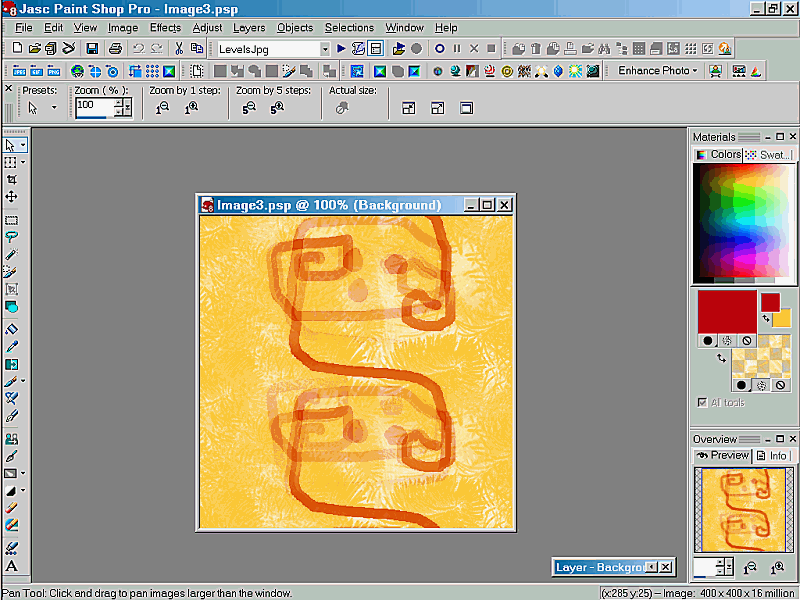
| OK...where to begin. The first Workspace is what I will use for Jman and graphics work. I have minimized the presentation of many photographic Toolbars. I have brought the Scripts Toolbar in close....notice that the Browse Toolbar is greyed out, seems to be a psp glitch that Jasc hasn't fixed yet. What else! oh! the Tools Toolbar has been opened up a bit to include a lot of the 'flyouts' that I expect to use often. | |||||||||||||
|
|||||||||||||
| You don't see my Start Menu at the bottom of either of these 'cause I choose to keep it on the left side of my desktop and in autohide mode. I might also add that I tried to place the Tools Toolbar on the right....but the flyouts didn't seem to work right from there. Soooooo! | |||||||||||||
|
|||||||||||||
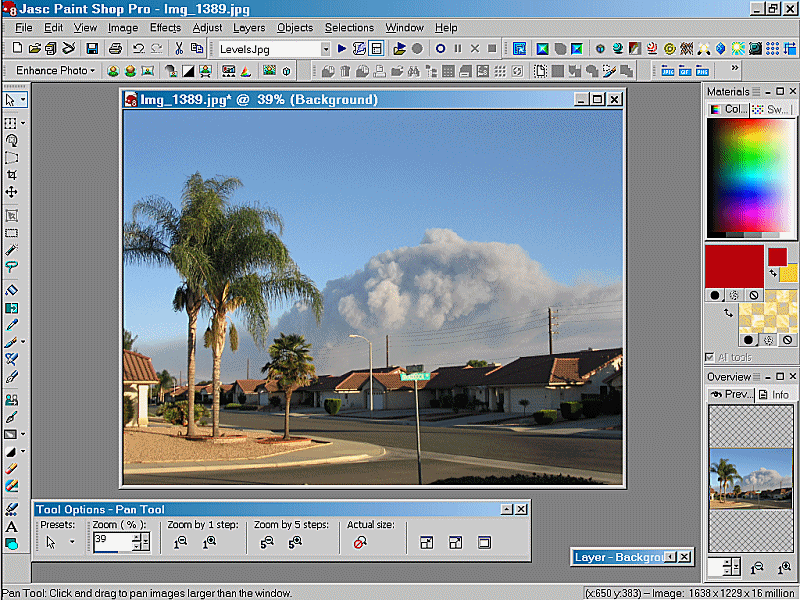
| This then is the Photographic Enhancing Workspace.... called Digital-Darkroom. My mentor Ron Lacey suggested that we might find it easier to work with the Tools Options tool bar floating at the bottom. It is slightly raised to allow for the minimizing of images they seem to fly down there and one can't see through the toolbar. LOL.... The enhancing toolbars and OneStep are closest to the left side of the workspace. |
|||||||||||||
| PS: That Photo was taken from my front porch, at the height of the So.Calif. fires. | |||||||||||||