|
How to use stationery
|
||
|
|
Stationery blanks are created in Outlook Express 5.0 (*.html extension) and Scrippy 2.01 (*.eml extension). |
 |
|
All files can be easily opened and used in Outlook Express 5.0. Files have different foramts: - HTML - files: easy graphics, with scrolling border or background. You can stop or start scrolling of border by left click. -EML - files: more complicated graphics, with double border, falling snow, leaves, etc.
Pick image and write letter to your friend!
|
||
|
HTML-files
These
files look like:
1. Unzip ZIP- file, including HTML - file, graphics and sound (sometimes) in folder C:/Program Files/Common Files/Microsoft Shared/Stationery.
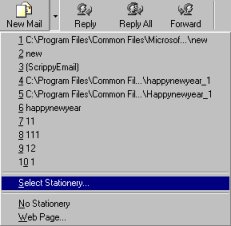
2. Open Outlook Express. Choose option New Message > Select Stationery. Then find and choose name of stationery you want to send and from the folder (default folder - C:/Program Files/Common Files/Microsoft Shared/Stationery) and press OK. Type the address, body of the message and send the email as usual.
EML-files
These
files look like:
1. Unzip ZIP- file in folder C:/Program Files/Common Files/Microsoft Shared/Stationery or in specially created folder at your option.
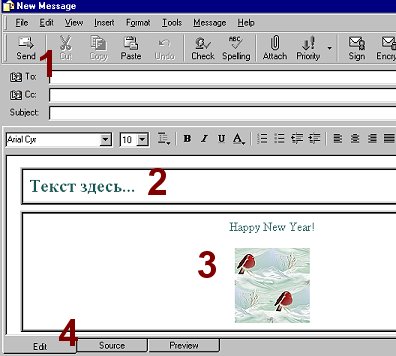
2. Double click on the file name will open Outlook Express, where the file will look like such as:
1 - type the address in line "To..." (as usual)
2 - click in this window, the arrow of cursor will change for "I" - formed cursor to type the text. Example of the text is in Russian, but you can change format, style, size and color of the font.
3 - don`t delete or edit this window! All graphics and options of the blank are saved there.
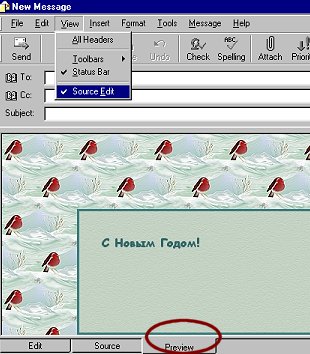
4 - choose option View and target Source Edit to view tabs at the bottom of file.
To look through the final message choose "Preview" tab. Press Send and send the message.
|
||
|
Have any problems? You can send email...
|
||
Optimized for resolution 800 х 600, IE5 All graphics and design are copyrighted: Country City © Copyright 2002
|
||