Eudora email and UK ISPs
Outlook Express is NOT my email program of choice. I use Eudora. Why? I think it is a far better product. If you wish to use Eudora instead of Outlook for collecting your email in the UK this page may help.
Eudora is one of the most popular email software products around, available for both PC and Mac (Apple Macintosh) in various versions over the years. The latest all-singing, all-dancing Windows version is v5.1.
Earlier versions of Eudora Light are smaller, load and run quicker and are more than adequate for most people. For several years I used Eudora Light 1.5.4 (16-bit, for Windows 3.1) on a Dell 386 that only had 4Mb of RAM. Since acquiring a Windows95 PC this was upgraded to v3.0.6 in September 2001.
One snag with using Eudora Light with some UK ISPs is the problem of your user login. Freeserve, Virgin, Fish and many others use the same method: you log in with a Username which is only a part of your email address. The bloated, virus-prone Outlook Express can handle this OK, but Eudora needs a little help.
Fish (www.fish.co.uk) is an ISP set up by Christian Aid. The fees from call charges while you are connected go to Christian Aid's work, which is infinitely preferable to lining the pockets of some rich city slicker or ethically dubious company.
Eudora v3.0.6 for Windows (16 bit and 32-bit) or the equivalent for Mac (System 7 and higher) can be downloaded by FTP from the following locations:
ftp://ftp.eudora.com/eudora/eudoralight/windows/english/306/
ftp://ftp.eudora.com/eudora/eudoralight/mac/english/3.1.3/
You can your browser to navigate or dedicated FTP software like WS_FTP. You can also download the v3 manual in Adobe Acrobat format.
Download the install file (if using your browser right-click the file and Save Target As...), then double-click on the saved file to run the Eudora install program. Once the program is installed you will need to set it up to connect to the Fish servers. Below are instructions to allow you to access mail at fish.co.uk with Eudora Light. If you want to fit more on your screen press the F11 key for Full Screen mode (press F11 again to restore the toolbars).
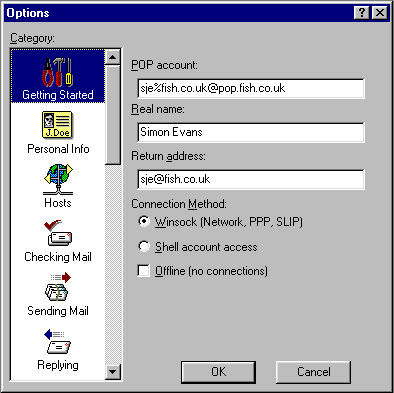
Start Eudora Light. Click on Tools - Options. Please note only the essential options are presented in the screenshots below.
Getting Started:
the format is username%[email protected]
(my Fish username is sje).
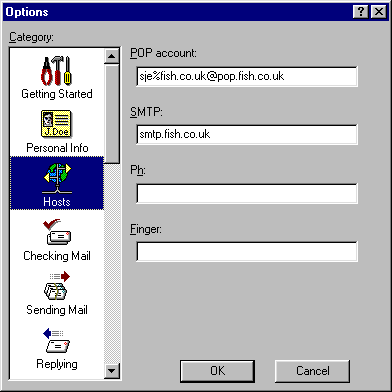
Hosts:
Your POP account will be already entered from the first screen. Type in the SMTP address: smtp.fish.co.uk
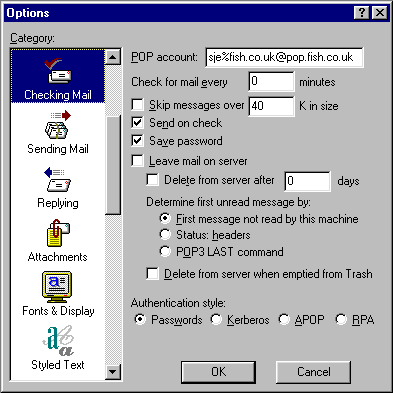
Checking Mail:
These options should be set already.
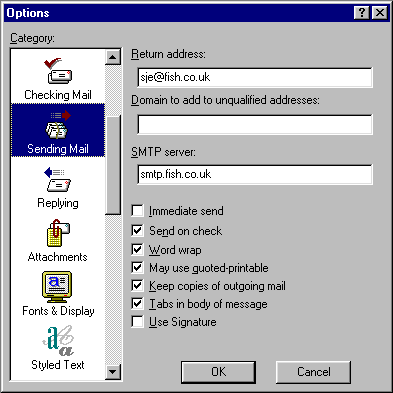
Sending Mail:
Untick the 'Immediate send' box.
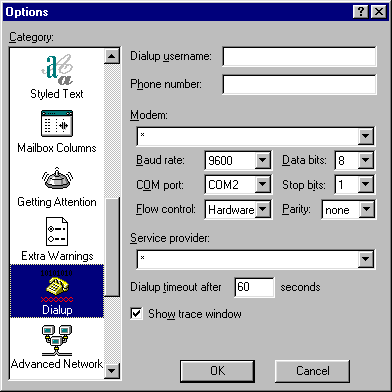
Dialup:
Do not set anything in dialup - the connection will be configured in the Advanced Networking screen.
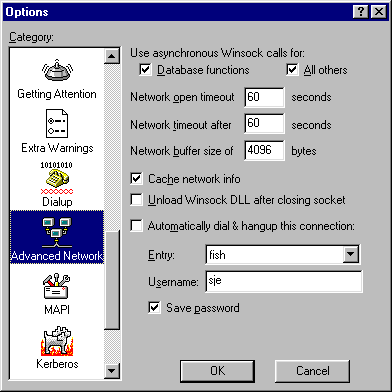
Advanced Networking:
If you already have the Fish connection set up (under Dial-up Networking on your PC) click the Entry and select it. Below it type your Fish username.
If you don't already have a Fish connection you can visit the Fish signup pages. Currently they only provide downloadable browser and settings files for Windows PCs, but there is connection advice for both Windows and Macintosh platforms.
Alternatively create a new Dial-up Networking option (for Win95 it is found under Start - Programs - Accessories, for Win98 it's in Start - Settings):
The connection number is 0845 0795033
your username is your email address
Server type is PPP, only the 'Logon to network' and 'TCP/IP' boxes should be ticked.
Under TCP/IP setting select 'Server-assigned IP address'
Useful links
Eudora can do lots more, such as running multiple email accounts.
You can find lots of advice at and plenty of links on the Eudora pages at Tidbits.com
Newsgroups: for Windows and Mac
via Google.
You can mail me with any questions.
Try the Unofficial Freeserve FAQ if you are looking for help on using their services.
This page last updated 5th June 2002
Home