OOA Using
UML
Final
Project Report
Richard
Skramstad
Contents
1.0 Executive Summary........................................................................ 2
2.0 The Diagrams.................................................................................. 4
Hospital Use Case [Use Case]............................................................. 4
Sequence--Schedule Appointment [Sequence]................................. 5
Sequence--Prescription (Within 72 hours) [Sequence]...................... 6
Collaboration--Maintain Charts [Collaboration].................................... 7
Hospital Class Diagram [Class]............................................................ 8
State Chart--Appointment [State]......................................................... 9
State Chart--Prescription [State]........................................................ 10
State Chart--Medical Record [State].................................................. 11
Activity--Schedule Appointment [Activity].......................................... 12
Activity--Refill Prescription [Activity]................................................... 13
Activity--Maintain Chart [Activity]......................................................... 14
1.0
Executive Summary
A large
hospital wants to build a system to meet the growing needs and capabilities of
its patients. The patient can view
information via the internet. This is to
ease bottlenecks in the current highly centralized telephone based system.
1.1
Requirements
The
Hospital Management System includes a Patient Interface System (PINS) that
allows he patients to look up:
1.
Appointments
2.
Insurance plans and capabilities
3.
Prescription information and
4. Medical
records (as much as possible)
The patient
should be able to (shall) make or cancel appointments and see co-payment
requirements. The system confirms the
ability of the patient to see the doctor and an acknowledgement is shown to the
patient and a record is made to both the nursing staff and the doctors about
the appointment. The PINS also can allow
for the nursing staff to prepare and keep the charts, and also allows patients
to review their prescriptions and request refills as needed.
1.2 Actors
and Use Cases
The four
major actors in the system are the patient, doctor, nurse, and pharmacist. An additional actor is the system controller
which must authenticate users and negotiate transactions. The major use cases are:
1. Make,
change, or chancel appointments by the patient or doctor
2. Request
and refill of prescriptions
3.
Preparation and maintenance of medical records and charts
The static
model is developed by the identification of classes (with their attributes and
methods) and the relationships between these classes. The dynamic model addresses the operations
offered to the users and the constraints on the system. These models are developed in a spiral
fashion using class diagrams, sequence (or collaboration) diagrams, activity
diagrams, and state transition diagrams.
Implementation is presented in the component and deployment
diagrams. These diagrams will drive out
the details of the operations and relationships between the classes. These diagrams are prepared using the UML
constructs and are best when augmented with other methods such as prototypes of
the user interfaces. User expectations can be clarified using these types of
prototypes.
1.3
Modeling Issues
The issues
relate to addressing the ambiguities and incompleteness of the model. What are the missing details and can these
details be resolved by talking to the users and domain experts. What are the data archive requirements? Does the model need to address concurrent
access in a multiple user system? Does
the system be fail safe and resistant to crashes and should it include fool
proofing? Trade offs include level of
centralization verses a distributed system.
Can life cycles cost be reduced by significant modeling activities?
System
boundaries must be addressed by determination of how many activities are
computerized. Interfaces to other systems
(insurance, billing, and pharmaceutical) must also be defined. Does the model need to address release of
data, access control, and user permissions?
Persistence of information or objects needs to be clarified if reports
are generated and external interfaces need to be supported. Activity Diagrams and State Charts can help
clarify these issues.
1.4 The
Spiral Model Meets Roundtrip Engineering
One
possible approach is the use of reverse engineering and automatic code
generation. An existing system or
prototype could be reverse engineered into class diagrams. These diagrams could be put aside (hidden
from the users). The users could then be
interviewed by using activity and sequence diagrams as a “clean sheet” and/or
“brainstorming” approach to solicit the true classes of the system. After the user interviews, these “preliminary
user defined” classes are compared to the reverse engineering classes by the
domain experts. New classes would be
developed through the reconciliation of the “preliminary user defined” classes
and the reverse engineering classes. The
new resulting class diagram would then be entering into an automatic code
generator and the next generation of prototype would be developed. The process could be repeated as many times
as necessary to evolve the system definition.
2.0 The
Diagrams
Hospital Use Case
[Use Case]

The use
case diagram represents the major four actors (patient, doctor nurse, and
pharmacist) and the major uses of the system.
The use cases fall into three major categories: view/make/change/cancel appointment, refill
prescriptions, and maintain medical records/charts.
Sequence--Schedule Appointment [Sequence]
This
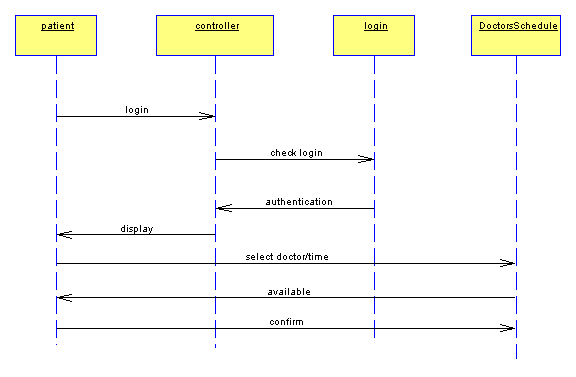
sequence diagram represents the timing and flow of information within the “make
appointment” use case. The summation of
the appointment record is called the Doctors Schedule. The System Controller verifies that the
appointment time is available notifies the patient, who confirms the
appointment and the system updates the database.
Sequence--Prescription (Within 72 hours)
[Sequence]

This
sequence diagram represents the timing and flow of information within the “refill
prescription” use case. Since the
patient has waited the required time, the system can automatically check availability
of the medication and send the confirmation email to the patient.
Collaboration--Maintain Charts
[Collaboration]
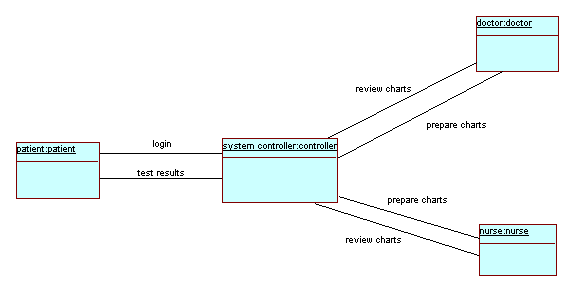
This
collaboration diagram represents the flow of information within the “maintain
charts” use case. The doctors and nurses
can prepare inputs to the medical records and charts. Lab test results can be viewed by the
patient.
Hospital Class Diagram [Class]

This Class
Diagram shows the classes and the relationships between the classes. For each class there is an representation for
the attributes and methods associated with each class. The three major actors (patient, nurse, and
doctor) are shown as classes and the three major pieces of data (appointment
schedule, prescription, and medical record/chart) are also shown as classes
State Chart--Appointment [State]
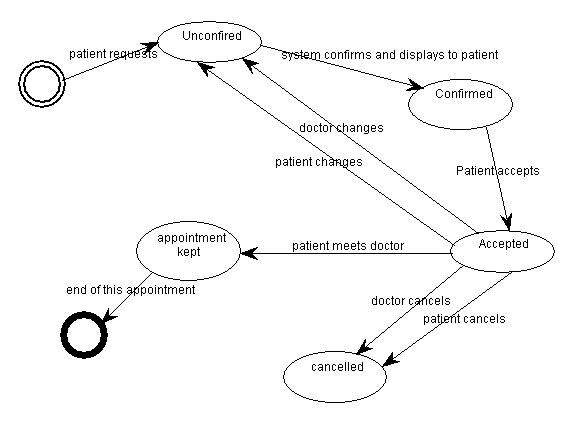
The
appointment class goes to various transitions in state as the patient and/or
doctor selects changes or cancels the appointment. When a patient requests an appointment, and
unconfirmed appointment record is created.
The record becomes confirmed if it is available, and it is presented to
the patient. If the patient accepts the
appointment, the record enters an accepted state. At any time the doctor or patient can cancel
the appointment at which time the record enters and cancelled state. The state transition reached an end point
whenever the appointment is kept.
State Chart--Prescription [State]
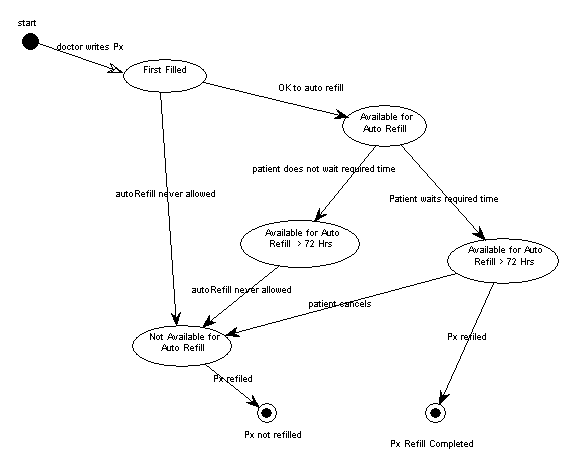
The
prescription class goes to various transitions in state as the patient requests
refills and the system fulfills the request.
This state chart nicely shows how if a prescription is available for
auto refill, whether the request can be fulfilled is based on whether or not
the patient tried to refill the prescription too early. If the patient waits to within 72 hours of
the end of dosage period he can use the automated system to get a refill. If he tries to refill the prescription before
this time, the automated system will not allow it.
State Chart--Medical Record [State]
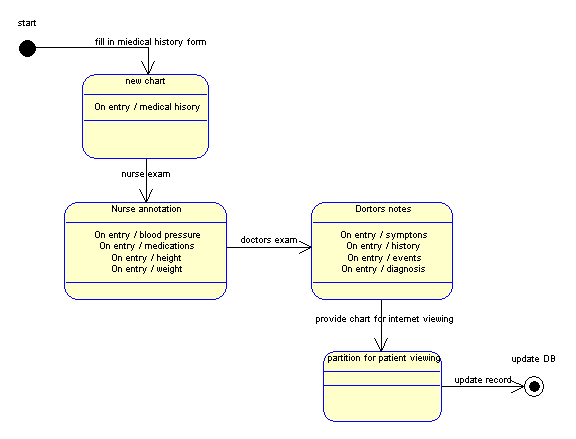
The patient
fills out a medical history form which will start the creation of the medical
record/chart. The nurse will take blood
pressure, height and weight and ask about medications being taken. This information is added to the chart. The doctor add the list of symptoms and the
results of his exam and diagnosis.
Finally the record is partition in data that can be viewed by the
patient over the internet and data that is not viewable.
Activity--Schedule Appointment [Activity]
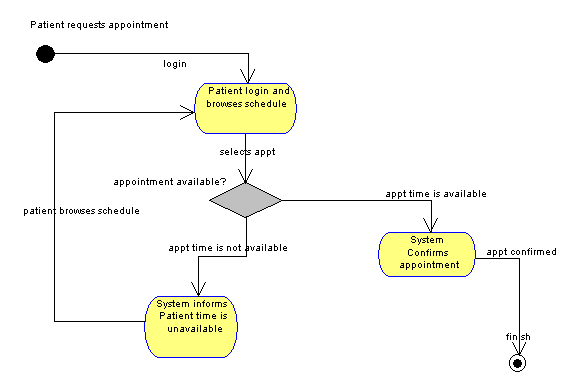
This
Activity Diagram represents operation viewpoint and flow of information between
activities for the “make appointment” use case.
A decision diamond provides the branching based on whether the time slot
is available. The loop back show how
alternative appointment times are selected.
Activity--Refill Prescription [Activity]
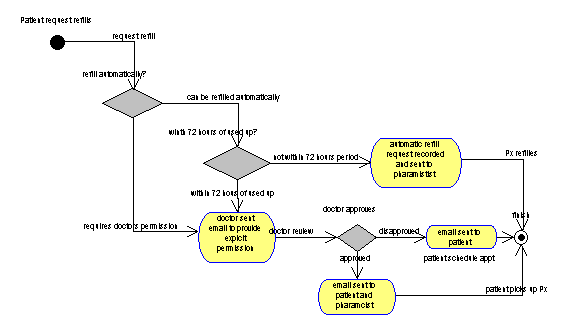
This
Activity Diagram represents operations viewpoint and flow of information
between activities for the “refill prescription” use case. Several decision items are provided because
some medications are not available for automatic refill and if the patient
tries to refill the prescription too early the system will require a doctors
approval.
Activity--Maintain Chart [Activity]

This
Activity Diagram represents operation viewpoint and flow of information between
activities for the “maintain charts” use case.
Both the nurse and the doctor will enter information into the
chart. The chart is continually updated
until no return visit is scheduled, at which time the chart is filed away for storage.