June 2002 Volume 20, Issue 6
Kokomo PC
Users Group
A geeat Users Group is the most important accessory you can buy for your computer !
June 2002
Presidents Message:
Well, summer is finally here. Hot weather and sunshine. Like everyone else I will begin to spend more time in the yard and traveling. I hope my PC doesn’t get too lonely.
In some ways summer is a good time for the Users Group. With the summer schedule at Ivy tech we should have no trouble finding a room. Far about three months we should have the finest in accommodations. We will have to see what happens this fall, but if enrollment continues to grow at the current rate we may be pushed into the executive conference room full time. (Of course this would not necessarily be a bad thing.)
We had a good meeting last month. We played around with Microsoft Word and spent a lot of time with the options menu and the mail merge command. We had good attendance and everyone appeared to have a good time. (I was fighting off a bit of a cold - so I was just happy my voice held outt.)
If you have any ideas for programs we could present at future meetings please let one of the officers know. We are always on the lookout for new ideas.
Microsoft has announced a big service pack for Windows XP. It is supposed to fix a number of bugs and security holes in the product. It will also include the ability to remove some of the standard Microsoft icons on the desktop. This ability is aprt of the Anti-trust settlement with the Justice Department. The service pack will be available later this summer.
If you get a chance please check out the Group’s web site. The URL is listed on the second to the last page of the newsletter. Rodney Malkoff has worked hard to get the newsletter archive posted and has really fixed the site up nicely. Please let Rodney know if you have any suggestions for additional content or styling ideas for the site.
I would also welcome anyone who would like to contribute to the newsletter to send me articles. We all love to hear what is happening with the other members in the group. Many of us have the same problems and an article is a good way to save someone else from the grief we have experienced.
Hope to see you at the next meeting.
Mark Pendergast
Da Prez
- - - - - - - - - - - - - - - - - - - - - -
- - - - - - - - - - - - - - - - - - -
Internet Explorer Setup
In the last meeting I was surprised at the number of people who were unfamiliar with the setup options for Microsoft Word. I thought I would start with Internet Explorer (because I actually own it and have it loaded.)
To get to the Internet Options screen select Tools > Internet Options from the main menu bar.
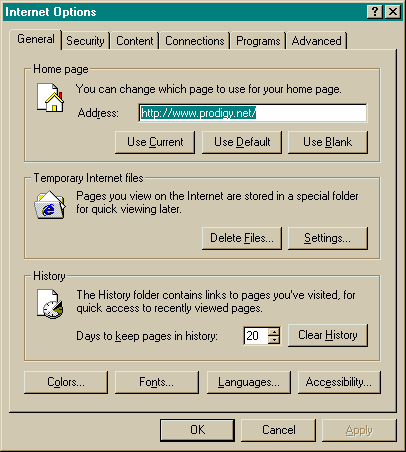
The Internet Options dialog window has several tabs that allow you to set various options. The most interesting for most users is the General Tab.
The General Tab has three main sections and four buttons that allow you to set the appearance and behavior of the interface.
The home page area allows you to set your home page. You can use the current page button to set the home page to the current page you are browsing. (This is a good way to set your page). You can use the default button to set your home page to the default value. (I believe that this is www.microsoft.com.) You can use the blank button to set your home page to a blank page. This will allow you to load other pages more quickly because you will not need to wait for the first page to be loaded. Normally the home page is set to the home page for your ISP when you load your internet software.
The next section is for temporary internet files. The Delete Files button will allow you to delete all the files currently cached on your hard drive. This will provide temporary relief from disk space problems. (It will just fill up again.) It can also get rid of pages that don’t refresh properly because they are stuck in the cache. The settings button takes you to the settings dialog that can permanently change the behavior of your cache. We will talk about this a little later.
The last major section is the History section. Here you can specify how many days to keep in the history log. You can also clear the history log. The history log saves the URLs of the pages you have visited. It is a handy way to get back to a page you looked at last week, If you don’t remember where it was.
The Colors, Fonts, Languages and Accessibility buttons are used to change the appearance of your browser. Most of the time you will have no need to change them. If you do have trouble using the computer due to a disability, the accessibility section may be worth a look.
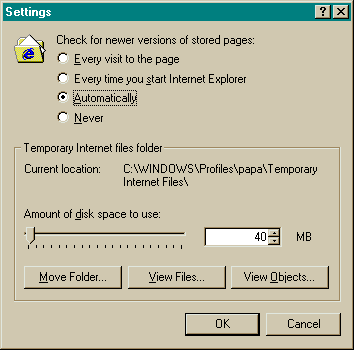
The Temporary Internet Files Settings button has some very interesting features. It controls the behavior of the file cache. This is where IE puts files while you look at them. The ‘Check for newer versions of stored pages’ section controls when the browser looks for new pages. Automatically is probably the best setting unless you have a cable modem.
The Temporary Internet Files folder section allows you to set how much space you will use to cache pages. (If you are short on disk space you can set this much lower.)
If you tend to go to the same pages over and over and they don’t change much, setting this higher will speed your work. If you go and see new pages all the time, this will not make much difference.
| MEETINGS: Second Thursday of each month at 7:00 PM at IVY Tech, 1815 East Morgan Street. Look for a notice of the room assignment as you come in the main East entrance. If the meeting location is changed, it will be announced on Page 1 of the newsletter. If a meeting is canceled due to inclement weather, radio stations WIOU and WWKI will be notified by 5:00 PM on the day of the meeting. | |
| MEMBERSHIP: Annual membership fee is $10. Checks should be made payable to the Kokomo -PC Users Group and mailed to: Mark Pendergast., 3705 Sugar Lane, Kokomo, IN 46902 (or pay at the meeting). Persons interested in joining the Group may receive two free issues of the newsletter. Contact the editor at the return address of this newsletter. | |
| BENEFITS: 2. Great presentations on interesting topics at each meeting. 3. Question and Answer session at each meeting. 4. HELP from other Group members who have been down the road before, and with whom you can share your experiences. |
|
| President Vice-President Vice-President Treasurer Membership Services Newsletter Editor Newsletter Distribution Group WWW site |
Mark Pendergast, 455-2229 Richard Ingles, 459-9260 Gene Sturdevant, 675-7628 John E. Haynes, 457-1867 Rodney Malkoff, 453-1159 Ben Sturm, 883-5343 Jane Ober, 455-1583 http://www.geocities.com/roood/pcusers |
| NEWSLETTER ARTICLES: Articles may be submitted on diskette or in hard copy to the return address of this newsletter or dropped off at the monthly meeting. Please submit articles two weeks before the meeting. | |
Return to the Archive