Control Panel
Description:
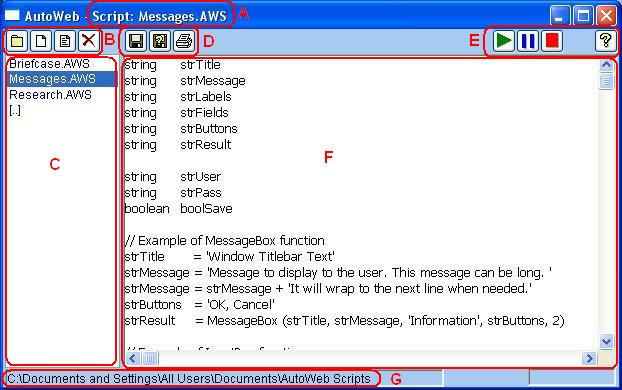
Control Panel Layout:
|
A |
Current Script |
The name of the currently open script. An asterisk following the script name indicates the script has been modified but not saved. AWS is the file extension for AutoWeb Scripts. |
|
B |
Script Management |
Open Folder – Display folder selection windowNew Script – Create a new, empty, script Open Script – Open the currently selected script Delete Script – Delete the currently selected script |
|
C |
Script Selection List |
Displays the list of scripts currently available in the selected folder (G). Use this list to select a script or navigate through the folder structure to find a script. Entries in Brackets are folders. The '[..]' entry is the parent folder of the current directory. Other bracket entries are children (sub) folders. DoubleClick an entry to open the selected script or folder. |
|
D |
Saving and Printing |
Save – Save the current script (F)Save As – Save the current script (F) with a new name Print – Print the current script (F) |
|
E |
Script Execution and Help |
Play – Execute the current script (F)Pause/Step – Pause script execution or execute one step of an already paused script. Stop – Stop script execution and reset to play from the beginning. Help – Open the AutoWeb User Guide. |
|
F |
Script Editing |
Use this area to edit scripts and view execution progress |
|
G |
Current Folder |
The currently selected folder that contains the scripts and folders listed in the Script Selection List (C) |
Cautions