CSS Page
This is probably 1 of 4 possibble css sites in geocities. Back
to index
I assume that you already know some html, if not go to my html
guide
CSS stands for Cascading Style Sheets and is a
combination of dyanamic html (The effects that move on a page like flash)
and Javascript (the programming code that gives you control over a form
or moving objects ans things). Css controls specific
kinds of elements that you verify in your css script. Css was made
to have more control over every pixel in your page. Also it can really
shorten your script by a lot.
But before I show you anythings, here are what all css sheets need:
1. <style>the standard for css</style>
the above is the standard, but to specify the style sheet, plug-in
the following:
<style type="text/css">
</style>
(Note:the new section is in blue saying "text/css")
2. The <style></style> tag must be in the <head> tag.
3. That all the items within a stylesheet must have a opening
and closing bracket ({ })
4. Here are the following sections you should somewhat understand:
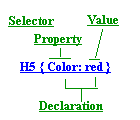
(Notice: the parts of the stylesheet are all in the brackets, those
are the parts of the bracket)
4A. For multiple function, use a comma. (this means writing
a shorter way for the same function.)
(ex)
This is an example of a stylesheet (it is ok not to understand, this
part is just a guideline)
H1 {text-decortation: underline}
H2 {text-decortation: underline}
Blockquote {text-decortation: underline}
but a shorter and faster way of writing the example is:
H1, H2, Blockquote {text-decoration:
underline}
(note:this way shortens your css script and page a little which
makes the difference
4b. Also the part in the bracker can also have a "divider"
H1, H2, P {text-decortion: underline; color: red;
}
5. Elements such as P. can combine with a selector and could
be:
(ex)
If the selector is palon, then it would be P.palon in
a paragraph
and is applied by using <p class=palon></p>
(Note:This part of css uses a end tag ans the palon selector can be
combined with almost any element)
6. usually the first word is not inherited into the complex formatting
(EX)
A. css script
H1.palon {text-decoration: underline; font-size: 20pts }
B. html formatting
<P class=palon>"Are you ok dorothy?"</P>
(Note: the underlined word class can have two other values
7. scripts witht he same value can be written shorterb y the following
example
(ex)
P.dad{
font-style: italic;
font-weight: bold;
font-variant: normal;
font-size: large;
line-height: normal;
font-family: palatino, serif
(The above can be wrote in the following short css script which is
the same as the above example:
P.dad {font : italic bold large palatino, serif }
(notice:that the margin script and many other can be wrote this way
as long as they have the same value, but be
aware that all scripts are not like this!)
8. The value can have an "&" to add additional properties to them
(EX)
A:hover {text-decoration: underline & overline}
The four implemintations (reasons) of css is in the following way:
1. To modify links (have you seen plain text and when your mouse goes
over it, it is underlined like a javascript effect)
from this to
to
2. Embeded style sheets
3. inline style sheets (The style sheet is in the html document)
4. making use of external style sheets ( .css) that are reusable
layout for the font property
(note: that when shortened, the normal property is not included)
font-style: italic
font-weight: bold
font-variant: normal
font-size: large
line-height: normal
font-family: palatino, serif
| Element |
use in css |
| H1-H7 |
headings |
| P |
paragraphs |
| pre |
pre-formatted text |
| span |
inside the div element |
| Div |
has the span element inside it |
| Body |
anything on a page |
| Blockquote |
text that are contained in the quotations("") |
| em |
emphasis (same as bold) |
| dd |
definition |
| dt |
meaning of definition |
| ul |
unordered list (bullets * * * ) |
| ol |
ordered list (1. 2. 3. ) |
| A |
anchor (hyperlinks) |
| strong |
another bold elements |
| i |
italics |
Font Properties
|
Name of Property
|
Value/meaning of selector
|
inherit/apply to
|
|
font-style
|
normal, italic, oblique
|
style elements |
|
font-weight
|
normal, bold, bolder, light, lighter, 100, 200, 300, 400, 500,
600, 700, 800, 900
|
yes all elements
|
|
font-variant
|
normal, small-caps
|
|
|
font-size
|
can be expressed by pt, cm, em, % (length)
|
|
|
line-height
|
normal, em (point value), number (ex: 1), percentage (%)
|
|
|
font-family
|
any font family on any speciric type of browse/computer
|
|
|
font-stretch (not)
|
normal, wider, ultra /extra / semi condensed,
semi-expanded, ultra-expanded, extra-expanded
|
|
More inside the text
| word-spacing |
normal, length (in points (pt) or em (points), mm (millemeters)
inch (in) ).this can also have a negative value (-) which is negative from
normal |
|
| letter-spacing |
same as word-spacing, but separates each letter |
|
| vertical-align |
baseline, sub, super, top, text-top, middle, bottom, text-bottom, percentage
(%) |
|
|
|
|
Decoration for page and formatting
| name of element |
value |
in or out of bracket S |
| text-decoration: |
none, underline, overline, line-through, blink |
in |
| text-transform: |
capitalize, uppercase, lowecase, none |
in |
| first-line: |
for capitalizing the first line (uses any selector such as font, and
text |
out |
| text-shadow |
margin-top, margin-left, margin-right, margin-bottom |
in |
| first-letter: |
same as first-line, but capitalizes the first letter |
out |
| text-align: |
left, center, right |
in |
| margin: |
top-margin, right-margin, bottom-margin, left-margin. also em
and %
it is wrote in 0em, 0em, 0em, 0em for all, 1 for separate |
in |
| padding: |
Between the cells in em (ex) 0.53m
it can be separated by the following four areas
padding-top, padding-right, padding-bottom, padding-left |
in |
| color: |
in color (ex are red and blue), hexademical value (#number), or
rgb (%, %, %) |
in |
| background: |
same as color, but is the background |
in |
| background-image |
used for the bacground image, and is used as:
(ex)
EM {background-image: url (name_of_gif.gif);} |
in |
classes and ids E=element De=different element
| div |
Must have a name and div and span, before it by div.name
and formatted by using the class value
(ex)
div.ham { text-decoration: underline } ---this line is not inherited
span.bones { font-family: cursive } ----this
line is inherited |
| span |
The inherited value with the selector that is inside the div selector |
| # id |
This part is like the div and span except that all id's must be different,
the way you do this is
assign an id
Then also assign the id to an html element in the body part
(ex)
#bus {text-decoration: underline }
<P ID=bus>this line is inderlined</p>
(note: theses kinds requre a ending tag to complete the function, and
also the id can only be used once. |
| E1 E2 |
Element A is not in herited but element b is inherited. Both of them
specify that if element two is in element 1, Element 2 will only be affected
in that way.
since this is confusing, here is an example:
E1 is the color red( E1 {color: red} ) and E2 is the color blue( E2
{color: blue} ). That instead of E@ being red, it will be blue only if
it is inside E1
E2 without E1 andE2
with E1 |
| E+De |
This specifies that the second element will have a different effect
than the previos element, somewhat like tge previous two properties above. |
Hyperlinks
| A |
anchor (means a kind of hyperlink) |
|
| A:link |
specifies the color and formatting of the link not visited (default
is blue) |
|
| A:visited |
specifies the color and formatting of the link that has been visited
(default is purple) |
|
| A:active |
specifies the color and formatting of a link that has been clicked,
but not released.(default is red) |
|
| A:hover |
the mouse is over the link and changes in a color or affect |
|
| A:focus |
like the A:hover property, except that it is used for concentration
of forms |
|
css tables
| border (color) |
|
|
| border (style) |
|
|
|
|
|
|
|
|
|
|
|
Explanations of all the elements and selectors used
font-size
length:
expressed by px, cm, em, pt and other measurements
absolute-value: xx-small, x-small, small, medium, large, z-large,
xx-large
relative size: small, medium, large
The font-size property explains what the size should be, it is
another way of expressing the font value.
Font-weight shows the thickness of the selected area
by bold, or bolder, lighter, etc.
The reason why this page is not in css because
support for css right now is somewhat low, and is not supported
by many wysiwyg editors such as microsoft
frontpage and netscape composer and some other browsers.
Copyright 2001 by [email protected].