JABcalc Version 9.5 for Planetarion Round 9.5
Download JABcalc NOW
------------------------------------------------------------------
UPDATES
03 June 03 - Version 9.5 for the new free round is now available through the link above. Stats have been updated from the manual as of today.
27 Feb 03 - Version 9 for the new round is now available through the link above. It *should* be ok, but let me know if you find anything wrong with it.
24 Feb 03 - Version 9 is in the pipeline, just waiting for the PDS stats and the various typos to be confirmed/corrected before I release the update.
If you really can't wait, then it's possible to edit the new stats into the 'ShipStats.ini' file for the old 8.2 version. But be careful as data in this file is case sensitive. Also I dont recomend changing any of the ship names, as this will break the internal parser.
7 Oct 02 - New version 8.2 released.
According to my recent battlereports, Zik stealing ships now die by RESOURCE and not by armor (as in JABcalc v 8.1)
INTRODUCTION
JABcalc is Just Another Battlecalc for Planetarion.
It is a 32-bit windows app written using Delphi 6, so it should run on most varieties of Windoze from win95 up.
At its heart it uses a modified version of Atamurs dynamic targeting routine (view the pascal source here).
This seems to give good results for most battles that I've run through it. However, given the random nature of Pa combat, it can never be possible to exactly predict how any given battle will turn out. All a calc like this can do is give you some idea of the expected outcome. Paste a few combat reports into it and you'll see if it is accurate enough for your needs or not.
This version is a first release prototype, so expect at least a few bugs and loose ends to be present. I'd appeciate it if you could let me know if you find anything major (or minor) wrong with it...
[email protected]
Happy Roiding,
FishEagle
------------------------------------------------------------------
INSTALLATION
To install JABcalc you'll need about 850 kB free disk space on your system,
First create a folder, name it 'JABcalc' or whatever you fancy.
Then unzip/copy the following four files from jabcalc.zip into this folder ...
JABcalc.ini
JABcalcb1.exe
ReadMe1st.txt
ShipStats.ini
The program is now installed and can be run by double clicking on the JABcalc.exe file.
Or create a shortcut, place it on your desktop and run it from there if you prefer.
To un-install, manually delete the installation files and any associated folders/shortcuts.
------------------------------------------------------------------
BASIC OPERATION
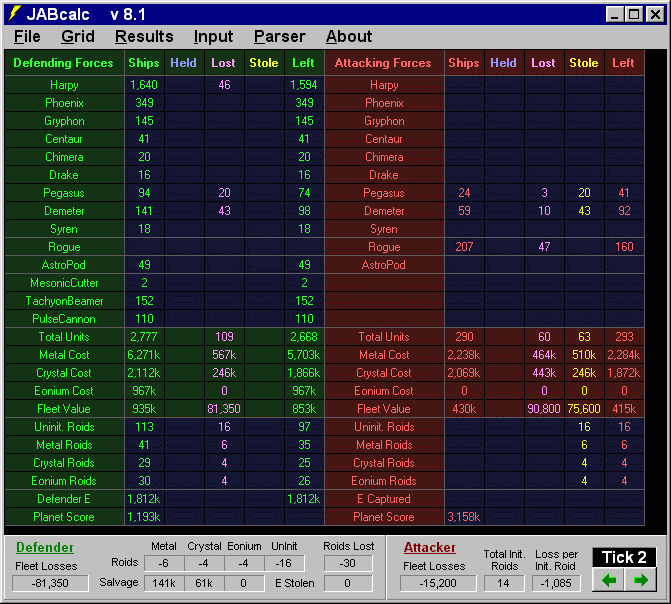
The battle results for each fleet is split into 5 columns...
Ships : Held : Lost : Stole : Left
The Ships column shows the ships ready to do combat that tick.
The Held column shows the ships held during combat.
The Lost column shows the ships lost during combat.
The Stole column shows any enemy ships that were captured.
The left column shows the ships left to do combat the next tick,
ie. Ships - Lost + Stole = Left
Edit the ship values directly with the keyboard, press enter or change the cell focus to re-calc the battle.
Or spin the ship values with the mouse, select the 'Spin' menu item then click in the top half of a cell to spin the value up, or the bottom half to spin the value down.
The battle is recalculated and the results updated each time a value is changed.
Click on 'Compress' to hide any empty rows, click on 'Expand to show the full grid again.
The parser currently accepts the following...
Overview copy
Sector scan
Unit Scan
PDS Scan
Military Scan
Combat Report
Parsing a combat report will show the Held and Lost results for both the calc and the report side by side for comparison, the combat report values are given in brackets. Press enter or re-calculate to return to normal mode.
The main program colors can now be changed under the File|Setup menu option. These changes can be saved to the JABcalc.ini file and will be auto-loaded when the program is run.
To change the stats, edit the relevant entries in the ShipStats.ini file. The new values will be used next time the program is run. If the ShipStats.ini file gets corrupted, then just delete it and the program will create a new ShipStats.ini next time it is run.
------------------------------------------------------------------