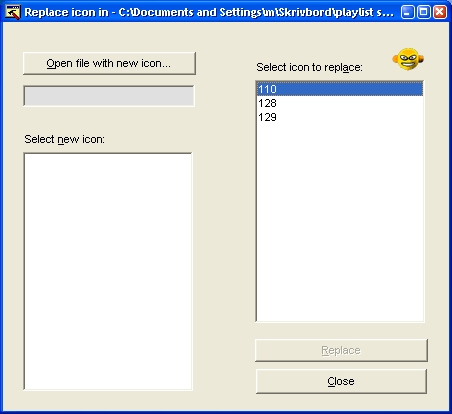
guide to playlist skinning / icon replacement in Coolplayer 2.1x
Put feedback in Coolplayer Forum (general).
Include the exact text "pl_skin" in main text or header so your feedback can be easily spotted via forum search.
Feedback = you giving input making the guide better for the sake of all mankind (or at least some Coolplayer user).
guide contributors: martin5; rmn (skin.def guide)
| ---------------------------- contents: (i) how to skin the playlist 1) extract the old skin 2) make the new skin 3) input the new skin (ii) how to replace icons --------------------------- |
you need: - coolplayer (do a backup of your original coolplayer.exe first) - resource hacker (http://www.users.on.net/johnson/resourcehacker/) - a graphics editor (like photoshop) for creating new skin elements |
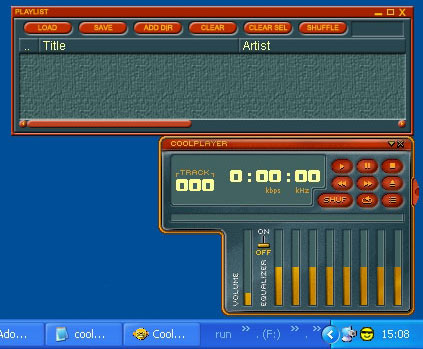
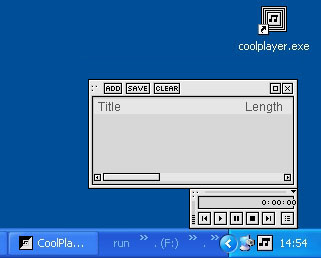
| old playlist skin / old icons |
example of a new playlist skin / some new icons |
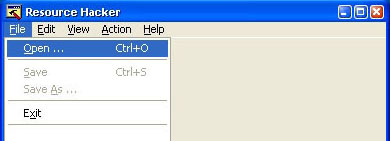
| ----------------------------------- (i) how to skin the playlist ----------------------------------- 1. Extract the old skin with Resource Hacker -------------------------------------------------- Open Coolplayer.exe in Resource Hacker |
 |
|
| In the folder tree, goto: "SKIN > 192 > 2057" | 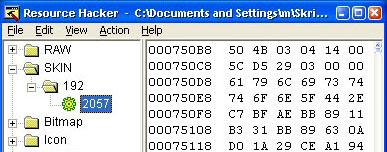 |
|
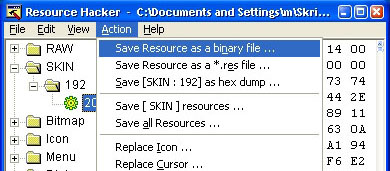
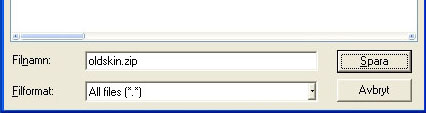
| goto menu: "Action > save Resource as a binary file..." Save the file with a .zip-extension, for example "oldskin.zip" |
 |
|
 |
||
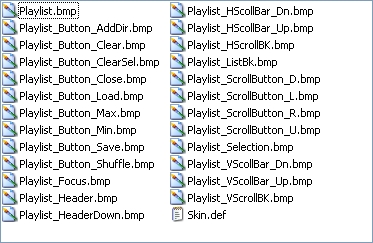
| unpack zip file to some folder You should now have these files ----------> |
 |
|
| 2. Make the new skin ------------------------ The basic idea is to create separate graphical elements (buttons, backgrounds etc) that are arranged together into a playlist according to the parameters in skin.def To make a new skin, you must (a) change the graphics (.bmp-files) and (b) change the parameters (in skin.def). (a) Change the graphics Not yet covered here. Check http://www.spoono.com/skins/tutorials/tutorial.php?id=1 or some other skinning guide. You could also try to recreate the look of existing Coolplayer skins and by reusing their graphical elements to make a skin that works in the newest versions of Coolplayer. (b) change Skin.def parameters Guide to the skin.def parameters (Parts in red needs to be filled/confirmed) |
| original Skin.def file: | explanations: | |
| # Default Skin file | Lines beginning with #'s are considered comments. | |
| # | ||
| define CoolSkinVersion="200" | Current CoolPlayer skinning-system version. | |
| define Transparent_MaskColour="#FF00FF" | The colour used to represent transparent in the bitmaps. Format: "#red-green-blue" (in hexadecimal). | |
| # Playlist | ||
| define Playlist_Font="Arial" | Can the font size/style be changed? | |
| define Playlist_MinSize="400, 200" | The minimum size of the playlist window. Format: width, height. | |
| define Playlist_ListBorders="8, 8, 32, 8" | Distance between the song list and the edges of Playlist_Background. Format: left, right, top, bottom. | |
| define Playlist_Colour_Text="#FCFE9C" | ||
| define Playlist_Colour_Selected="#FCFE9C" | ||
| define Playlist_Colour_Playing="#FFFFFF" | Doesn't seem to affect anything. Bug? | |
| define Playlist_Colour_HeaderText="#FCFE9C" | The colour of the song list header ("Title", "Artist", etc). | |
| tileddraw Playlist_Background, "Playlist.bmp", 48, 16, 8, 8 | Make it a bit large. The numbers state the size of the area to be tiled when it is resized. Format: left, right, top, bottom. | |
| tileddraw Playlist_ListBackground, "Playlist_ListBk.bmp", 4, 4, 4, 4 | Make it a bit large. | |
| tileddraw Playlist_Header_up, "Playlist_Header.bmp", 4, 4, 4, 4 | IMPORTANT:All bitmaps must be at least 5x5. | |
| tileddraw Playlist_Header_dn, "Playlist_HeaderDown.bmp", 4, 4, 4, 4 | Pressed song list header. | |
| tileddraw Playlist_Selection, "Playlist_Selection.bmp", 2, 2, 2, 2 | Selected song(s). | |
| tileddraw Playlist_Focus, "Playlist_Focus.bmp", 1, 1, 1, 1 | Focused (last selected) song. | |
| define Playlist_HotItem_Seq="playlist_current.bmp" | Not clear; The file doesn't exist. | |
| # Scrollbars | ||
| tileddraw HScrollBar_Background, "Playlist_HScrollBK.bmp", 0, 0, 0, 0 | Horizontal scrollbar background. | |
| tileddraw HScrollBar_Tracker_up, "Playlist_HScollBar_Up.bmp", 8, 0, 8, 0 | Normal (not pressed) horizontal scrollbar. 8 = the number of pixels from the left and right that may not be resized. | |
| tileddraw HScrollBar_Tracker_dn, "Playlist_HScollBar_Dn.bmp", 8, 0, 8, 0 | ||
| buttondraw HScrollBar_Left, "Playlist_ScrollButton_L.bmp", 2State | Left scrollbar button. 2State: the button has two states - normal and pressed. | |
| buttondraw HScrollBar_Right, "Playlist_ScrollButton_R.bmp", 2State | ||
| tileddraw VScrollBar_Background, "Playlist_VScrollBK.bmp", 0, 0, 0, 0 | ||
| tileddraw VScrollBar_Tracker_up, "Playlist_VScollBar_Up.bmp", 0, 8, 0, 8 | ||
| tileddraw VScrollBar_Tracker_dn, "Playlist_VScollBar_Dn.bmp", 0, 8, 0, 8 | ||
| buttondraw VScrollBar_Up, "Playlist_ScrollButton_U.bmp", 2State | ||
| buttondraw VScrollBar_Down, "Playlist_ScrollButton_D.bmp", 2State | ||
| # Verbs | ||
| addplaylistverb PlaylistMinimise, "Playlist_Button_Min.bmp", 3State, 30, 0, "ALIGN_RIGHT | ALIGN_TOP" | Minimise button. 3State - normal, pressed, hover. 30, 0 = coordinates from the directions specified in ALIGN_*. ALIGN_* = the borders to follow when the window is resized. | Available verbs: TogglePlaylistWindow ToggleRepeat ToggleShuffle ToggleEqualiser ToggleFindDialog PlaylistClearSelected PlaylistClearAll Play OpenFile SavePlaylist |
| addplaylistverb PlaylistMaximise, "Playlist_Button_Max.bmp", 3State, 18, 0, "ALIGN_RIGHT | ALIGN_TOP" | ||
| addplaylistverb TogglePlaylistWindow, "Playlist_Button_Close.bmp", 3State, 6, 0, "ALIGN_RIGHT | ALIGN_TOP" | ||
| addplaylistverb OpenFile, "Playlist_Button_Load.bmp", 3State, 10, 15, "ALIGN_LEFT | ALIGN_TOP" | ||
| addplaylistverb SavePlaylist, "Playlist_Button_Save.bmp", 3State, 65, 15, "ALIGN_LEFT | ALIGN_TOP" | ||
| addplaylistverb AddDirectory, "Playlist_Button_AddDir.bmp", 3State, 120, 15, "ALIGN_LEFT | ALIGN_TOP" | ||
| addplaylistverb PlaylistClearAll, "Playlist_Button_Clear.bmp", 3State, 175, 15, "ALIGN_LEFT | ALIGN_TOP" | ||
| addplaylistverb PlaylistClearSelected, "Playlist_Button_ClearSel.bmp", 3State, 230, 15, "ALIGN_LEFT | ALIGN_TOP" | ||
| addplaylistverb PlaylistShuffle, "Playlist_Button_Shuffle.bmp", 3State, 285, 15, "ALIGN_LEFT | ALIGN_TOP" | ||
| # Indicator | ||
| addplaylistindicator Status, 340, 15, 10, 16, "ALIGN_LEFT | ALIGN_RIGHT | ALIGN_TOP" | Tagging progress indicator (build 213 and up). Specifying ALIGN_LEFT and ALIGN_RIGHT at the same time enables horizontal stretching. |
map over the graphical elements defined in the skin.def-file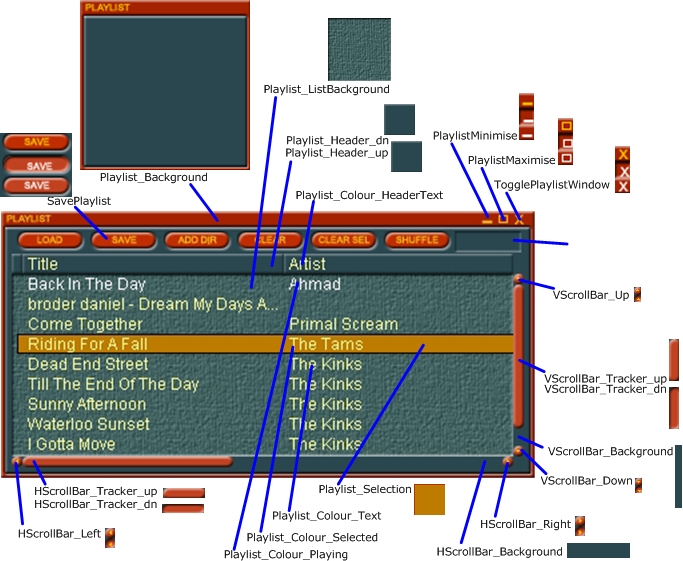 |
||
| 3. input the new skin with resource hacker ------------------------------------------------- Put all new graphical elements and the new "Skin.def" in a zip-archive |
The graphics and skin.def for the grey playlist skin at the top of the page can be found in zipped format here. (Graphics adapted from Axios skin) |
|
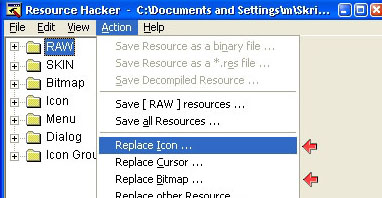
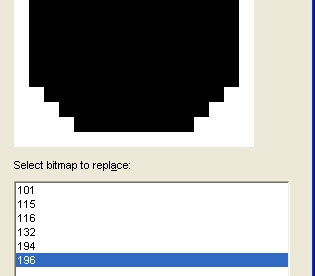
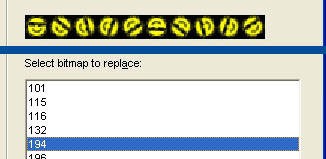
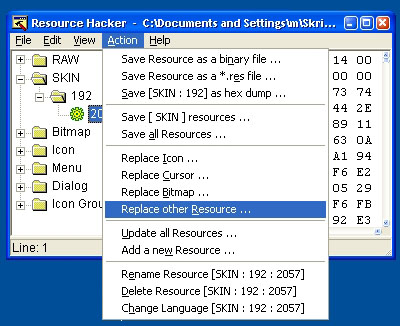
| Open Coolplayer in Resource Hacker goto menu: "Action > Replace other Resource ..." |
 |
|
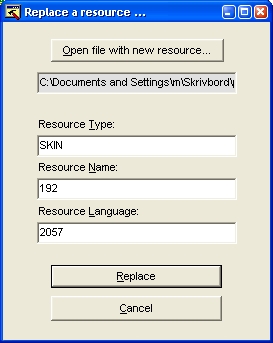
Open zip-file of new skin specify what to replace type: SKIN name: 192 language: 2057 |
 |
|
| Save the changes to Coolplayer.exe in Resource Hacker Close Resource Hacker. Open Coolplayer. Thats it! |
||