Ronald's Bloodbowl Tool
If you're playing by e-mail, you should use the program like this:Setting up the game
If you're the one to start up the game, make sure you have the html-files for both teams. Start the tool, and load the teams using and
and  on the toolbar. You will notice that injured players,
niggled players and empty roster slots will be moved to 'OUT'. Also the name of the teams and the number of re-rolls
will be automatically adjusted.
on the toolbar. You will notice that injured players,
niggled players and empty roster slots will be moved to 'OUT'. Also the name of the teams and the number of re-rolls
will be automatically adjusted.
Roll on the weather table  and work out the Gate
  (just one click each).
See if you have any bonus cards and roll for cards:
type "Cards for your teamname" in the comment field, hit enter, and click the 'Roll 1 die' button. Draw the cards
you choose  . Remember to use a password, or your opponent will be able to see which cards you got!
Roll for any Niggling injuries and move the players back to 'Reserve' (right-click the niggled player and choose the appropriate menu item) that pass the test.
For the toss, first enter "Toss: odd" or "Toss: even" in the comment field, and hit enter.
If you lost the toss, assume your opponent will receive. Set up your players on the field, either by clicking on the
player and then on the field where you want them, or by dragging them. Now save the game  , zip
the bbm file and send it to your opponent.
, zip
the bbm file and send it to your opponent.
Getting ready to play
After receiving a game file, load it , and roll for cards as described above.
Set up your team.
If you're receiving, save the game and send it back to your opponent for the kick-off.
Kick-off
Place the ball on the field (right-click the field where you want the ball) and roll on the kick-off table . If necessary, apply the result.
Now click on 'Roll scatter die' for the direction, roll 1 die (or 2 with 'Bad Kick') for the distance, and another
scatter for the final bounce (if it isn't caught already). Place the ball in its final position, save the game
and send it back to your opponent again for his move.
Your turn
Click on the correct turn, and now you can execute your evil plans to take over the field!Make sure you enter plenty of text in the comment field (always hit 'enter' after you're done) to annotate your file for your opponent.
Some examples:
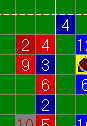 | In this case, Red4 is going to block Blue3. As you can see, he is assisted by Red2 and
Red9, but Blue3 is assisted (counterassisted) by Blue4. In the comment field you should enter "4 b 3 a 2,9 ca 4" or
"4 vs 3 .." or "4-3 ...". The program can help you with this though. Just drag Red4 on top of Blue3. The comment field as well as the following block roll is automatically made by the program! |
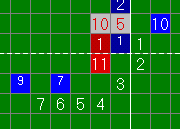 | Here Blue10 (MA 6, AG 3) is making a long walk. You have clicked the field to show
the path Blue10 is taking. Now you should enter "dodge to 4 (3+)" and after that roll a die. Then enter "gfi" (go for it)
and roll another die. And finally you can drag Blue10 to the position marked with 7 to make the move. Afterwards you
can review it in your log file like this (here Blue10 had to re-roll his dodge).728: "dodge to 4 (3+)" 729: Roll: 1 730: Rerolls change for Blue: 2 731: Roll: 5 732: "gfi" 733: Roll: 2 734: Blue10 moves to I14 |
When you're done, just save the game and send it to your opponent again for his move.
Reviewing a turn
Usually you would like to see what your opponent did. Load the game, click  to go to the start of his turn, and then just keep clicking
  until you reached the end of the file
again. This way you're taken step by step through your opponent's turn.
until you reached the end of the file
again. This way you're taken step by step through your opponent's turn.
Breaking in in your opponent's turn
Sometimes you would like to 'break in' in your opponent's turn, like when you would like to play a card, or if your player is using the 'Diving Tackle' skill. Just play the file to the point where you would like to break in, and make your moves from there on. As soon as you make your first action, a messagebox will appear asking you if you are really sure you want to play on from here and erase the remainder of the log file. Just click 'OK' and you're on your way. Make your moves, (make sure you enter some explaining text in the comment field so it is inserted in the log file), and send the updated game file to your opponent again.An example
If you want to see how it's usually done, I've included an example game for you to download so you can see for yourself how such a game is handled.
Questions?
If you have any questions, just ask! I'm only one message away. Mail me at [email protected]. If you would like to join the PBEMBBL, go to the website for details.Ronald Lokers