Ronald's Bloodbowl Tool
The CARDS menu
The CARDS menu has the following options:- Draw Cards
- Add Card
- Decode cards for Red
- Decode cards for Blue
Draw Cards
This option will allow you to draw cards. The exact details are explained below.
Add Card
There are certain players (like Deamons) that make it possible to add cards to your hand during the game. This option allows you to add a card. It works in the same way 'Draw Cards' works.
Decode cards for Red and Decode cards for Blue
When you have entered a password when you took your cards, the cards will later be shown as '??????'. To see what cards you had, select this option and enter your password.NOTE: You can also decode your cards by clicking on the words 'Cards for Red team' or 'Cards for Blue team' on the main window.
How to use cards
Drawing cards
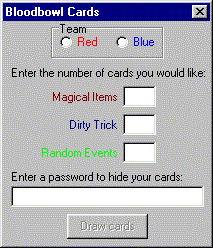 To draw the cards, click . You will see this window >>>>>>
Here you should select your team (Red or Blue) and enter the number of desired cards in each category. Optionally you can enter a password. If you enter a password, it should be at least as long as the total number of cards you're drawing.
Now you can click the 'Draw cards' button. The cards you got are shown on the topleft- or topright- side of the window. |
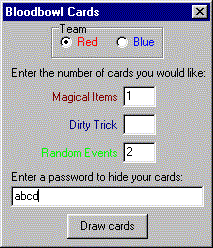 <<<<<< Here's an example of what we entered: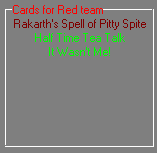
Playing cards
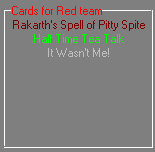 If you would like to play a card during gameplay, just click on that card. It will be highlighted and the Tool will ask
you if you want to play that card. If you choose 'OK', the appropriate text will be added to the log file (in this example:
Red plays card "It Wasn't Me!") and the card will turn to gray to indicate it has been played.
If you would like to play a card during gameplay, just click on that card. It will be highlighted and the Tool will ask
you if you want to play that card. If you choose 'OK', the appropriate text will be added to the log file (in this example:
Red plays card "It Wasn't Me!") and the card will turn to gray to indicate it has been played.
|
Hiding cards from your opponent
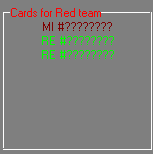 You can hide your cards from your opponent by entering a password. If your opponent then loads the game he will see this:
If you end the program, restart it and load the game, you too will see this. To see which cards you have, decode them as described above. IMPORTANT NOTE: Even though there is a simple check built into the program, it is possible to enter a password that is accepted by the program, but will show you some entirely different cards! (Suppose you entered the password 'password', the program will also accept 'wordpass' or 'drowssap' or any other anagram, as well as 'passwosc' and all other even changes (r to s: one up, and d to c: one down, totals to none) but it will NOT show you the right cards). The only way to be absolutely certain that you are looking at the right cards is to enter the right password. This password can NOT be found in the logfile, so the coding can not be broken. |
Using Grab Bag cards
You can use Grab Bag cards if you like to. In the PBEMBB.INI file, change 'GrabBagAllowed=No' to 'GrabBagAllowed=Yes' and the program will allow you to draw Grab Bag cards as well.