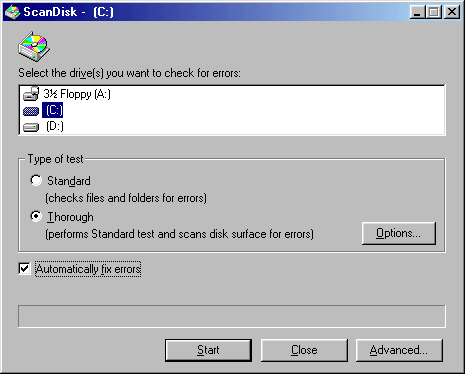
Running Scan Disk on your computer's hard drive.
Running Scan Disk is recommended once a month. Scan Disk helps keep your hard drives helps determine if you are going to have problems with your hard drive. If you are getting many errors on your computer it would be best to run this utility to determine what may be wrong with your hard drive. When you are running Scan Disk and it is displaying lost segments messages, you may want to have your computer technician take a look at your computer. It may be time to replace the hard drive or the computer itself, if you have an older computer system. To run Scan Disk follow the instructions below.
1) Click on Start, Programs, Accessories,
System
Tools, then Scan Disk.
2) You will then be prompted with a window similar
to the one below. Make sure Thorough is selected and Automatically
fix errors has a check mark next to it.
3) Click on Start to begin the Scan Disk process.
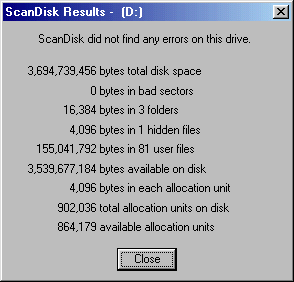
4) Once the scan if finished you will see a similar message shown
below that gives you some important information about your hard drive.
You may want to pay close attention to the bad sectors. When
you start to see bad sectors it may be time to buy a new hard drive for
your computer.
5) Click on Close to close out Scan Disk.
Running Defrag on your computer's hard drive.
When your computer starts slowing down, you may want to try Defrag to see if that speeds things up. Defrag is recommended twice a month to put all the files that have been scattered on the hard drive back together where they belong. This will prolong the life of your hard drive because as files get scattered around the hard drive needs to work harder to find them. To run Defrag follow the instructions below.
1) Click on Start, Programs, Accessories,
System
Tools, then Disk Defragmenter.
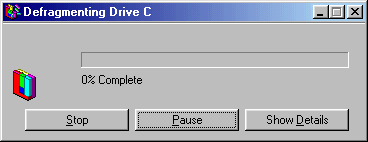
2) You will then see a window similar to the one
below. If you are using Windows 95 you will need to click on the
Start
button which is where the Stop button is shown below. Windows
98 will automatically start the defrag process.
3) Once the Disk Defragmenter is finished, it will ask you if you would like to quit Disk Defragmenter. Click on Yes to finish the process.
Removing Temporary Internet Files in Internet Explorer.
1) Once you have opened Internet Explorer, on the Menu Bar click on Tools, then Internet Options.
2) You will see a window similar the one below. Half way down the window you will see Temporary Internet Files. Click on the Delete Files button.
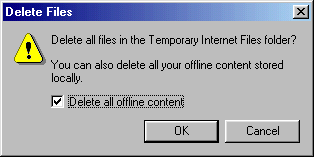
3) You will then receive a window prompting you to delete all offline content. Make sure there is a check mark next to Delete all offline content, then click Ok. Depending on the last time this has been performed, this can take a while to remove the files.
4) You will be brought back to Internet Options window.
Click Ok to close this window.
Removing Temporary Internet Files in Netscape.
1) Once you have Netscape open, on the Menu Bar click on Edit, then Preferences.
2) The Preferences window will open. One the left double click on Advanced, then click Cache.
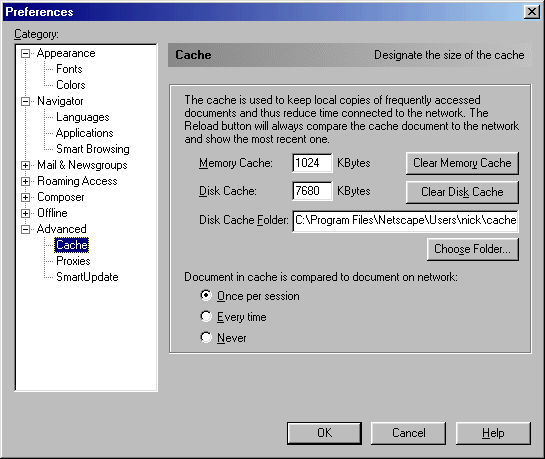
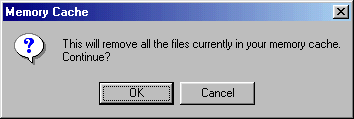
3) Click on the Clear Memory Cache button. You will receive a window similar to the one below asking you to continue with removing the files. Click on Yes.
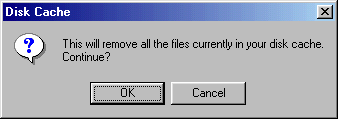
4) Next click on the Clear Disk Cache button. You will receive a window similar to the one below asking you to continue with removing the files. Click on Yes.
5) At the Preferences windows click Ok to finish clearing
the files.
Install & Update AntiVirus Software.
There are thousands of computer virus that can be caught from downloads
and e-mails. It is recommended that you install AntiVirus software
such as Norton AntiVirus, McAfee VirusScan, or InoculateIT Personal Edition.
Make sure that you update your AntiVirus software at least once a month
to keep the software current.
It is a good idea to make sure your computers are plugged into surge
protectors especially during the storm seasons in Michigan. Power
outages are the main cause for computer equipment damage. A good
surge protector can help prevent computers from being damaged during a
power outage. Also check to make sure your electrical outlets are
not being overloaded with surge protectors. It is recommended that
your surge protectors are not chained together. This could also overload
the electrical outlet.
