 &
&  --»
--»| close the GeoCities ad with & --» |
Please note this was written in 1998 - some of the info may be out of date!This primer introduces concepts and skills necessary for understanding and using the Internet (or World Wide Web) via public-access at the New York Public Library with Netscape Navigator browser software.Most topics are fundamental and will apply to a wide range of users. If you are reading a printout of this page, you can find it on the Web at http://www.geocities.com/rgoya/internetintro.htm COPYRIGHT © 1998 by Randall Alan Goya [email protected] |
| The Internet is a global network of computers (called servers) connected mainly by phone lines. The World Wide Web (or WWW) is a popular subset of the Internet, designed
to transmit images and other media via special programs on user's computers called browsers.
The most popular browsers are Netscape Navigator (or Communicator in v4.0) and Microsoft Internet Explorer. While each offers subtle differences in features, both are capable of most WWW tasks, and selecting a browser is mainly a personal choice (excluding economic considerations beyond the scope of this primer). The New York Public Library uses Netscape Navigator (most branches have v3.0 - except the Science, Industry, and Business Library, which has v2.1). Although many functions are available on Netscape Navigator, I will explain only those which are essential for "getting started." For more about Navigator, see Netscape's web site, or look under the Help menu on Navigator. |
|
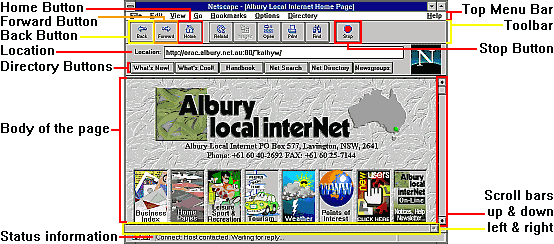
Generally, you will begin at the NYPL Home Page, which can be accessed at any time by clicking (once) on the Home button. Notice the Location field above the display window. It shows the URL (Uniform Resource Locator - or address) of the Web Page which is currently displayed. Note that the URL is case-sensitive; http://www.anyname.com is NOT the same as http://www.Anyname.com!! There are 3 ways to go to a different page:
When typing in the URL, it is not necessary to include the prefix http://. Actually, when the URL looks like http://www.anyname.com, it is usually sufficient to type in only the anyname part. To return to the previous page/URL, click on the Back button. Sometimes a page does not load completely as some of the data gets lost in transmission. The Reload button will reload the current page. |
| BACK: to previous page | NEXT: Intermediate Internet search engines, email, mailing lists, newsgroups, and creating your own free website |
 |
a netSperience website ©2002 by Randall Goya |
| <||> netSperience <||> JavaScript <||> Tools <||> My Résumé <||> Guest Book <||> |
Hosted by
![[ Geocities icon ]](http://www.geocities.com/pictures/gc_icon.gif) Get your own Free Home Page |