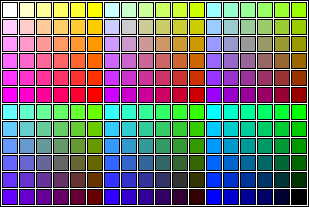
The color of a web page is expressed in a six character code known as a hexadecimal code. An example of a six character string would be: "000000" In other words, six zeros. Each zero is a character in this six character string.The hexadecimal code is scalable with "0" being the lowest number. But the numbers are not counted "0 through "10".After the number "9" the next highest number is "A.". This is because there is no "10" in hexadecimal code. The next highest number after "A" is "B", and so on until you get to the highest character which is "F". All in all there are sixteen characters in the hexadecimal colour scale. From left to right they are:
0... 1... 2... 3... 4... 5... 6... 7... 8... 9... A... B... C... D... E... F
As far as colours are concerned:"0" is the darkest and "F" is the brightest. For argument purposes, think of the hexadecimal color code as being organized into three pairs: 00 00 00
Each pair of characters works like the buddy system. For example: ���� FF���� 66���� 99 The LEFT pair governs the colour RED . The MIDDLE pair governs the colour GREEN and the RIGHT pair governs the colour BLUE .
For example:�� � � FF � � � � FF � � � FF
This is basically a colour system founded on the principle of RED , GREEN and BLUE light. Keeping in mind that "0" equals darkest and that "F" equals brightest, it follows logically that
"00 00 00" equals the colour BLACK and that "FF FF FF" equals the colour WHITE . These colours can be used for fonts as well as backgrounds.
This illustrates how the hexadecimal colour code corresponds with the colour:
��������������� RED is (FF0000) ��������������� GREEN is(00FF00) ��������������� BLUE is (0000FF)
To the left is a sample of a hexadecimal colour chart. This shows just a few of the millions of colours that are avialable in the hexadecimal colour code.
GIF and JPEG image formats are the two most popular image formats on the internet for many reasons. The most significant of these, is that GIF images take up very little space. These are most commonly used for animated and cartoon clipart images.
JPEG images require more bytes to store the information than GIF images. However, other than GIF it's still the most efficient(requires the least number of bytes) method of saving images. The types of images that are stored in the JPEG format are photos and more realistic pictures than GIF which have more detail and use more colours.
Capturing images from the world wide web and applying them to your html document is a lot easier than most people would think. The first thing you must do is find an image you'd like to use. Once you've found it, right click on the image and scroll down to the "save image as" bullet, then save your image(preferably into the same folder as your html document).
Now to apply it to your html document you need to use the tag IMG SRC="the name of the saved image.gif/jpeg". To position your graphic you simply type "ALIGN= Left,Right, or Center" within the IMG SRC tag. If you need to resize the image just type in "LENGTH=(a #) HEIGHT=(a #)" within the IMG SRC tag. And that's all there to capturing images from the world wide web and applying them to your html documents.
 Background Texture |
 Animated Clipart |
 Button Clipart |
 Cartoon Clipart |