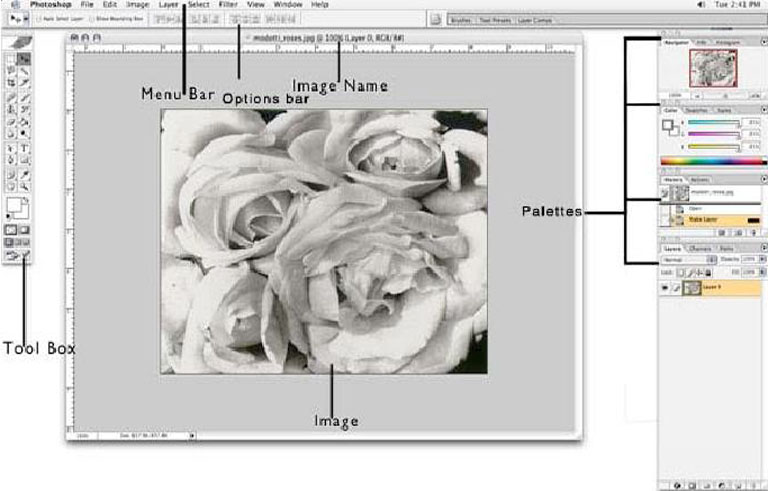
- Menu Bar - If you look at the top of the screen you will see the Menu bar which contains all the main
functions of Photoshop, such as File, Edit, Image, Layer, Select, Filter, View,
Window, and Help.
- Tool Bar - Most of the major tools are located in the Tool bar for easy access.
- Options Bar - The Options bar contains extra options for most tools. The options change as different
tools are selected. Some tools share the same settings in the options bar, for example,
painting modes and opacity, the others have specific options, for example, the Auto
Erase setting for the Pencil tool.
- The Image - The image will appear in its own window once you open a file.
- Image Name - The name of any image that you open will be at the top of the image window as shown
above.
- Palettes - Palettes contain functions that help you monitor and modify images. By default, palettes
are stacked together in groups. These are the palettes that are usually visible:
Navigator, Color, Histogram, Layer. If none of the palettes are visible, go to Window
in the Menu bar and choose palettes you need to work with.
|