Making buttons Using PSP 6.2 and Eyecandy by: 2sXy


Making buttons Using PSP 6.2 and Eyecandy


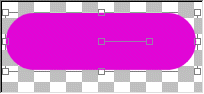
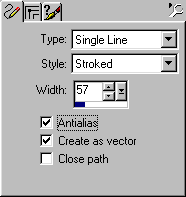
EXAMPLE 1:::You need to start by opening a NEW image. CLick on File, then new, then for size (Example Only) Type in Width = 204, Height=94 (this bigger size allows room for you to work). Box should be transparent and at 6.7 millions colors. Now that you have your new image..go to your color palet and select color you want to use for your button..I chose bright pink. Now click on the LINE draw optionin your psp. then set tool palet to how i have it set in the example below.

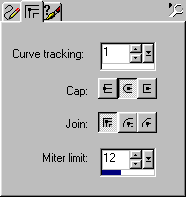
EXAMPLE 2:::In that same tool/line draw palet Click on the middle tab and set to what i have in this example below. I have the size of this button set at 57.. you can change the setting to the size you prefer as long as it is no larger then the box.

EXAMPLE 3:::Place your cursor in the image (left side) now drag it from the left to the right to make your line. Make sure it is straight. This should be a THICK line.

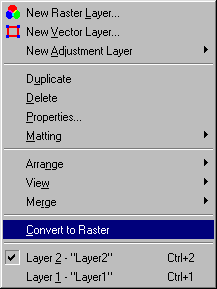
EXAMPLE 4:::Now you will neeed to get rid of the vector lines.. to do that Click on Layers, click on "convert to raster" as you see in example below.

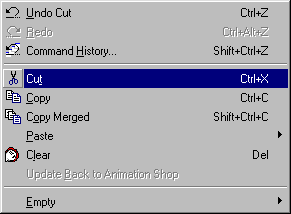
EXAMPLE 5:::Now to make the raised smooth edges. Click on edit at top in your psp, then click on cut, then click on your image.then click on edit again, then cut

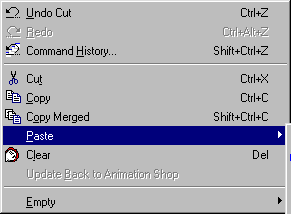
EXAMPLE 6::: then click on paste,

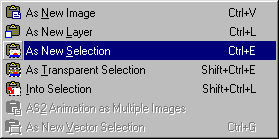
EXAMPLE 7::: then, paste as NEW SELECTION.

EXAMPLE 8:::

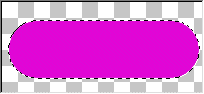
EXAMPLE 9:::Now to make your beveled edge.. you can do this in Eyecandy or psp 6.2. In my example i used Eyecandy. To do this in eyecandy..Click on image, then plugin filters, then eyecandy,outer bevel.. and Wala... there is your button! (You may want to adjust the brightness on your button).. Now to make your smooth buton using psp 6.2...Clickon image, then effects, then inner bevel. Play around with the adjustments to your liking.
EXAMPLE 10:::To put your new button on a background....Click on edit, then cut, then clickon the image you want to place your button on, then click paste. then paste as new selection.


This Tutorial brought to you by 2sXy
@ www.2sXy.net


Hosted by www.Geocities.ws

1 1