Hey! You most likely got to this page by coming from my homepage, but this part of my site is about QBASIC. So, what is QBASIC? QBASIC is a programming language, which, for those of you who don't know, are sets of instructions that tell the computer what to do. For example, I could design a program that asks the user for their name, have them type it in, and greet them. (We will be doing this later.) I could also design a program as complex as keeping track of records of patients in a doctor's office or something. Hell, I could just make a game where you have to shoot a smiley face bouncing around! Anything is possible in programming.
QBASIC runs in DOS. In the old days, programming used Machine Code, which is just a bunch of 0's and 1's. A general question that someone normal like me would ask is "How the hell do you tell the computer to do something with a bunch of 0's and 1's?" Well, some geniuses made this easier by making QBASIC, which uses everyday math sentences and English like commands. These people made it so that when the computer sees these English-like commands, the computer will say, "Hey! That is a different language than mine!" And it translates the English words and math sentences into 0's and 1's so that the computer can understand. This is how the programmer and the computer communicate in programming. So, since I'm sure that after hearing about all of this cool stuff that you can make, why don't we get started?
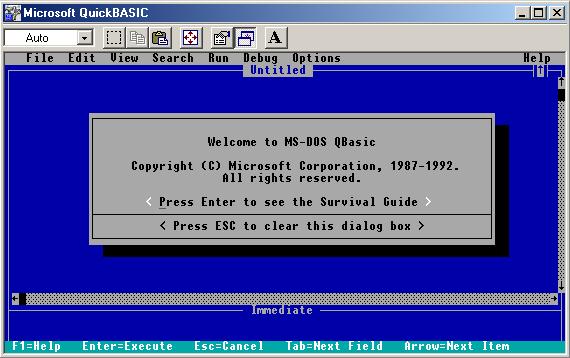
First, if you don't already have it, download QBASIC (run a search on Yahoo! or something. If you can't find it, E-mail me at [email protected] and I can find it for you.) The screen should look like this:
Just hit Escape to exit the dialog box... You don't need the Survival Guide while reading this tutorial. All you really need to know about is the text window, which is the box below where it says Untitled in the above screenshot. Time to learn your first basic commands! Get into the text area and type the following:
CLS
PRINT "Hello World!"
END
Now run it by clicking the Run toolbar and then Start. Now, here is the analysis for the above program:
Line 1: CLS
This line has the command CLS, which stands for CLear Screen. It clears the screen of anything else that may be on the screen at the time.
Line 2: PRINT
This line has the command PRINT, which PRINTs text to the screen, as in the Hello World! example above. Make sure the text that you want to PRINT is enclosed in quotes!!! THIS WILL NOT WORK OTHERWISE!!!
Line 3: END
I think that this line is pretty self-explanatory. It quits the program and exits back to DOS.
That is your first QBASIC program! Now that we know the PRINT command, we can start to make things a little more communicative. We will now learn the INPUT command. Wait: first, we need to learn about variables.
Think of variables as cubbies from kindergarten. They have a name, and they hold stuff. This is the general idea behind variables. I could have a variable named "integer," "RandomNumber," "MyVariable," or even "Biff." Variables can hold numbers or letters. Here is a table of the first two variables that we will be using:
| Name: | What it can hold: | Symbol: |
| String | Text | $ (Dollar Sign) |
| Integer | Numbers | Don't need one, but if you want to, it is % (Percentage Sign) |
There are more, but we will get into them later. So now you know what a variable is. Now we will put your newfound knowledge to use. Type in this following program and run it:
CLS
PRINT "Hi, This is your computer speaking. What is your name?"
INPUT name$
PRINT "Hello,"; name$ ;"!"
INPUT "How old are you?"; age%
PRINT "Oh, I see. You are"; age% ;" years old! That is cool,"; name$ ;" . Well Bye!"
END
This program is a bit longer, but it is better than just PRINTing a bunch of text to the screen. This program allows the user to get into it. Here is an analysis:
Line 1:
CLS command. We already went over this.
Line 2:
This line PRINTs the text "Hi, This is your computer speaking. What is your name?"to the screen.
Line 3:
This line has a new command: the INPUT command. This tells the computer to wait for the user to type in information, and then to store that information into the variable listed after INPUT. Remember the cubby thing: The computer will take the user's name that they type in, and store it into the name$ "cubby."
Line 4:
This prints the text "Hello," to the screen, and after that, you will notice that it will close the quotes after the comma: It is doing this so that everything after "Hello," will be treated as program code instead of text to be printed onto the screen. The semicolon just says that this is not a part of the quoted text: It is a variable. QBASIC then sees the name$ variable, and since the quotes have been closed and there is a semicolon, it knows that name$ is a variable and not PRINTable text, so the contents are then printed to the screen. Then, there is another semicolon, telling it that there is about to be more text to be printed to the screen, and then another quote, a exclamation point, and a closing quote. So, for example, if you type in "Jack" for the name when the program asks you to, this line will print "Hello, Jack!" To the screen. Cool, huh?
Line 5:
This line is more convenient because you can use the PRINT and INPUT statements in one by typing INPUT followed by quoted text, just like a PRINT statement. Then you must type a semicolon after the quoted text and the variable name to where you will store the data.
Line 6:
This line PRINTs the age and name again.
Line 7:
ENDs the program.
Well, now that we know how to communicate with the computer, let's go over math stuff. Math in QBASIC is easy. Here are some example math programs with analysises (If that is even a word...):
CLS
PRINT 2+2
END
This program clears the screen and prints 4 to the screen.
CLS
PRINT 3*3
END
This program clears the screen and prints 9 to the screen.
CLS
PRINT 4/2
END
This program clears the screen and prints 2 to the screen.
CLS
PRINT 4-3
END
This program clears the screen and prints 1 to the screen.
CLS
PRINT (2+2) + (3*3) + (4/2) + (4-3)
END
This program clears the screen, takes 2+2, adds it to the answer of 3*3, and adds that to 4 divided by 2, (the "/" slash is the division sign in QBASIC) and adds that to 4-3, and it all comes out to be 16.
You can even use the INPUT commands in conjunction with a math sentence to make something like this:
CLS
INPUT "Input a number to be doubled: "; number%
number% = number% * 2
PRINT "Your doubled number is ";number%;"."
END
This program clears the screen, and asks the user to INPUT a number to be doubled. When they do, it runs the code on line 3, which takes the contents of number% (Which is the number that the user typed in) and doubles it, and then reassigns the result to the same variable. The result is PRINTED, and the program ends.
More to come!