 |
| Tools---Worldcraft |
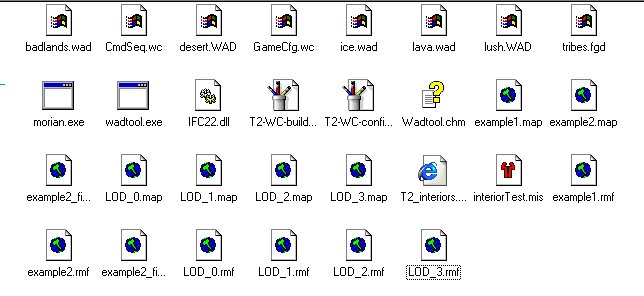
| 1st------ Create an Interiors folder in Dynamix/tribes 2/gamedata/base 2nd----- Create a folder called Worldcraft in the Dynamix folder and place the ice/lava/lush/badlands/desert wads in this folder. Also place the tribes.fgd here also. 3rd------ Place morian.exe/wadtool.exe in Dynamix/tribes2 folder. Also place the IFC22.dll in this folder. 4th------ Make a folder called "Art" or whatever.. this name does not make a difference.. 5th------ Place all map and rmf files in "Art" folder. 6th Place the interior test.mis in your Dynamix/tribes 2/gamedata/base/missions folder. 7th------Last is this step.... This is for newbies. : ) Place the CmdSeq.wc and GameCfg.wc files in your worldcraft/hammer program folder. IE C:/windows/programs files/Valve/Hammer That should be it for that... now on to configuring your worldcraft to make objects. |
| *For advanced users only. Step 7 is not neccesary. The files belong to the original user so it will point to his settings for tribes. So if your tribes 2 is in a different folder it will not work.Worldcraft will make these files automatically so it isnt neccasary to add these. You will have to configure them manually if you do not add these files. |
| Ok, Now to configuring the Gamecfg.wc file. Start worldcraft and choose tools---options. Now you should see this view.. choose these tabs and then change everything to your settings. |
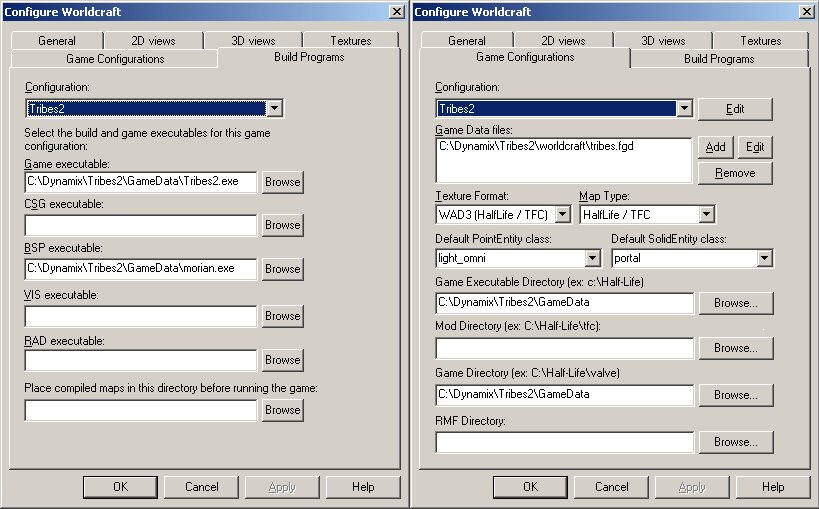 |
| Tips. 1. change the "Place compiled maps in this directory before running the game" to point to your interiors folder. Use the browse button. 2. Change the RMF Directory to point to your Folder with all your RMF files. : ) This will enable you to open that folder specifically instead of having to browse for your maps.. : ) |
| Ok on to F9 "Run Map" Now if you use the files that come with the tools CmdSeq.wc then its all done for you. As long as your Tribes is here......C:/Dynamix/Tribes 2/Gamedata/Base. Otherwise you may have to do it manually. I will add that later.. got to do something.. : ) |