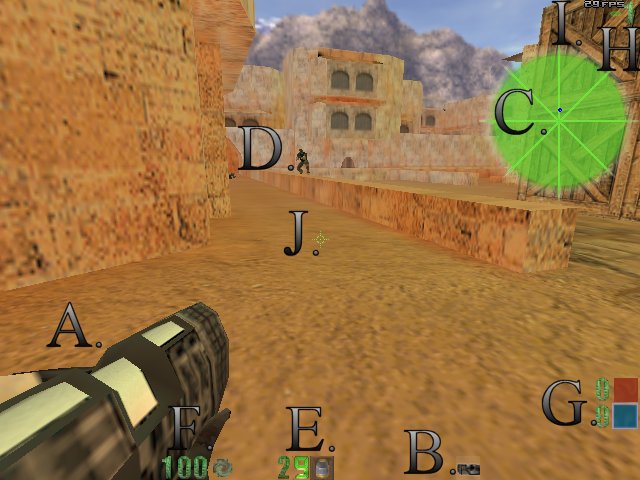
A. Your current weapon. If you have a mouse wheel, turn it up/down to change weapons. You start out holding the grappling hook.
B. Your current selected item. You can select other items by pressing [ and ].You can drop the hightlighted item by press backspace. You start out with ammo selected.
C. Your radar. Blue dots are friendleys, the only dots you are able to see. E activiates radar.
D. A friendly/foe, type in ID at the console to see te persons name. You can't hurt your teammates by default.
E. Your ammo counter. Be careful, the ammo you start with is the ammo you get, unless you kill others with the same ammunition...
F. Your health, getiing hit in the head will result in major loss as opposed to a shot in the leg. When this reaches 0 or negative, its all over. After dying, the game tells you how many lives you have left, when you exhaust these lives while the round is still happening, you are eliminated.
G. The team display, and how many points each team has. You team is highlighted with white around it. Hit x, tab, or f1 to see the scoreboard.
H. How many frags(or points)you currently have. If its a negative numbers, then you killed yourself by falling or being crushed by some heavy object.
I. The FPS (Frames per second) counter. Although useless in a gameplay sense, it does make sense to ensure it staying in the high numbers, for performance's sake.
J. Your crosshair. This is accurate ONLY when firing semi-auto with ANY weapon. Holding down the fire button will result in a loss of accuracy. Crosshairs subject to change with new release(s). |