

Introduction
More than often one finds the need to make a fast decision based on qualitative parameters. Imagine if you have the money to treat yourself a new car. Immediate question will be what car should I buy? Definitely, price and comfort may not be the only factors that one would only rely on.
Making qualitative decision at times requires a lot of factors to consider. This tool helps executives to gauge those factors and make the decision fast.
Decision process
A qualitative decision process would require the identification of factors that would contribute to the goal, i.e. build the hierarchy:

In ranking or making a decision, the criteria can be decomposed to sub-criteria or even lower level in the hierarchy as necessary.
Relative to the goal, compare each of the criteria a pair at a time by examining the combinations of the pair according to the numerical scale from 1 (equal contribution) to 9 (Extreme strong contribution of one to the other criteria in respect to the goal).
After the comparison of each criterion, the tool will further generate the weights of contribution of each factor to the decision of choosing the best car:
But how consistent are these weights? The tool provides an index that indicates the consistency of the whole weighing process. Using this process, the consistency index must be less than 10% for our consistent judgements to hold true.
Based on the example above, we can conclude the following weights:
|
Criteria |
Weights (W) |
|
Initial Cost |
0.054 |
|
Operating Costs |
0.119 |
|
Resale Value |
0.287 |
|
Comfort |
0.264 |
|
Reliability |
0.277 |
With a consistency index of less than 10%, the judgements are consistent.
Now compare the alternatives.
The results for alternatives relative to Initial Costs are given as follows:
Initial Costs
|
Alternatives |
Local Weights (W) |
|
Proton Waja |
0.43 |
|
Proton Gen 2 |
0.19 |
|
Kia Spektra |
0.23 |
|
Honda City |
0.15 |
|
Total |
1.00 |
We proceed by comparing all the other alternatives and for the sake of the completion of the example the following are the results:
Operating Costs
|
Alternatives |
Local Weights (W) |
|
Proton Waja |
0.28 |
|
Proton Gen 2 |
0.15 |
|
Kia Spektra |
0.34 |
|
Honda City |
0.23 |
|
Total |
1.00 |
Resale Value
|
Alternatives |
Local Weights (W) |
|
Proton Waja |
0.21 |
|
Proton Gen 2 |
0.12 |
|
Kia Spektra |
0.08 |
|
Honda City |
0.59 |
|
Total |
1.00 |
Comfort
|
Alternatives |
Local Weights (W) |
|
Proton Waja |
0.20 |
|
Proton Gen 2 |
0.28 |
|
Kia Spektra |
0.06 |
|
Honda City |
0.46 |
|
Total |
1.00 |
Reliability
|
Alternatives |
Local Weights (W) |
|
Proton Waja |
0.09 |
|
Proton Gen 2 |
0.12 |
|
Kia Spektra |
0.17 |
|
Honda City |
0.62 |
|
Total |
1.00 |
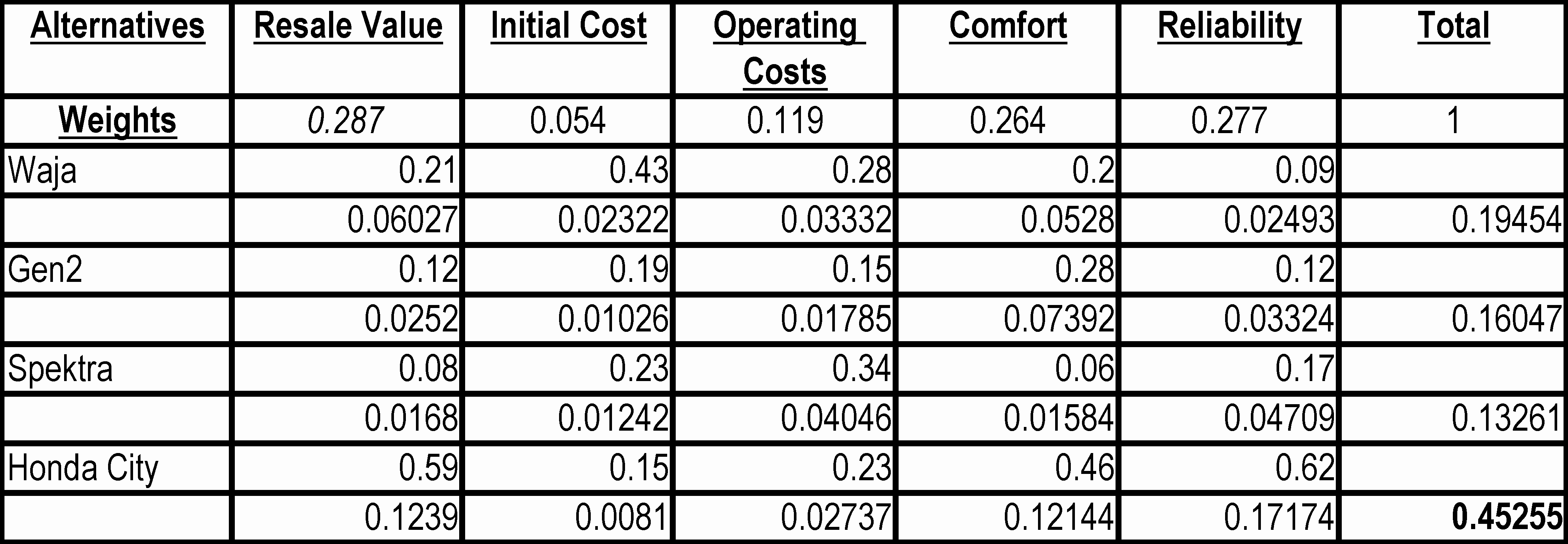
Now we rate all the alternatives by calculating the overall priorities.
Rating
In this particular example, based on the user’s priorities, Honda City is the best choice, with Waja a distant second, as its score is the highest in the most critical factors of selecting the best car.
Of course, this is subjected to the relative important of the criteria, which may change from time to time. The important thing is that response to such changes can be done swiftly.
Way Forward
This is a simple example; using relative measurement between alternatives. The extended tool allows weighing of relevant factors consistently at a faster speed than what the normal ‘gut-feeling’ approach and using of absolute measurement for ranking of endless list of alternatives.
Other features are also in the pipeline, which include:
 | ‘What-if’ features |
| Gap Analysis features |
| Reporting, |
| etc |
There are numerous areas where consistent weighs must be employed in order executives to make the right choice and decision consistently. Other areas include:
| Strategic Planning and Management, |
 | Internal / External Factor Evaluation |
| Competitive Analysis, Ranking between ‘best of breeds’, etc |
Defining Scales
There are 3 columns to work from namely, the criteria, scale and the question column. The fourth and fifth columns will only appear if the criterion needs to be linked to a data column in a worksheet. These columns define the range limits of the scale and can be edited if the scale-edit function is selected.
Use Scale-scale to add new and register scale.
Scale definition is complete, after it has been compared either from personal or data input mode.
After the scale has been defined, select scale-assign to assign to a criterion to the scale. You can either assign scale to one of the criteria or assign to all.
Click OK to close window.
Compare-Personal mode
This mode is the normal compare mode that we had done for the criteria.
Compare –Data mode
The contribution of inputs to the scale can be calculated based on the actual numerical data, e.g. price of a car, rental rate, and population. bSure calculates the normalized contribution. An example is as follows:
Ranking alternatives
Once you have finished the scales, you can now proceed to ranking the alternatives by selecting ranking function from the main form.
Ranking is done either by manually run through the alternatives by answering the questions or automatically, by reading the data from the worksheet. Defining the data columns required certain format and rules.
Practically, not all data need to be defined in the worksheet. Only those data that are numerical or real values can be stored in the worksheet. The name of the columns must be exactly the same as the criteria names.
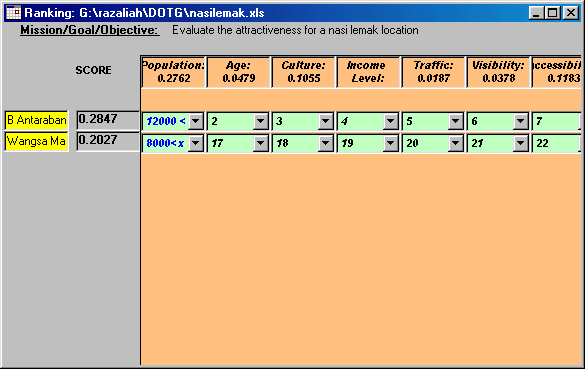
The following form is displayed when the ranking is selected. All the data linked to worksheet will be automatically filled in. The user requires going through the questionnaire to complete the ranking process.
Write up by:
RH