JCounter
A case study in program design using
domains and the Java Abstract Window Toolkit
This document discusses the design of a small Java program called JCounter. The program contains
The document provides
The two roles of this document
This document describes the design of the program, and lists the source code. The source code is embedded within the document and can be extracted using a tool called ExtractFromDoc (the tool is primitive and is not intended to aid serious software development. The source of the tool is given in an appendix, from where it can be copied and pasted into a file for compiling so that you can extract the source of JCounter from this document).
Lines in this document that are to be processed by the extract tool are marked with one of 3 symbols:
The organization of this document
The document is in two parts.
Part One describes the design and implementation of the JCounter program, and assumes some knowledge of the AWT and of the Observer design pattern. Part One begins with the principles of the design of the program, then looks at the design in more detail, and finally presents the full source code.
Part Two describes the Observer design pattern and the Java AWT, using the JCounter program as an example application.
There is a circular dependency between Part One and Part Two: I am hoping you�ll read enough bits of the two parts to learn something that helps you.
There is a lot of detail in this document, which it is hard to learn just by reading about it. I wrote this document assuming you�ll try out the ideas in your own programs in order to learn them.
Richard Mitchell
September 1998
PART ONE The JCounter program.
This part of the document explains the design and implementation of the JCounter program. It defers discussion of the Java AWT and the Observer pattern to Part Two.
The program maintains a counter that
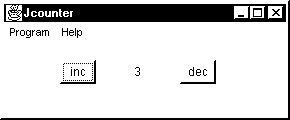
This is what the running program looks like.
The user sees a window, with the usual controls in the top right corner to minimize, resize and close the window. There is a menu bar with two menus. The Program menu offers an Exit option. The Help menu offers an About option. Finally, there are two buttons, and a display panel between them containing the current value of the counter (the panel itself doesn�t show up well in black and white). Pressing the �inc� button causes the counter to increase. Pressing the �dec� button causes the counter to decrease. In both cases, the display panel is updated accordingly.
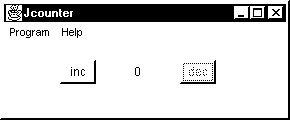
The counter is not allowed to go negative, so the program must ensure that the user cannot decrement the counter when it is on zero. This is what the user sees when the counter is on zero� the decrement button has been disabled.
The architecture of the program
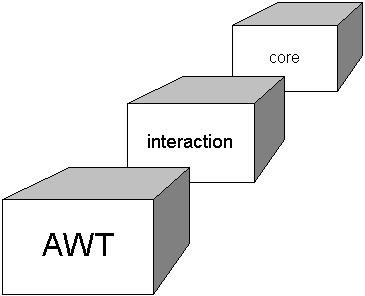
The program is designed so that its classes fall into one of three domains.
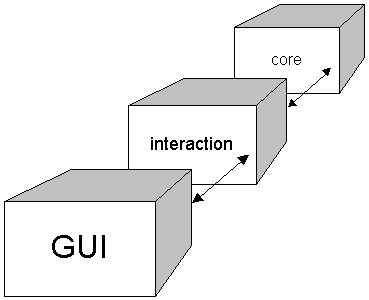
The key responsibility of the interaction domain is to make sure that the core domain and the GUI domaindo not know about each other. An alternative design, in which the GUI and core were directly connected, would involve the core knowing that it is controlled and viewed via a GUI, or the GUI knowing that it controls and views a counter.
The counter that forms the core of the program is an object of class Counter, and offers the following interface to its clients:
=begin ICounter.java

=	public interface ICounter {
There are two queries, one to return the current value of the counter
= public int getValue();
and one to return whether the counter can be decremented (the result is false if the counter is already on zero).
= public boolean isDecrementable();
Clients should not test directly for the value being zero, but should work with the more abstract concept of �isDecrementable�, so that they are independent of the choice of minimum value for the counter (clients that use �isDecrementable� rather than testing the value against zero would be unaffected if we chose to count upwards from one, rather than from zero).
There are three commands on counter objects. The first initializes the counter to a given value.
= public void initializeTo(int v);
The design goal behind the �initializeTo� method is to reduce the number of places in the design that need to know that the counter starts from zero. This is explained further in the section that describes the class Counter, which implements the interface ICounter.
The other two commands increment and decrement the value, respectively. The decrement method has a precondition that the counter is decrementable, and throws an exception if this precondition is violated.
=		public void increment();
=		public void decrement() throws CounterException;
=	}

=end ICounter.java
The GUI domain contains objects of the following classes:
The interaction domain�s responsibilities
The purpose of having an interaction domain is to remove direct dependencies between the classes in the GUI domain and the classes in the core domain (in fact, in this simple application, there is only one class in the core domain, but the principle remains the same).
In more detail, the interaction domain must:
The increment and decrement buttons are objects of class java.awt.Button. In java.awt 1.1, a button can have a registered listener that is informed when the button is pressed. The use of listeners is explained in Part Two, using the counter program as an example. Given the architecture of the program, the listeners for the increment and decrement buttons belong in the interaction domain.
The listener for the increment button must detect that the increment button has been pressed and call �increment� on the counter.
The listener for the decrement button must detect that the decrement button has been pressed and call �decrement� on the counter, having first checked that it is OK to decrement the counter.
This leaves these two pieces of interaction to be designed:
The counter is observable, and has two observers:
The interaction domain contains three manager objects, each of which manages the interaction between the core and one of the top level window�s widgets:
Here is a picture of the connections, which is followed by an explanation.
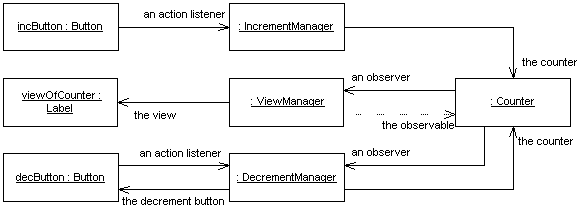
The increment manager has two permanent connections to or from objects in other domains:
The view manager has a temporary connection to the counter, in order to find out the value that is to be displayed. It acquires this temporary connection as follows: whenever an observable object (here, the counter) notifies its observers that it has changed, it passes its own identity as the first argument to the �update� method. So, for the duration of the �update� method, the view manager knows the identity of the counter.
The decrement manager has a total of 4 connections to and from 2 objects in other domains:
The interaction domain also contains an object of class TopLevelFrame that (amongst other things) configures the connections between the GUI components, the interaction managers and the core counter.
The implementation of the counter
The class Counter is the only class in the core of the program. It has a primary role
and a secondary role
Class header
The class Counter begins by declaring that it extends (i.e., inherits from) class Observable from the library package java.util, and that it implements the interface ICounter.
=begin Counter.java

=	public class Counter
=				extends java.util.Observable
=				implements ICounter {
=
Representation
The implementation of the counter needs just one instance variable, in which to remember the current value of the counter.
=		private int value;
=
Queries
The implementation of the �getValue� method is straightforward�simply return the current �value�.
=		public int getValue() {
=			return this.value;
=		}
=
The query �isDecrementable� tests whether the counter is zero. The design rationale for introducing the query is to reduce the number of parts of the program that know explicitly that the counter cannot go below zero. By introducing the method, we reduce the number to one. Other parts of the program know that counters might not be decrementable, but they do not explicitly need to know what this means.
=		public boolean isDecrementable() {
=			return ( this.value > 0 );
=		}
=
Commands
There is no explicitly-programmed constructor. Instead, there is a method to initialize the counter to a given value. The reason for having an explicit initialize method rather than a constructor is because the counter is an observable object. In a world of observable objects and their observers, it is clearer to separate two phases of the program: initial configuration and normal running. To avoid subtle problems resulting from order of construction during the configuration phase, the program is designed to carry out the construction and connection of objects during configuration, but NOT to set the objects to any particular initial values. That happens at the start of normal running. As a consequence, the observer pattern can be used to initialize observers of the counter quite naturally�the initialize method notifies all observers that the counter has changed, and each of them takes responsibility for bringing itself into line with the value of the counter.
There is another way to evaluate the chosen design. Suppose we had adopted the alternative design in which the object that configures the program (the top level frame) calls a constructor on Counter to construct a counter object with a particular starting value. To avoid order-of-construction problems, the top level frame could also disable the dec button and set the view to display the string "0". Now imagine that our customer asks for a change: the counter is to start from one. This is one change from the customer�s perspective, but would require three changes in the source code, to construct the counter with a starting value of 1, to start with the dec button enabled, and to set the view initially to 1. When one change in the world entails three changes in the software, the design is not ideal. Now re-consider the design that has actually been adopted, in which the counter is given its starting value through a call to its �initializeTo� method. To change the program so that the counter starts at one requires just one change. The top level frame calls �initializeTo� on the counter with an argument of �1�, and both observers automatically start in the appropriate states (the dec button starts in the enabled state and the view starts by displaying the string "1").
In detail, then, to initialize a counter, set its �value� to the given value, �v�
=		public void initializeTo(int v) {
=			this.value = v;
and do what observable objects do to alert their observers.
=			this.setChanged();
=			this.notifyObservers();
=		}
=
The increment method increments �value� and must also alert observers that the counter object has changed.
=		public void increment() {
=			this.value++;
=			this.setChanged();
=			this.notifyObservers();
=		}
=
The decrement method is a little more complicated. It has a precondition that the counter is decrementable, and throws an exception if the precondition is not met. If the precondition is met, it decrements the �value� and alerts observers that the counter object has changed.
=		public void decrement() throws CounterException {
=			if ( !isDecrementable() ) {
=				throw new CounterException(
=					"Counter.decrement()::not decrementable");
=			}
=			this.value--;
=			this.setChanged();
=			this.notifyObservers();
=		}
=	}
=end Counter.java
The counter�s decrement method raises an exception if a client calls the method when the precondition is not met. Here is the definition of the class of the exception.
=begin CounterException.java
=	class CounterException extends RuntimeException {
=
=		/**
=		 * Constructs a CounterException with no detail message.
=		 */
=		public CounterException() {
=			super();
=		}
=
=		/**
=		 * Constructs a CounterException with the given detail message.
=		 *
=		 * @param   s   the detail message.
=		 */
=		public CounterException(String s) {
=			super(s);
=		}
=	}
=end CounterException.java
That concludes the implementation of the Counter class.
The implementation of the view manager
We now turn to the first of the 3 classes that manage interactions between GUI components and the core counter. An object of class ViewManager is an observer of a counter object and keeps a label up-to-date with the counter�s value.
=begin ViewManager.java

=	public class ViewManager
=				implements java.util.Observer {
=
A view manager needs to remember the label it keeps up-to-date (it does not need permanently to remember the counter it is observing, since the �update� method will supply the identity of the object being observed as an argument). The label is called �viewOfCounter�
=		private java.awt.Label viewOfCounter;
=
and is set by the method �setLabel�.
=		public void setLabel(java.awt.Label x ) {
=			viewOfCounter = x;
=		}
=
Providing a �setLabel� method, rather than a constructor with a Label argument, simplifies the job of creating and connecting a number of objects when the program is configured.
Observer objects implement an �update� method, which has two arguments. The first is the identity of the object that is notifying this observer that it has changed (in this program, that will always be the program�s counter object). The second argument allows the observed object to pass additional information to the observer, and is not needed in this program.
= public void update(java.util.Observable o, Object arg) {
The �update� method begins by casting the object that is being observed to a �Counter�
= Counter c = (Counter) o;
and then performs these steps
=			viewOfCounter.setText( new Integer(c.getValue()).toString() );
=		};
=	}
That completes the implementation of the view manager.
=end ViewManager.java
The implementation of the increment manager
The increment manager is the second of the 3 classes that manage interactions between GUI components and the core counter. The program contains one object of class IncrementManager. It is an action listener to the �inc� button in the GUI domain. (When the user presses the �inc� button, the increment manager�s �actionPerformed� method is called�this method increments the counter.)
=begin IncrementManager.java

=	class IncrementManager
=				implements java.awt.event.ActionListener {
=
The increment manager remembers the identity of the counter it is to increment and provides a method �setCounter� to set this variable.
=		private Counter counter;
=
=		public void setCounter( Counter c ) {
=			counter = c;
=		}
=
The �actionPerformed� method is called when the user presses the button that this manager has been registered to listen to. There is no precondition on the �increment� method in class Counter, so all the increment manager needs to do is call �increment� on its counter.
=		public void actionPerformed( java.awt.event.ActionEvent e ) {
=			counter.increment();
=		}
=	}
=end IncrementManager.java
That completes the implementation of the increment manager.
The implementation of the decrement manager
The decrement manager is the third of the 3 classes that manage interactions between GUI components and the core counter. The program contains one object of class DecrementManager. It is an action listener to the �dec� button in the GUI domain. When the user presses the �dec� button, the decrement manager�s �actionPerformed� method is called. This method decrements the counter.
The decrement manager is also an observer of the counter object. This is so that it can disable the decrement button whenever the counter becomes non-decrementable, and enable it when it becomes decrementable again.
=begin DecrementManager.java
=
=	class DecrementManager implements
=					java.awt.event.ActionListener,
=					java.util.Observer {
=
The decrement manager remembers the counter it decrements when the decrement button is pressed, and provides a method by which it can be told the identity of the counter.
=		private Counter counter;
=
=		public void setCounter( Counter c ) {
=			counter = c;
=		}
=
Similarly, the decrement manager remembers the button it enables and disables, and provides a method by which it can be told the identity of the button.
=		private java.awt.Button decButton;
=
=		public void setButton( java.awt.Button b ) {
=			decButton = b;
=		}
=
The decrement manager is an action listener to the decrement button. When the user presses the decrement button, the manager�s �actionPerformed� method is called. This method decrements the counter. Because the counter�s decrement method has a precondition (that the counter is decrementable), it can raise an exception. The �actionPerformed� method must use a try clause to call the method.
It is worth emphasizing that the �actionPerformed� method does not need to check whether the counter is actually decrementable. Because of the way the program is designed, the counter must be decrementable when �actionPerformed� is called back by the decrement button (if the counter were currently not decrementable, the button would be disabled, and there would be no source of callbacks to the �actionPerformed� routine).
=		public void actionPerformed(java.awt.event.ActionEvent e ) {
=			try {
=				counter.decrement();
=			} catch (CounterException ce) {};
=		}
=
The decrement manager is an observer of the counter. Whenever the counter changes, it notifies its observers by calling back their �update� methods. When �update� is called, the manager checks whether the counter is decrementable, and enables or disables the �dec� button accordingly.
=		public void update(java.util.Observable o, Object arg ) {
=			if
=				( counter.isDecrementable() )
=			{
=				decButton.setEnabled( true );
=				decButton.setForeground( java.awt.Color.black );
=			} else {
=				decButton.setEnabled( false );
=				decButton.setForeground(java.awt.Color.white );
=			}
=		}
=	}
=end DecrementManager.java
Is it wasteful to call �setEnabled� each time the value of the counter changes? Would it be better for the decrement manager to remember the status of the button, and call �setEnabled� only when its status needs to be changed? You are encouraged to think about what extra code is needed to support this alternative design, and about whether it would lead to a faster and smaller program. And you are encouraged to think about such issues as the clarity of the design, and what sorts of speeds are needed in this particular context.
That completes the implementation of the decrement manager.
The implementation of the top level frame
The program�s main window is an object of class TopLevelFrame, which is a subclass of java.awt.Frame. The class TopLevelFrame also implements the interfaces IExitableFrame and IFrameWithAbout, for reasons that are explained when we look at the Exit and About menu options later.
=begin TopLevelFrame.java
=	public class TopLevelFrame
=				extends java.awt.Frame
=				implements IExitableFrame, IFrameWithAbout {
The data
The top level frame holds and creates the core counter object and the various GUI components that the program uses, and configures the program by connecting them up in appropriate ways. Here, first, are the declarations of the variables to hold all these objects.
The core counter.
=
=		private Counter			counter;
The main window�s widgets
=		private java.awt.Label		viewOfCounter;
=		private java.awt.Button		incButton;
=		private java.awt.Button		decButton;
The three managers
=		private ViewManager		viewManager;
=		private IncrementManager	incrementManager;
=		private DecrementManager	decrementManager;
The menubar, the two menus, and their menu items
=		private java.awt.MenuBar	menuBar;
=		private java.awt.Menu		programMenu;
=		private java.awt.MenuItem	exitMenuItem;
=		private java.awt.Menu		helpMenu;
=		private java.awt.MenuItem	aboutMenuItem;
The managers for the menu items
These are discussed in detail in a later section. For now, it is probably enough to know that the managers are registered listeners of their respective menu items, and carry out an appropriate action when alerted that the menu item has been selected (the action is to exit the program, or to show the �about� dialog).
=		private ExitManager 	exitManager;
=		private AboutManager 	aboutManager;
=
The constructor
= public TopLevelFrame() {
The constructor for class TopLevelFrame can be examined in a number of small sections, starting with the section concerned with the whole top level frame (i.e., the program�s main window).
The main window
Enable window events (so that the close box works, for example).
= enableEvents(java.awt.AWTEvent.WINDOW_EVENT_MASK);
Set the layout manager of the window to null (this is the simplest option, and means that (a) we have to lay components out by defining their positions, which is what �setSize� does, and (b) we get no help with repositioning components if the user resizes the window. This is not an option you can use in a serious program.)
=			this.setLayout( null );
=			this.setSize(new java.awt.Dimension(300, 150));
Set the top level frame�s title.
= this.setTitle("Jcounter6.2");
The menu stuff
Create a menu bar.
= menuBar = new java.awt.MenuBar();
Create a program menu, with label "Program".
=			programMenu = new java.awt.Menu();
=			programMenu.setLabel("Program");
Create a menu item with label "Exit".
=			exitMenuItem = new java.awt.MenuItem();
=			exitMenuItem.setLabel("Exit");
Create a manager for the exit menu item, and give it a reference to this top level frame (so that it can call back the frame to tell it to quit when the user selects the exit menu item).
=			exitManager = new ExitManager();
=			exitManager.setExitableFrame( this );
Register the manager as a listener of the exit menu item, so that its �actionPerformed� method is called when the user selects the exit menu item.
= exitMenuItem.addActionListener( exitManager );
And finally add the program menu to the menu bar.
= menuBar.add(programMenu);
Now do much the same stuff to create a help menu with a single menu item labelled "About".
=			helpMenu = new java.awt.Menu();
=			helpMenu.setLabel("Help");
=			aboutMenuItem = new java.awt.MenuItem();
=			aboutMenuItem.setLabel("About");
=			aboutManager = new AboutManager();
=			aboutManager.setFrameWithAbout( this );
=			aboutMenuItem.addActionListener(aboutManager);
=			programMenu.add(exitMenuItem);
=			helpMenu.add(aboutMenuItem);
=			menuBar.add(helpMenu);
The menu bar is now complete. Add it to the top level frame.
=			this.setMenuBar(menuBar);
=
The top level frame�s widgets
Create a label on which we can display the current value of the counter, and add it to this top level frame.
=			viewOfCounter = new java.awt.Label("", java.awt.Label.CENTER);
=			viewOfCounter.setBounds(120,60,36,24);
=			viewOfCounter.setBackground(java.awt.Color.lightGray);
=			this.add(viewOfCounter);
Create a button labelled "inc", and add it to this top level frame.
=			incButton = new java.awt.Button();
=			incButton.setLabel("inc");
=			incButton.setBounds(60,60,36,24);
=			incButton.setBackground(java.awt.Color.lightGray);
=	 		this.add(incButton);
Create a button labelled "dec", and add it to this top level frame.
=			decButton = new java.awt.Button();
=			decButton.setLabel("dec");
=			decButton.setBounds(180,60,36,24);
=			decButton.setBackground(java.awt.Color.lightGray);
=			this.add(decButton);
=
The interaction domain�s managers
First, construct the core counter and the three managers.
=			counter = new Counter();
=			viewManager = new ViewManager();
=			incrementManager = new IncrementManager();
=			decrementManager = new DecrementManager();
Now connect them up. Tell view manager the identity of the label it is to write onto, and register the view manager as an observer of the counter.
=			viewManager.setLabel(viewOfCounter);
=			counter.addObserver( viewManager );
Tell the increment manager the identity of the counter it is to increment, and register it as a listener of the actual inc button.
=			incrementManager.setCounter( counter );
=			incButton.addActionListener( incrementManager );
The decrement manager is the most complicated. It needs to be told the identity of the counter it is to decrement. It also needs to be told the identity of the dec button that it is to enable and disable. Finally, it needs to be registered as a listener of the dec button and an observer of the counter.
=			decrementManager.setCounter( counter );
=			decrementManager.setButton( decButton );
=			decButton.addActionListener( decrementManager );
=			counter.addObserver( decrementManager );
Lastly, in this section, we initialize the counter to zero. Because the �initializeTo� method changes the state of the counter, and because the counter is an observable object, this will cause the counter to send �update� to its observers (the view manager and the dec button) so that they start life in the appropriate states, too. The call to initialize the counter must come here, at the end of the top level frame�s construtor, after all the relevant objects have been created and connected up.
=			counter.initializeTo( 0 );
=		}
=
Handling window events
Because class TopLevelFrame inherits from Frame, it has a �processWindowEvent� method. The event we are interested in is the WINDOW_CLOSING event, so we override �processWindowEvent� to make it quit the program when WINDOW_CLOSING event is received.
=
=		protected void processWindowEvent(java.awt.event.WindowEvent e) {
=			super.processWindowEvent(e);
=			if (e.getID() == java.awt.event.WindowEvent.WINDOW_CLOSING) {
=				this.quit();
=			}
=		}
=
Callback methods for the menu items
The File|Exit menu item and the Help|About menu item both need to call back to this top level frame. When the user selects the File|Exit menu item, it calls back to tell the top level frame to quit.
=		public void quit() {
=			System.exit(0);
=		}
When the user selects the Help|About menu item, it calls back the top level frame to tell it to show the about dialog (an alternative design would be to have the About menu item show the dialog, which would entail it telling the dialog the identity of the top level frame, because dialogs must be told their owning frame when they are created).
=		public void showAbout() {
=			AboutDialog about = new AboutDialog(this);
=			about.show();
=		}
=
=	}
=
=
That ends the implementation of the top level frame.
=end TopLevelFrame.java
The exit menu item is a menu item on the "Program" menu on the menubar of the top level frame. It has a registered listener, which is an object of class ExitManager. This section discusses the design of that manager.
First, the manager needs to call back the top level frame, but does not need to know all of the top level frame�s methods. So, here is the interface that the exit menu item manager expects of the top level frame. It defines just one method, �quit�.
=begin IExitableFrame.java
=
=	public interface IExitableFrame {
=
=		public void quit();
=	}
=end IExitableFrame.java
Now here is the manager. It implements the �java.awt.event.ActionListener� interface, and so provides an implementation of the �actionPerformed� method.
=begin ExitManager.java
=
=
=	public class ExitManager
=				implements java.awt.event.ActionListener {
=
The manager remembers the identity of the exitable frame it is to call back, and provides a method �setExitableFrame� so that it can be told this identity.
=		IExitableFrame myFrame;
=
=		public void setExitableFrame(IExitableFrame aFrame) {
=			myFrame = aFrame;
=		}
=
When the user selects the exit menu item from the "Program" menu, the manager�s �actionPerformed� method is called) because the manager is a registered action listener of the menu item. All that the method does is call back the top level frame and tell it to �quit�.
=		public void actionPerformed(java.awt.event.ActionEvent e) {
=			myFrame.quit();
=		}
=	}
=end ExitManager.java
Managing the About menu item � an exercise for you
Here is an exercise for you. Work out how the About menu item does its job. You�ll have to study three source files:
=begin IFrameWithAbout.java
=
=	public interface IFrameWithAbout {
=
=		public void showAbout();
=	}
=end IFrameWithAbout.java

=begin AboutDialog.java
=	public class AboutDialog
=				extends java.awt.Dialog
=				implements java.awt.event.ActionListener {
=
=		java.awt.Label lineOne;
=		java.awt.Label lineTwo;
=		java.awt.Label lineThree;
=		java.awt.Button okButton;
=
=		public AboutDialog(java.awt.Frame parent) {
=			super(parent);	//Dialogs must be created with an owning frame
=			enableEvents(java.awt.AWTEvent.WINDOW_EVENT_MASK);
=			this.setModal( true );
=			this.setLayout( null );
=			this.setBounds( new java.awt.Rectangle( 50, 50, 250, 200 ) );
=			this.setResizable( false );
=			lineOne = new java.awt.Label(
=							"A simple demonstration of domains" );
=			lineOne.setBounds( new java.awt.Rectangle( 30, 30, 200, 20 ) );
=			this.add( lineOne );
=			lineTwo = new java.awt.Label(
=							"(GUI <-> interaction <-> core)" );
=			lineTwo.setBounds( new java.awt.Rectangle( 45, 60, 200, 20) );
=			this.add( lineTwo );
=			lineThree = new java.awt.Label(
=							"(c) Richard Mitchell 1998" );
=			lineThree.setBounds(new java.awt.Rectangle(55, 110, 200, 20));
=			this.add( lineThree );
=			okButton = new java.awt.Button();
=			okButton.setLabel( "OK" );
=			okButton.setBounds( new java.awt.Rectangle(100, 150, 50, 30) );
=			okButton.addActionListener( this );
=			this.add( okButton );
=		}
=
=		void cancelDialog() {
=			dispose();
=		}
=
=		protected void processWindowEvent(java.awt.event.WindowEvent e) {
=			if (e.getID() == java.awt.event.WindowEvent.WINDOW_CLOSING) {
=				cancelDialog();
=			}
=			super.processWindowEvent(e);
=		}
=
=		public void actionPerformed(java.awt.event.ActionEvent e) {
=			if (e.getSource() == okButton) {
=				cancelDialog();
=			}
=		}
=	}
=
=end AboutDialog.java


=begin AboutManager.java
=
=	class AboutManager implements java.awt.event.ActionListener {
=
=		IFrameWithAbout myFrame;
=
=		public void setFrameWithAbout(IFrameWithAbout aFrame) {
=			myFrame = aFrame;
=		}
=
=		public void actionPerformed(java.awt.event.ActionEvent e) {
=			myFrame.showAbout();
=		}
=
=	}
=

=end AboutManager.java
The application is an object of class JCounter. When this object is created, it creates a top level frame object and shows it. (There�s a bit of AWT black magic, too. Setting �packFrame� to false tells the AWT not to try to lay components out to their preferred sizes but to leave us to do the sizing.)
=begin JCounter.java
=	public class JCounter {
=
=		boolean packFrame = false;
=
=		public JCounter () {
=			TopLevelFrame frame = new TopLevelFrame();
=			frame.setVisible(true);
=		}
=
=		public static void main(String[] args) {
=			new JCounter ();
=		}
=	}
=
=end JCounter.java
That�s all, folks! Part Two discusses the Observer pattern and the AWT framework that were used in the design and construction of the JCounter program.
PART TWO Underlying patterns and frameworks
Part Two begins with a short section describing the Observer Pattern and how it is provided in Java. The second section is much longer, and gives an overview of the Java Abstract Window Toolkit (AWT). Both parts refer back to the counter program, described in Part One, as a source of examples.
The Observer pattern allows objects of one class to observe objects of another class. An observer registers interest in a subject, and is alerted whenever the subject changes.
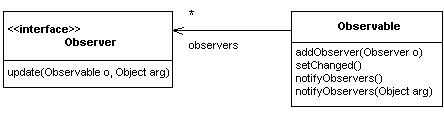
The Observer pattern is described in the book Design Patterns by Gamma et al. The pattern is provided in Java via the interface Observer and the class Observable.
Here�s an example of the pattern in use in the counter program.
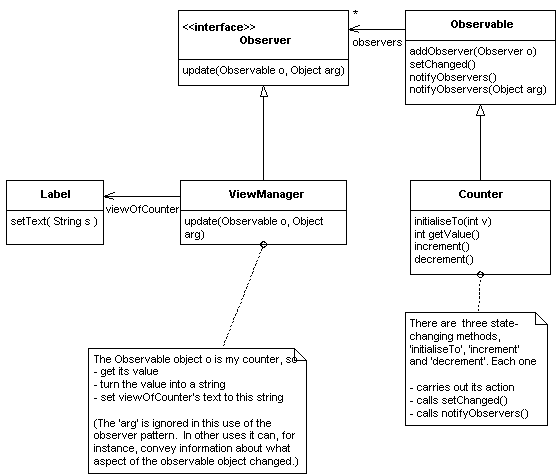
Imagine that the user presses the �inc� button on the screen. The counter�s �increment� method is called. It adds one to the value of the counter, and initiates the process of alerting its registered observers. To do this, it calls �setChanged� on itself (a method it inherits from Observable), and then calls �notifyObservers� on itself (another method it inherits from Observable). The body of �notifyObservers� calls �update� on each registered observer, including the view manager. When it receives a call to its update method, it gets the latest value of the object it�s observing and uses it to update the label on the screen.
Before all this happens, when the program is configured, the view manager will have been passed as an argument to the counter�s �addObserver� method (yet another method it inherits from Observable).
The observer pattern provides "registration-based notification of changes". An observer registers with an observable object (using �addObserver�) and is then called-back whenever the observable object says it has changed (using �setChanged�) and that it is time to tell its observers (using �notifyObservers�).
Advantages of using the observer pattern, rather than hard-wiring the identity of the view manager into the counter include:
Java�s Abstract Window Toolkit (AWT)
By constructing your program�s graphical user interface (GUI) using Java�s Abstract Window Toolkit (AWT), you ensure that your program can run on any platform that supports Java, without modification.
The AWT is a framework. A framework is like a class library�it contains many classes� but it also has rules about how they may be combined. The framework is founded on a few principles. You do not need to grasp the principles fully in order to write Java programs with GUIs, and you certainly do not need to understand all the details of all the classes.
This document introduces the main principles, and some of the details. You�ll probably have to write some programs and study some other texts before you feel you�ve understood how to use the AWT. If you�re using an IDE to develop Java programs, it will have detailed documentation on the classes introduced here.
We begin with an overview, to introduce you to some of the terminology, and then revisit the ideas again, in more detail.
The AWT is in the process of being overtaken by a new set of components, currently referred to as the Swing components. The overall structure of the Swing framework is the same as that of the AWT, so studying this document will still be of some help if you are using Swing.
The AWT is based on components (e.g., buttons) which can be put into containers (e.g., panels) to build complex windows that appear on the screen. When the user manipulates a component (e.g., clicks on a button), the AWT generates events (e.g., a mouse down event and a mouse up event). These events are sent to objects that have registered as listeners for the events (you write the classes for these listeners� they do application-specific stuff).
The place of the AWT
The AWT sits between a program you write and the native windows system on the computer your program runs on.
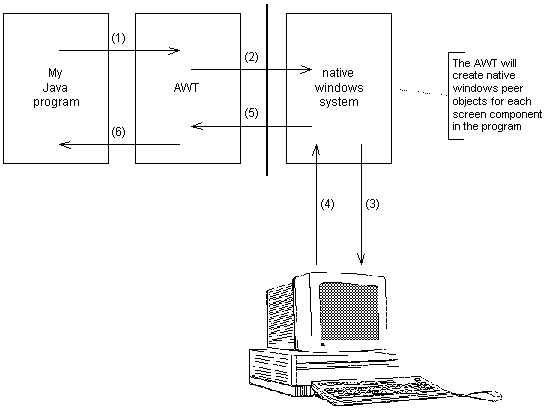
Communication between the AWT and the native windows system is carried out via peer objects (e.g., a checkbox in your program will have a corresponding, or peer, checkbox in the windowing system). There are plans to remove peer objects from the AWT. Beginners to AWT do not need to worry about peer objects.
Components
Microsoft Windows uses the term "controls" for objects on the screen that users manipulate. In the Unix/Xwindows world they�re known as "widgets". Java has no particular term for them, but it won�t hurt for now to call them components (as we shall see, component is sometimes a broader term than we want). These components are managed by the AWT, which generates events whenever the user manipulates them.
Events
There are all sorts of AWT events. There are action events generated when you click a checkbox. There are mouse events generated when you press the left mouse button or release it. There are mouse motion events generated when you drag the mouse with the left button down. There are window events generated when you click a window�s close box. And so on. We�ll look at the full list later. Events are objects that carry information about something that happened, such as the co-ordinates at which a mouse button was pressed, and which button it was.
Listeners
You write classes that can act as listeners for events coming from components, and you declare objects of these listener classes. You write code to configure your program by registering your listener objects with the appropriate controls. The listener objects carry out whatever processing is required when a control is manipulated by the user and an event is generated.
For example, you might write a DeleteManager class and register an object of that class as a listener for events coming from a button labelled "Delete" (you might think of it as a manager, because it does more than listen� listening to a button is just one of its management tasks). Whenever the user clicks the button, your manager is alerted, and carries out whatever processing the delete entails.
Here�s the code for adding an object of class DeleteManager as a registered listener of a button object.
deleteButton.addActionListener( deleteManager );
The action listener will be called back when the user presses the button. The callback will be to the following method in the action listener:
	public void actionPerformed( ActionEvent e ) {
		//The code to do deleting goes here
	}
Containers
A window in a Java program is an example of a container. It can contain controls such as buttons and checkboxes. It can also contain other containers, so that you can build complicated windows with lots of structure. Some windows can contain a menubar, containing menus and menuitems.
Here�s an example of adding a component (a button) to a container (a frame). This line of code is in the constructor for the frame.
this.add(incButton);
Containers are themselves components, so they can be manipulated by the user. For instance, suppose you add a button to a window, and register both as listeners for �mouseClicked� events. If the user clicks the mouse over the button, the button component receives the event. If the user clicks inside the window but not over the button, the window component receives the event. (You can even arrange that they both receive the event.)
A word about menus
Menus are not treated in the same way as other kinds of components. We�ll return to menus after looking at the mainstream components.
Components and containers � the static view of an AWT-based GUI
The classes Component and Container are related.
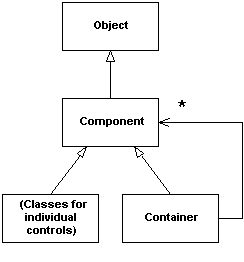
Readers of the Design Patterns book by Gamma et al will recognize the Composite pattern in this picture, which captures the recursive structure of components. Every component is either an individual control (such as a button or a menu item) or a container (such as a window or a panel). If it is a container, it can contain a number of components, which can themselves be individual controls or more containers, and so on.
There are five important kinds of containers (all of which can act as components, too).
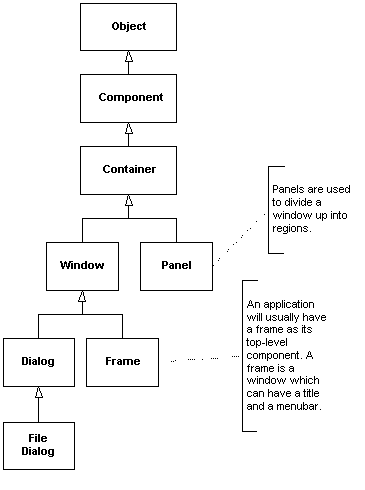
Here are the various kinds of basic components, i.e., those that are not themselves containers (the components for building menus will appear later).
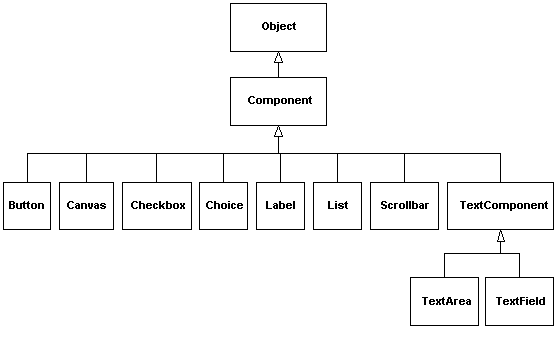
It�s best to learn about the different kinds of components by writing programs that use them.
Putting the two previous diagrams together gives a detailed picture of the possible structures you can build in a Java AWT-based GUI.
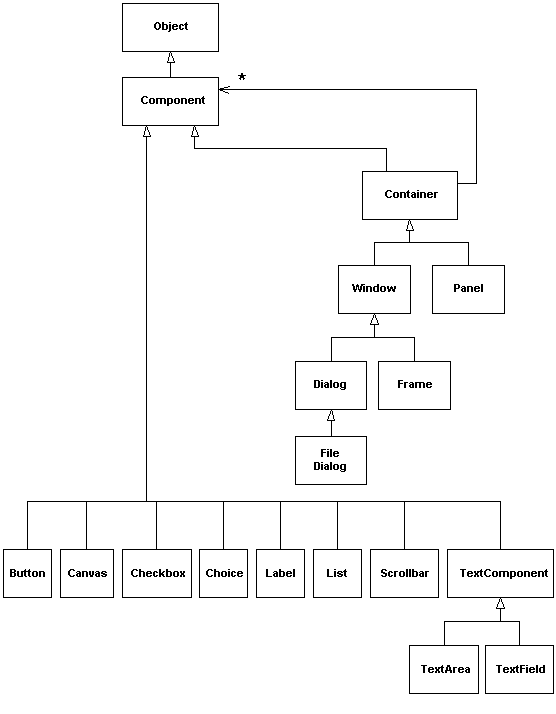
Exercise
Construct a UML-style object diagram to show the structure of the main window from the Counter program.
Here are some tips to keep things reasonably simple:
The Program and Help menus look like this in their pulled-down state.
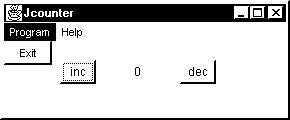
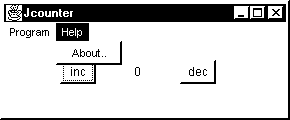
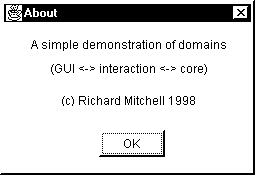
Selecting the "About" menu item from the "Help" menu causes a dialog to appear which, itself, has internal structure (it contains some labels and a button).
Events and listeners � the dynamic view of an AWT-based GUI
Here, again, is the outline story about what happens at run-time in a program with an AWT-based GUI. You write special classes that conform to interfaces called listener interfaces. These listener interfaces define what methods the AWT will call when things happen at the user-interface, and what kind of event object it�ll pass as an argument.
For example, you could write a class DecrementManager for the Counter program, and make it implement the interface ActionListener. To do this, you write a method �actionPerformed� that takes an ActionEvent argument. Now, buttons are components that can generate action events when they are pressed, so you can register an object of class DecrementManager (which is an action listener) as a listener for action events from the decrement button.
Whenever the user clicks on the button, your decrementManager object receives a call to its �actionPerformed� method, with an ActionEvent argument that tells your listener such information as the identity of the component that generated the event and whether the user was holding down the ALT or the CTRL keys when the button was pressed.
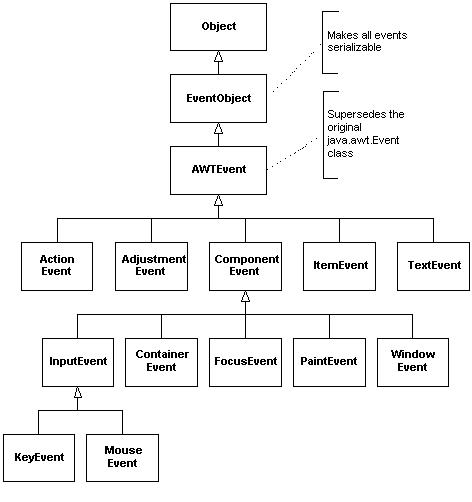
Here�s the class hierarchy for AWT events.
public class MouseEvent extends InputEvent {

		//Mouse events are passed as arguments to methods
		//called on objects that conform to two listener
		//interfaces, MouseListener and MouseMotionListener

	//Seven ints to distinguish different types of mouse event
	public static final int MOUSE_CLICKED
	public static final int MOUSE_PRESSED
	public static final int MOUSE_RELEASED
	public static final int MOUSE_MOVED
	public static final int MOUSE_ENTERED
	public static final int MOUSE_EXITED
	public static final int MOUSE_DRAGGED

	public MouseEvent(Component source, int id, long when, int modifiers,
	                      int x, int y, int clickCount, boolean popupTrigger)
		//Constructs a MouseEvent object with the specified source
		// component, type, modifiers, coordinates, and click count.

	public int getX()
		//Returns the x position of the event relative to
		//the source component.

	public int getY()
		//Returns the y position of the event relative to
		//the source component.

	public Point getPoint()
		//Returns the x,y position of the event relative
		//to the source component.

	public synchronized void translatePoint(int x, int y)
		//Translates the coordinate position of the event by x, y.

	public int getClickCount()
		//Returns the number of mouse clicks associated with this event.

	public boolean isPopupTrigger()
		//Returns true if this mouse event is the popup-menu
		//trigger event for the platform.

	public String paramString()
		//Returns a single string made from the parameters used
		//in constructing the object.
	}
Here�s an example of a Listener interface, the MouseListener. It is the interface through which your program can be alerted when the mouse buttons are manipulated. (There�s another interface, MouseMotionListener, for detecting that the mouse has been moved or dragged.)
Interface java.awt.event.MouseListener
public interface MouseListener extends EventListener {

		//The listener interface for receiving mouse events on a component.
		//(See also MouseMotionListener)


	public abstract void mouseClicked(MouseEvent e)
		//Invoked when the mouse has been clicked on a component.

	public abstract void mouseEntered(MouseEvent e)
 		//Invoked when the mouse enters a component.

	public abstract void mouseExited(MouseEvent e)
 		//Invoked when the mouse exits a component.

	public abstract void mousePressed(MouseEvent e)
 		//Invoked when a mouse button has been pressed on a component.

	public abstract void mouseReleased(MouseEvent e)
 		//Invoked when a mouse button has been released on a component.
}
All 5 methods take a single argument of type MouseEvent.
When you write a class that implements this interface, you�ll have to provide bodies for all 5 methods. You might only want to do something interesting when the mouse is clicked, so you�ll have to write 4 empty bodies. To save you the trouble, all listener interfaces with more than one method in them have an associated Adapter class. The adapter for MouseListener, for instance, is called MouseAdapter and provides empty bodies for the 5 methods. You write a subclass of MouseAdapter and re-implement just the methods you�re interested in. If you are familiar with Gamma�s Design Patterns you�ll recognize that the name comes from the Adapter pattern.
On the next page, there�s a table that tries to explain which components generate which types of events, and which listener interfaces you�ll have to implement to register to listen for those events. For each listener interface, there�s a list of the methods the interface declares, and a column to tell you whether there is an associated adapter.
Here is how to extract information from the table. For example, from the row
| MouseEvent | Component | MouseListener | mouseClicked | yes |
you can deduce the following information.
public void mouseClicked( MouseEvent e )
| Event type | Components that generate these events |
Listeners you�ll have to implement |
Methods declared in listener interface |
Is there an adapter class? |
| _______________________________________________________________________________________________ | ||||
|
ActionEvent |
Button List MenuItem TextField |
ActionListener | actionPerformed | no |
| AdjustementEvent | ScrollPane Scrollbar |
AdjustmentListener | adjustmentValueChanged | no |
| ComponentEvent | ScrollPane Scrollbar |
ComponentListener | componentResized componentMoved componentShown componentHidden |
yes |
| ContainerEvent | ScrollPane Scrollbar |
ContainerListener | componentAdded componentRemoved |
yes |
| FocusEvent | Component | FocusListener | focusGained focusLost |
yes |
| ItemEvent | Checkbox Checkbox- MenuItem ChoiceList |
ItemListener | itemStateChanged | no |
| KeyEvent | Component | KeyListener | keyTyped keyPressed keyReleased |
yes |
| MouseEvent | Component | MouseListener | mouseClicked mousePressed mouseReleased mouseEntered mouseExited |
yes |
| MouseMotionListener | mouseDragged MouseMoved |
yes | ||
| TextEvent | TextComponent | TextListener | textValueChanged | no |
| WindowEvent | Dialog Frame Window |
WindowListener | windowOpened windowClosing windowClosed windowIconified windowDeiconified windowActivated windowDeactivated |
yes |
Here is a high-level overview of the classes in the AWT.
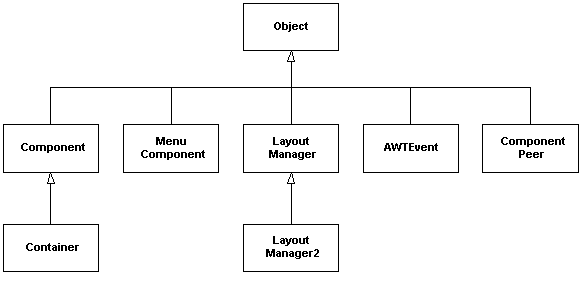
We�ve spent a long time looking at components, containers and events. We�ve seen that there are also interfaces for various kinds of listeners (and that, for convenience, these listeners have adapter classes with empty implementations). We�ve mentioned peer components, and said that they are not important to beginners.
That leaves menus and layouts to discuss.
Menus
For historical reasons (not necessarily good ones), menus don�t fit into the AWT framework alongside other components and containers.
A Frame can have a menu bar (an object of class MenuBar). This can contain a number of menus (objects of class Menu). Each menu can contain a number of menu items (each an object of class MenuItem).
As an example of using all three classes, here�s the code to declare and construct a menu bar containing a single menu labelled "File" containing a single menu item labelled "Close".
	//Declare and construct the three objects
	java.awt.MenuBar mainMenuBar = new java.awt.MenuBar();
	java.awt.Menu fileMenu = new java.awt.Menu("File");
	java.awt.MenuItem miClose = new java.awt.MenuItem("Close");

	//Now connect them up (by adding menu components to menu containers)
	fileMenu.add(miClose);
	mainMenuBar.add(fileMenu);
Menu items generate action events when they are selected, and the handlers for such events will implement the ActionListener interface. A special listener class for the "Close" menu item would have the following form:
	class MyActionListener implements java.awt.event.ActionListener {

		public void actionPerformed(java.awt.event.ActionEvent event)
		{
			Object object = event.getSource();
			if (object == miClose) {
				//Here�s where you write the application-specific
				//code to do whatever is meant by "Close" in your
				//program.
			}
		}
	}
Inner classes
Because you�ll have to write a lot of classes as small as the one in the previous section, Java lets you write a class within a class. The class MyActionListener can be declared within the class MyFrame, for instance. This has several consequences, some good, some not so good:
Layouts
If you are writing programs that will run on different platforms (and that automatically includes applets to be delivered over the web), you�ll want to avoid being too specific about how components are arranged within containers, since platforms differ in such critical areas as screen sizes and resolutions. Java provides a number of layouts that you can call upon. The principle is that the layout will look as good as possible on each platform, even if it does not look exactly the same on each platform.
The counter program that this tutorial supports does not use layouts (and has been tested on MSWindows platforms only).
My favourite Java book is this one.
Peter van der Linden
Just Java 1.1 and beyond (3rd edition)
The Sunsoft Press, 1998
ISBN 0-13-629155-4
I expect a new edition describing changes to the windowing stuff (Sun are working on a set of classes called the Swing library that will augment or even replace the current AWT).
If you are a serious object-oriented programmer, you�ll need ready access to several books on design patterns, beginnning with this one, mentioned several times in the text.
Erich Gamma, Richard Helm, Ralph Johnson and John Vlissides
Design Patterns. Elements of reusable object-oriented software
Addison-Wesley, 1995
ISBN 0-201-63361-2
This document describes the design of the JCounter program. The source code of this program is embedded within this document. It can be extracted using a tool, itself a Java program.
Here is the source code for the extract tool. You can copy and paste the source into a separate file and
Please remember that this is only a simple "proof of concept" version of the extract tool and is not intended for serious software development. For example, it often gets confused if there is text after the last source file in your Word document, and generates error messages that are entirely spurious.
I�m looking for a project student to build a decent version (it would give the user lots of freedom to describe a program in pieces, not necessarily in the order the compiler needs them, and wouldn�t get confused so easily as my prototype). Interested?
/********************************************************************/
import java.awt.*;
import java.io.*;

public class ExtractFromDoc extends Frame {

	public static void main( String args[] ) {
		new ExtractFromDoc();
	}

	private static final char TAB = '\t';
	private boolean traceOn = false;
	private String theInputFilename;
	private String theInputFileDirectory;
	private DataInputStream theInputFile;
	private String theCurrentOutputFilename;
	private String theCurrentOutputPathname;
	private PrintStream theCurrentOutputFile;
	private final String begin = "begin";
	private final String end = "end";

	public ExtractFromDoc() {
		getTheInputFilename();
		if (theInputFilename != null) {
			try { openTheInputFile(); }
			catch( IOException e) {
				System.out.println("Cannot open the input file " +
							theInputFileDirectory + theInputFilename);}
			try { copy(); }
			catch( IOException e) {System.out.println("Cannot copy lines");}
		}
		closeDown();
	}

	private void getTheInputFilename() {
		FileDialog d = new FileDialog(this, "Select LP source file", FileDialog.LOAD);
		d.setFile( "*.*" );
		d.show();
		theInputFilename = d.getFile();
		theInputFileDirectory = d.getDirectory();
		if (traceOn) System.out.println(theInputFileDirectory + theInputFilename);
	}

	private void openTheInputFile() throws IOException {
		theInputFile = new DataInputStream( new FileInputStream(
						theInputFileDirectory + theInputFilename ) );
		if (theInputFile != null) {
			System.out.println();
			System.out.println("READING: " + theInputFileDirectory + theInputFilename);
			System.out.println();
		}
	}

	private void copy() throws IOException {
			// from input file to output file
		String line;
		int lineCountForThisFile;
		int lineCountAcrossAllFiles;

		lineCountForThisFile = 0;
		lineCountAcrossAllFiles = 0;
		line = theInputFile.readLine();
		while (line != null) {
			if (line.length()>=2 && line.charAt(0) == '=' && line.charAt(1) == TAB) {
				stripAndCopyToOutput( line );
				lineCountForThisFile ++;
			}

			if (line.length() > begin.length() + 1 &&
					line.substring(0,6).compareTo( "=begin" ) == 0 )
				openNewOutputFile( line );

			if (line.length()>end.length() + 1 &&
					line.substring(0,4).compareTo( "=end" ) == 0 ) {
				closeOutputFile();
				System.out.println( " (" + lineCountForThisFile + " lines)" );
				lineCountAcrossAllFiles += lineCountForThisFile;
				lineCountForThisFile = 0;
			}

			line = theInputFile.readLine();
		}
		System.out.println();
		System.out.println( "Total number of lines written = " +
							lineCountAcrossAllFiles );
	}

	private void stripAndCopyToOutput( String line ) {
		String outLine = line.substring( 2, line.length() );
		if (theCurrentOutputFile != null)
			theCurrentOutputFile.println( outLine );
	}

	private void openNewOutputFile( String line ) throws IOException {
		theCurrentOutputFilename = line.substring( 2+begin.length(), line.length() );
		theCurrentOutputPathname = theInputFileDirectory +
						"temp\\" + theCurrentOutputFilename;
		try { theCurrentOutputFile =
			new PrintStream( new FileOutputStream( theCurrentOutputPathname ) );
		} catch( IOException e ) {
			System.out.println( "Cannot open output file " + theCurrentOutputPathname );
			System.out.println( "Check that there is a subdirectory called temp, and" );
			System.out.println( "that your source file contains no unwanted lines" );
			System.out.println( "beginning with =" + begin + ".");
			System.out.println( );
			throw e;
		}
		if (theCurrentOutputFile != null) {
			//theCurrentOutputFile.println( "// " + theCurrentOutputFilename );
			//theCurrentOutputFile.println();
			System.out.print("WRITING: " + theCurrentOutputFilename);
		} else {
			//one day I'll put something useful here
		}
	}

	private void closeInputFile() throws IOException{
		if (theInputFile != null)
			theInputFile.close();
	}

	private void closeOutputFile() throws IOException{
		if (theCurrentOutputFile != null)
			theCurrentOutputFile.close();
	}

	private void closeDown(){
	    System.out.println();
	    System.out.println("Press return to exit ...");
	    try {System.in.read();} catch (IOException e) {}
		System.exit( 0 );
	}

	public boolean handleEvent( Event e ) {
		if (e.id == Event.WINDOW_DESTROY) System.exit( 0 );
		return super.handleEvent( e );
	}
}
/********************************************************************/