MOTOROLA
C650 plg bersesuaian utk pelajar 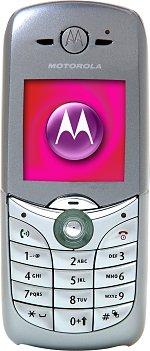
Introduction / Preview The new C650 is music to your ears: a sleek Tri Band phone bundled with MP3 ringtones, integrated VGA camera, large 65k color display, brilliant personalised lighting and packed with the latest & greatest messaging & download features like MPEG4 video playback… it’s an all-round sensory experience! Features - Integrated 4x zoom VGA Camera - Preloaded & Downloadable Games & Applications (J2ME™) - Large, vibrant color display - Multimedia messaging (MMS) - Instant Messaging with presence (Wireless Village) - MP3 & Polyphonic (24 channels) Ringtones - MotoMixer remixable ringtones - MPEG4 video playback - Fun Lighting - Tri-band - Integrated speakerphone - Elegant, compact design w/multiple colors available - 1.7 MB user memory - Picture caller ID - Downloadable Themes, Wallpaper, Screensavers, Ringtones
3G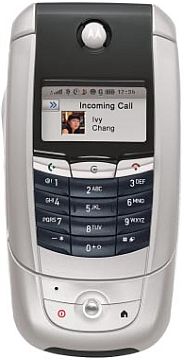
I got the A780, and have been playing with it for the last few days. This phone is incredible. My only experience with smartphones has been the Kyocera 7135 and Treo 600. I have lots of experience with regular cell phones and Palm Pilots, but not Pocket PC. That being said, this is easily the best implementation of PDA/phone that I've used. I'll give any prospective buyers a mini-review/commentary, and some of the strong/weak points as I've evidenced. The phone is beautiful. Although not as well-built as a RAZR phone, it is tremendous. Fits in the same Eva "pouch" I used to keep my V600 in, although it sticks out the top a bit. Old Moto chargers will not work with the A780 because of the tip. It comes with a desk charger or you can charge via the USB cable to your computer. Additionally if you want a cigarette lighter adapter, I think you can buy the one for the RAZR phone - they utilize the same tip (not sure). Call volume is great via either earpiece (flip open or closed) or via bluetooth headset (I use Moto HS820 and Jabra 250 and both work well). MP3 ringers (supplied by me) are harder to hear than the A780-supplied MIDI ringers. There doesn't appear to be any vibrate-and-ring at the same time functionality - either "vibrate and soft ring" or "vibrate and loud ring". Also the speakerphone is very hard to hear if there is noise around you. There are battery-indicator issues with my phone - the home screen randomly will show a decrease in battery (from 100% to 0% during a call) for no apparent reason, but if I click on the green "phone status" bar and go to it's properties, the battery may still show fully charged. Oh well. I used the phone yesterday for 16 hours with medium phone and EDGE usage and BT enabled, and the phone did not die - all the while the home screen indicator showing 0% battery left. My recommendation is to carry two batteries, even though they seem to be lasting rather well. I had to charge my V600 every day, and so far this seems to be no different. It uses the same batts as the V600 (part# SYN5683). The included email app is wonderful. You can accept attachments up to 1MB in size, and if they are supported (PDF, DOC, PPT, XLS, etc.), will open via the included viewer. This works well. The Opera browser works well with most WAP sites (it's very fast), but I am having difficulty with Cingular's WAP deck - not sure if this is a "certificate" issue or not. Am working on it. I added on the Reqwireless WebViewer browser, and it is good too, but it is not opening any https:// websites. So I'm having a few browser issues, but I'm sure they are workable. I connected the A780 to my laptop via USB and BT (using Mobile Phone Tools, make sure you have the latest version), no problems. Via Cingular's EDGE service, am getting an average of 115 kilobits per second - about double of a regular landline modem. It tested as low as 95 kb/sec. and as high as 160 kb/sec. I synchronized with Outlook and no problems there either. A780 does a great job with "recurring" appointments - something that Moto phones has had a problem with in the past. There is an issue with available apps for this phone. I have used some Vxxx java apps with success. Some install and work well, and allow you to use the touch screen for input. The ones that don't let you use the touch screen for input are useless, because while using the touch screen for an application, there is no keypad. You can simply move your backed up .jad and .jar files to the phone (via USB or BT) and install them from the phone, either to the phone or the transflash card. After installation it will delete the .jad file. There is a Task Manager on the phone so if any app gets "hung up" just go to the task manager and "end" task. Most of the "games" are not working, but most of the "apps" (like Travel Buddy and Merriam Webster's dictionary) work perfectly. If you keep your contacts on the phone, you can store multiple phone numbers, email address, etc. per entry - a big problem for Moto phones utilizing Moto software. If you keep your contacts on the SIM, you cannot do this (stuck with one number per name). If you try and copy contacts from phone to SIM, the phone will ask you which number you want to copy to SIM. When searching for contacts with the flip open, click on find and start entering letters until it finds your contact. When searching for contacts with the flip closed, as soon as you start entering numbers it will bring up potential matching contacts - for example entering "564" on the phone brought up Dave JOHnson and JOHn Jones and Ted KNIght - it matches up the letters on the "564" keys with any contacts with those letters in their name sequentially. Pretty neat! In the case you're not looking for a contact and are just dialing a number, then just continue to dial and press send. Camera is decent - pictures are decent - not the best camera phone. Not the greatest, but they sure are BIG!! Video mode is nice but again, the quality suffers a bit. They have made the camera lens for this phone flush with the back of the phone - no "recessed" lens like with the V600, so if you don't take care of it, it will definitely get scratched. Be careful with laying the A780 on it's back because that is exactly how it will get damaged. That, and trying to put the stylus back in the phone incorrectly. Entering messages with the flip opened can be done via handwriting or a mini-keyboard that pops up on the screen. I use these methods strictly for email and calendar functions. Both work well. The handwriting works remarkably well. There are two places to enter characters, and you can enter a letter in the first place, then enter a letter in the second place, while the A780 is recognizing the first character. Then go back to the first place while the A780 is recognizing the character entered in the second place, and so on. Once you get used to it, it works well and is very fast. With the flip closed, entering SMS is done via good ol' T9 tapping. It works great as well, and is the easier way to text. I have not even mentioned voice command, which works amazing right out of the box. Imagine checking new messages, searching for contacts and dialing via voice command? All works, and works very well, no voice training required. It's a bit hard to hear the voice commands repeated by the A780 (same speakerphone issue mentioned earlier). I'm using it quite a bit while driving, to call people. You can also get a "text-to-speech" readout of messages, but I have not figured out how to do this yet. That's all I can think of right now. If I can get the browser problems fixed, it will be the closest thing to a perfect GSM Quad-Band PDA/phone implementation that I have seen. Only thing missing is Wi-Fi. If anyone has any questions - feel free to ask and I will try to answer. Sorry this was so long and opinionated.
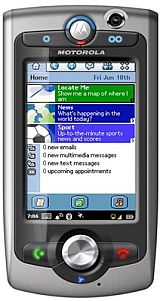
Introduction / Preview A 3G convergence phone that allows you to do almost everything while looking stylish and staying on the cutting edge. With this multi-functional mobile’s voice and data functionality, you can feel confident leaving the office and taking your work on the road. It allows you to review documents and conduct conference calls at the same time and open up a whole new way to communicate and share information with two-way videoconference capabilities. The A1010’s works on 3G technology combined with Tri-band functionality keep you connected globally. A full HTML browser plus high-speed data connections allows you to surf the net. A camcorder and a 2.0 mega-pixel camera with zoom capability is built into the phone. You can conduct a phone call while simultaneously using other wireless services, such as surfing the Internet or accessing corporate data. Bluetooth Wireless Technology keeps it simple with no wires. No matter where you are or how much time you have, the A1010 helps keep you together.
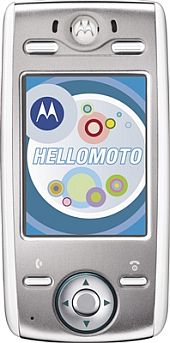
Introduction / Preview The new Motorola E680i has over two gigabytes of music with optional memory. Stereo audio is supported wirelessly with Bluetooth technology to the Motorola HT820 Bluetooth stereo headphones. The E680i also provides easy plug & play desktop synchronization and music transfers between handset and PC. Connect straight into the Music Store to learn about and purchase new music whenever you want. The handset performs across MP3, WMA, RealAudio/Video, MIDI, WAV, AAC and other formats – providing wide-ranging industry compatibility. Complete with a built-in FM radio receiver, video capture/playback capabilities, handwriting recognition and e-mail, the Motorola E680i will be available in the Asia-Pacific region in April 2005.
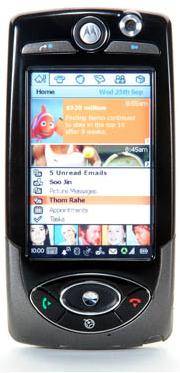
Introduction / Preview Motorola A1000 includes a great many features and options, and it can do a lot more than simple voice calls. Among the numerous features available are video telephone calls, Bluetooth™ connectivity, GPRS and WAP technology, A-GPS location services, video capture download and playback, a Transflash memory card slot, MMS multimedia messaging, video and audio streaming, MP3 and MPEG4 media players, voice memo recorder, speakerphone for hands-free conversations, Java™ and Symbian software operating platforms, a Picsel™ document viewer, voice control, and an e-mail client. There is also an aeroplane mode, which makes it safe to use the phone’s personal organiser or entertainment features during flights. The A1000 has a satisfyingly large TFT active matrix LCD touchscreen display. This screen has a high resolution of 208 x 320 pixels, and it can also display up to 65,536 different colours. The size of the screen makes it a good tool to view your pictures or videos, and it is a 1.2 megapixel device (providing a best resolution of 1280 x 960 pixels), which can also be used with up to 4x digital zoom. Another useful feature of the A1000 is its ability to act as an MP3 player.
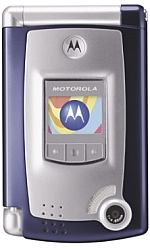
Introduction / Preview The MPx is part of the MOTOPro series of handsets featuring Microsoft Windows Mobile software. The dual-hinge device opens both lengthways as a terrific clamshell phone and in landscape mode as an exceptional email device with a wide screen and full QWERTY keyboard. The model MPx accomplishes this with a familiar, easy-to-navigate interface like the one you’re used to on your Windows office desktop. The Motorola MPx blends a mobile phone, personal data assistant (PDA) and email messenger in one easy-to-use compact device. By opening the device in landscape mode, Internet browsing, streaming video and access to corporate applications are all within easy reach using the Motorola MPx
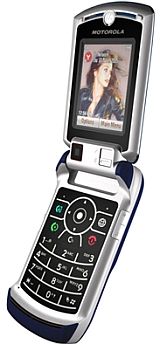
Introduction / Preview Be seen and heard with the Motorola RAZR V3x – the supremely svelte, sophisticated mobile accessory for discerning fashion and tech enthusiasts. The handset’s intuitive multimedia offerings include: real-time 2-way video calling*, still and moving image capture and editing, and large color display. Additionally, the Motorola RAZR V3x features SCREEN3*, an innovative technology solution from Motorola that gives you zero-click access to news, sports, entertainment, and other premium content directly from your mobile device home screen* – no buttons to push, no browsers to launch. Motorola's SCREEN3 puts fresh content at your fingertips. A 2 mega-pixel camera, Bluetooth® wireless technology* and removable memory add to this lengthy feature set. Strutting a sleek, slim design and premium functionality, the Motorola RAZR V3x exudes multimedia perfection. Creative Liberty Two cameras are better than one. Open up a world of mobile visual imagery with a 2 mega-pixel camera to capture still and moving images combined with a VGA camera for 2-way video calling*. Extend your mobile artistry further with editing capabilities, allowing you to manipulate images and then share via Multimedia Messaging Service (MMS) *. Patience Not Required Choose to rely on the Motorola RAZR V3x to streamline your information and make life easier. Enjoy non-stop access to current events, news and celebrity gossip via Motorola’s dynamic idle solution. And, Bluetooth* connectivity furthers convenience by allowing the ability to talk hands-free using compatible Bluetooth* enabled accessories. Get Blown Away With progressive downloading, you can download media files and view them almost instantaneously, or store them and view at your convenience*. Still not impressed? 3D graphics energize your gaming entertainment, making each twist, turn and supersonic blast seem real. And with up to 512 megabytes (MB) of optional removable memory, you can download* and store music, games and videos from dusk till dawn. The Motorola RAZR V3x is expected to be available in Q4 2005. For more information regarding pricing and product availability in your region, please contact your local Motorola representative.
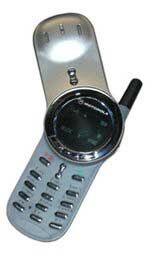
Introduction / Preview The V70 mobile phone is small, sleek and swings open smoothly. Its round-the-clock flip design screen that show "negative image"style character with black backlight. GPRS and WAP enabled Key Features iTAP text input Support SMS and EMS 32 built-in ringtones + 32 self-composed ringtones Organiser functions 3 games