.
What's an Easter Egg ?
Easter Eggs are hidden and funny things, placed in the source of some programs by the developers and programers just to introduce themselves. You should do something to make the Easter egg run. For example pressing some keys together or typing something special. After that a funny scene will appear. And some of them have a little game inside. Usually the developers try this way to introduce themselves to the users. Here we've provided Easter eggs of some famous softwares. All of them have been tested and run correctly. Try them and enjoy !!! 
For a more complete source of Easter Eggs in any field, visit : www.eeggs.com
.
Windows 98 (Very very HOT) 
  1. Right-click on an empty spot on your Desktop.
  2. Select New -> Shortcut.
  3. Browse to the folder C:\Windows\Application Data\Microsoft\Welcome.
  4. Double-click on Weldata.exe to select it as your shortcut's command line.
  5. Click Finish to save your shortcut.
  6. Right-click on your newly created shortcut and select Properties.
  7. Click the Shortcut tab, and after typing a space at the end of Weldata.exe(after the quote), in the Target area add this string (EXACTLY as shown here):
    You_are_a_real_rascal
  8. In the Run area, select Minimized.
  9. Click OK/Apply to save your changes.
  10. (Double)-click your new shortcut to enjoy the show!
.
Internet Explorer 5 
  1. Open up Notepad
  2. Type: "<!-- introducing the Trident team -->" (without the quotes)
  3. Save the file as "test.htm" (yes, it must be saved as an HTM file)
  4. Open up "test.htm" in IE5
  5. That's IE5 Easter Egg 
Internet Explorer 4.xx/5.xx/6.xx 
  1. Open an Internet Explorer window.
  2. Type this command in the URL Address box [command name is case insensitive, but ALL characters after the colon (:) MUST be typed in lower case]: about:mozilla
  3. Click the Go button (ONLY IF you have MS IE 5.xx/6.xx) or press Enter.
  4. An empty blue screen will pop up.
.
Microsoft Outlook 2000 (a game inside)
  1. Type "Ren Hoek" (without the quotes) into the "Find a Contact" box on the toolbar and press Enter. (Outlook will say that it cannot find the requested contact.)
  2. Click on this menu item: Tools->Macro->Macros.
  3. In the "Macro Name:" box, type "OL2KRocks" (without the quotes).
  4. Click the Create button.
  5. The "About Microsoft Outlook" dialog appears.
  6. Hold down the CTRL-ALT-SHIFT keys and click OK.
  7. The Outlook 2000 team credits appear, along with a game. Try to catch the names as they fly across in the mailbox.
.
Microsoft Frontpage 97, 98, 2000
  1. Start FrontPage Explorer.
  2. With FrontPage Explorer application open, hold down the Shift key
  3. Select Help | About
  4. Click OK
  5. With the Shift key still held down, click on Help | About for the second time
  6. Click OK
  7. With the Shift key still held down, click on Help | About for the last time
  8. The credits screen should appear with a song
.
Windows 3D Screen saver
     In the screen saver settings dialog select '3D Text' as your screen saver. Click 'Settings' and change the text to be displayed to 'Volcano'. The screen saver will now display names of different volcanoes.
.
Microsoft Excel 2000 - Part I (a driving game inside)
  1. Run Excel 2000.
  2. Select "Save as Web Page" from the File menu.
  3. Select "Save: Selection: Sheet".
  4. Check the "Add interactivity" box and click Save.
  5. Exit Excel 2000.
  6. Load the saved HTML page in Microsoft Internet Explorer 4/5/6.
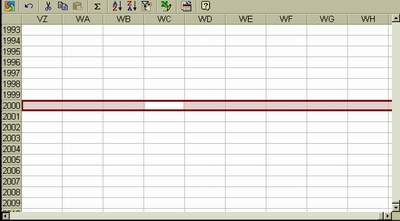
  7. Scroll down to row 2000, column WC.
  8. Select row 2000 (activating the entire line) and then press Tab until WC is selected again.
  9. Hold down Shift + Ctrl + Alt and click the MS Office logo in the upper left corner.
  10. Use the arrow keys to steer, space to fire, O (the letter "ou") to drop oil, and H to turn on the headlights.
  11. Hit Esc to exit the game.

.
Microsoft Excel 2000 - Part II 
  1. In Excel, open a new spreadsheet.
  2. Press F5 (goto function).
  3. Type X2000:L2000 in the reference box. Click OK.
  4. Then press Tab. (You should now be at cell M2000).
  5. Hold Ctrl + Shift down, and while holding them down click the mouse on Chart Wizard. Exit by hitting Escape.
  6. You get the Excel 2000 Credits!
Excel 97 (a game inside)
  1. Run Excel 97 and open a new spreadsheet.
  2. Press F5 (goto command function).
  3. Type X97:L97 in the reference box. Click OK.
  4. Then press Tab. (You should now be at cell M97).
  5. Hold Ctrl + Shift down while left-clicking the Chart Wizard icon on the toolbar.
  6. Now you can fly in the sky, viewing the Excel Credits. Use arrow keys and mouse buttons to play.
.
Microsoft Word 2000
  1. Create a new document.
  2. Click Help -> About.
  3. Hold down CTRL + ALT + SHIFT.
  4. Click the bottom line.
  5. It will display the splash screen normally shown when Word 2000 is first opened."
.
Microsoft PowerPoint 95/97/2000
For those who have PowerPoint 95, 97 or 2000, when you go to Help then About Microsoft PowerPoint, click on the PowerPoint logo and a little fireworks display will appear with a list of programmers
.
Coreldraw! 6.0
  1.  Select 'About' from the help menu.
  2.  Double click either of the icons in the dialog box.
  3.  A blimp (instead of a balloon in earlier versions) will appear, with scrolling credits. Press the right mouse button to set off fireworks, and ESC to exit.

Top of the page


Copyright © 2001-2002 , @Sign Company, All rights reserved.

Send your comments about this page to the Webmaster

Collected, Designed and published by Ramtin Raji


Hosted by www.Geocities.ws

1