|
I
got a note from JR about why a graphic created at
FlamingText couldn't be imported to his Homestead
site. The error message was that it wasn't a supported
file type. I knew right away what the problem was.
I
had the same problem when I first went to CoolText and
created a graphic there. Here's what happens, how to
correct it now without having to re-do the graphic, and what to do for the future to
prevent the same problem.
After
you create the graphic in either FlamingText or
CoolText and right-click to save your graphic, a
dialog box pops up as shown in Figure 1 on the
right.
Chances
are you write over the whole line and assume that the
extension shown in the "Save as Type" box will carry over to
the saved file. Actually, it doesn't.
If
you go into your hard drive after saving the file,
you'll notice that the graphic extension is not there.
Your graphic file appears as a generic file rather
than as a .gif or .jpg. To make the correction now,
highlight the file and then right-click. Scroll down
to Rename. Now you can correct the file using the
correct extension. With the corrected extension, your
graphic can be uploaded to your Homestead account and
will not generate the error message as before.
In
the future when you use the graphics-generating
program at either FlamingText or CoolText, just
remember to add the .gif or .jpg after the name of the
graphic, depending how its extension is named by the
generator. Then click Save.
|
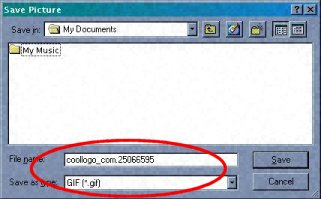
Figure 1
You'll
notice that it shows a file name assigned by
the graphics program, GIMP. Below that is the
file extension that should be assigned in the
"Save as type" box.
You
can either save it by the assigned filename or
change it to something more meaningful to you.
For example, if your site is called "My
Homepage," you could name the logo
graphic as "hplogo.gif" instead of
"coologo_com25066595."
|
