The Software Monitor for your Development Needs
Background:
Blue screens of death, crashes, hangs and
abnormal program behavior. This is what the developer has to content with.
Hopefully, if the developer does his job right, the customer purchasing the
software will not have to put up with buggy software. Should a customer
encounter a bug, we should not expect the customer to have a knowledgeable
understanding of the software problem, or it's cause.
A scenario might have a customer calling support about a problem with their application. The support personal asks, "how can I help you?" The customer replies with an unqualified, "I don't know what's wrong with my computer. But, when I click on the Play button the program crashes."
So the assistance asks a list of questions to help resolve the matter:
Making it easier:
Automating some of the steps in
diagnosing the software would result in saving time and money. It would also be
very beneficial to the developer to have more information to work with when
isolating and fixing a problem. For the Q/A, the diagnostic report takes the
guess work out of determining which code module caused the error. This saves
time in assigning the issue to the correct developer.
For example, the picture below shows you the possible ways the "Play" operation can fail. Without the Diagnostic Server, a developer can expect to spend a long time in locating the cause of the problem.
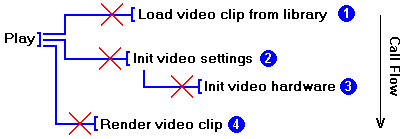
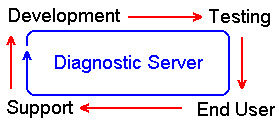
The Diagnostic Server makes it clear to the developer where the problem occurred, and is most cases what the problem is. When it comes to software maintenance, the Diagnostic Server supports the software lifecycle. Throughout each stage of the project, the Diagnostic Server is there to support the developer.
Helping the Developer
If you're a developer who's just
declared war on software bugs! Then, the Diagnostic Server is your best
ally in the combat against software defects. It's a good way to improve the
quality of your software development process. With this tool, your application
can log trace messages and report errors. It aids the developer to: monitor
multiple processes, track memory access, detects memory leaks, help monitor
multi-threaded application and determine thread deadlocks. Also, it reports
exceptions caused by null pointer access or divide by zero, for example.
Furthermore, the developer can choose to do remote debugging by having the
Diagnostic Server run on one PC and the application run on a different PC.
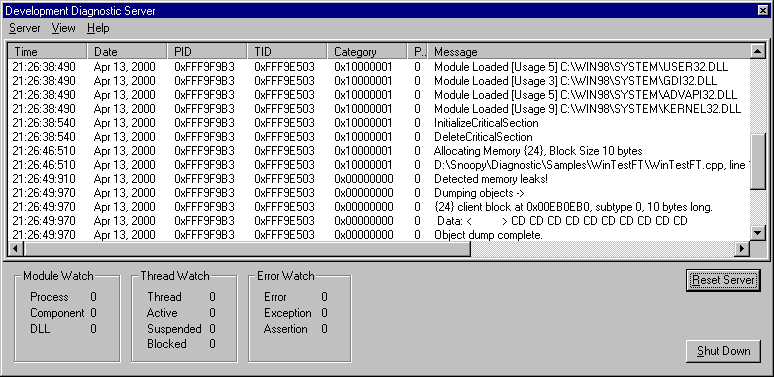
The Diagnostic Server work's with both debug and release builds. It's in the debug builds where the developer gets the most power. There is still much support in the release build, such as thread monitoring, deadlock detection and OS exception reporting.
The
Diagnostic Report:
A list of, some of the things the diagnostic
report will provide:
Each diagnostic message will contain the following information for the developer to work with:
What's Next?
I am currently working on developing a
separate module that will provide real-time debugging support. This will allow
the developer to set break points, observer the stack, etc.
mailto:[email protected]
Contact persons for the Diagnostic Server
Last Updated: April 14, 2000