


RLE Compression:
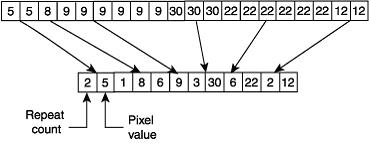
Run Length Encoding (RLE) technique was developed on an idea that “Pixel values can be compressed depending on identical pixel values”. For example say we have five black pixels to be stored at a stretch, in general methods they are stored like this in the memory:
0XFFFF 0XFFFF 0XFFFF 0XFFFF 0XFFFF
According to the algorithm they can be stored as:
-9 0XFFFF
[head byte] [element byte]
Where 0XFFFF is the value of black color, and -9 is the head byte which says how many times the following byte should be imitated. If it was not for RLE compression it would have taken 5 bytes instead of 2 bytes to store the same value. Usually there are around 200 to 300 bytes at a stretch having the same color, especially in grayscale images.
Now say there are 5 colors different from each other at a stretch, then it can be written as:
+5 0xf234 0x433 0x135 0x2132 0x483F
Where 5 is the number of bytes following, and the rest are the various colors.
If you have observed, for bytes having same values, the head byte is coded with a -ve sign. Where as, for bytes which consist of different colors, the head byte will be +ve. According to the RLE rule for similar bytes following (which is just one byte following the head byte), there can be a maximum of 127 bytes. So the head byte value varies between -1 and -127. For the bytes with different colors the head value varies between 0 and 127.
Well this algorithm fails when there is very high rate of change in colors, which results in images size greater than the original.
In Dicom, If an image is RLE compressed, it can be identified from the dicom header. For RLE compressed images, the Header should be having a transfer syntax of "1.2.840.10008.1.2.5".
Here is a small piece of code to decompress the RLE compressed image:
int head = 0;
k = 0;
for (int j = 0; j < compressedImageBuf.length; j++) {
head = compressedBuf[j];
if (head >= 0 && head <= 127) {
for (int p = 0; p <= head; p++) {
j++;
byteOrigPixels[k] = (byte) (compressedBuf[j] & 0xff);
k++; } }
else if (head <= -1 && head >= -127) {
j++;
for (int p = 0; p <= -head; p++) {
if (j < compressedImageBuf.length) {
byteOrigPixels[k] = (byte) (compressedBuf[j] & 0xff);
k++; } } } }
Well this is only the main part of the code. I've not included codes of reading the compressed image buffer array. I guess its simple. Do let me know if you want to know that also.
JPEG Compression:
Jpeg Compression is one of the most complex compression technique. No matter where you begin from, I'll end up filling a book to explain what it means. So I shall not be going into meaning of each and every step. Here are is a short idea of what happens in the JPEG encoding: For Decoding it is the reverse order again.
Major Steps included:
- DCT (Discrete Cosine Transformation)
- Quantization
- Zigzag Scan
- DPCM on DC component
- RLE on AC Components
- Entropy Coding
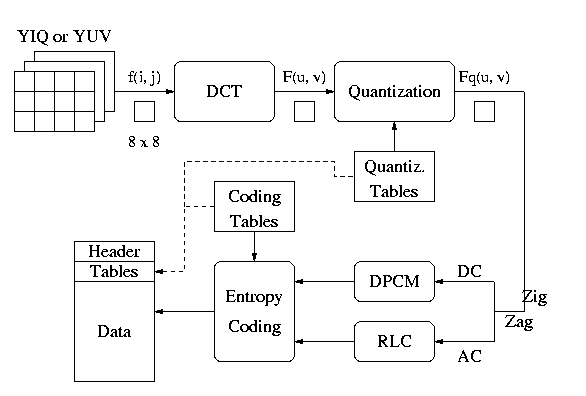
Please click to get a better idea about JPEG.
In Dicom, If an image is JPEG compressed, it can be identified from the dicom header. For JPEG LOSSY compressed images, the Header should be having a transfer syntax of "1.2.840.10008.1.2.4.50". For JPEG-LOSSLES the header should be having a transfer syntax of "1.2.840.10008.1.2.4.70".
An example of how to decode a JPEG image if you have its pixels in an array is as follows: ( the example is coded using JAVA):
ByteArrayInputStream bais = new ByteArrayInputStream(compressed);
 // compressed is the array that contains pixels.
JPEGImageDecoder decoder = JPEGCodec.createJPEGDecoder(bais);
if(lossy){
ImageFactory.bufImage = decoder.decodeAsBufferedImage(); }
if(lossless){//lossless is a Boolean value that you have to decide
ByteArraySeekableStream seekIs = new ByteArraySeekableStream(compressed);
ImageReader r = (ImageReader) ImageIO.getImageReadersByFormatName( "jpeg-lossless").next();
ParameterBlock pb = new ParameterBlock();
pb.add(seekIs); pb.add(new Integer(0)); pb.add(Boolean.FALSE); pb.add(Boolean.FALSE);
 pb.add(Boolean.FALSE); pb.add(null); pb.add(null); pb.add(null); pb.add(r);
RenderedOp jpgOp = JAI.create("ImageRead", pb);
bufImage = jpgOp.getAsBufferedImage(); }
Here, we use the libraries provided by java, rather than implementing the whole JPEG process again. But still if you want to have a look at the code of how a JPEG image is encoded hereit is.
This is all about compression. More in the future.