PS4School
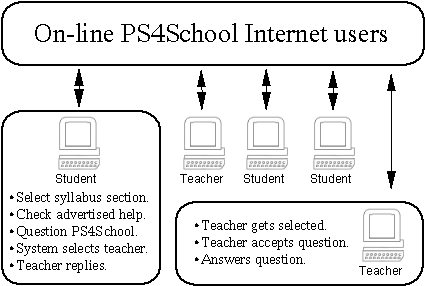
generic architecture
|
|
In every learning situation, almost all students, at some time or another, come to the point where extra help is required to overcome a specific obstacle. Usually, since the learning session is delivered by a teacher physically present amongst his students, the problem can be easily tackled by further explanation, during or immediately after the session.
Due to the considerable number of students per class, and the subject matter teachers are expected to deliver, teachers in typical school environments are not usually able to support each and every student with all his or her difficulties. Furthermore, students who require a lengthy explanation usually find that the teacher does not have sufficient time available for individual attention. Worse still, if the student is too shy to ask his humble question, the effectiveness of quality learning and quality teaching will be completely lost. Nowadays, with the introduction of a wide range of learning methodologies, including distance learning, and video streaming over the Internet, the learning student must somehow be in a position to interact with the teacher to get the required support.
Taking the above into consideration, in our project we attempted to create an Internet based student support system, where the learning student is not only able to retrieve the already available help but also ask teachers in a discreet and user-friendly environment. Therefore, without going into too much details, the aim of this project is to implement a system where:
Students and teachers are able to interact with each other.
Interactions may involve different types of communication methods.
All sessions are recorded and automatically stored to a predefined curriculum hierarchy.
Searching for previous sessions is performed by going through the curriculum structure.
A peer to peer network model is used.
Such a system has many advantages. For the teacher it provides a great relief from repeating the same set of answers to the same set of questions. For the students, it offers great advantages too, since once a help session is created, the help session is instantly available to all the other students. Also, with an increasing number of stored questions and answers the teacher's load will be always decreasing. Finally, since the system is not centralised, there is no single point of failure since all the users are connected together using an ad-hoc P2P network model.
This section discusses some of the work that has been developed on computer-mediated peer support. It mentions two of the projects that have already been implemented in the field. It will also give a very brief outline of the JXTA library which was used to connect students and teachers over the Internet.
The Peer Help System provides a facility for locating somewhere on the network a peer helper who is ready, willing, and able to provide help to a particular request. All help is provided just-in-time and always in the context of a particular area. The system makes use of a central server who is responsible for retrieving all the necessary information about each connected peer. When a peer requires some help, PHelpS is able to provide four different types of help:
A very brief, hard coded hint, such as the Tool Tips.
Hard coded links to available manuals.
Dynamic selection of previous relevant help cases between peers.
Another human peer is contacted and asked for help.
When a peer requires some direct peer to peer help, the system attempts to create a ranked list of potential peer helpers to assist with their current task. By referring to a repository of helper models a constraint algorithm generates the list of candidate peers. Still the peer requiring help must still select the helping peer himself from amongst the generated list of candidates.
Whenever a peer using PHelpS initiates a dialogue, the interaction information is recorded and then used again as fodder for the help cases module. Since the PHelpS provides peer contact information other than the standard PHelpS contacts, peers are also able to communicate via other means, such as E-Mail and telephone, hence 'losing' the precious interaction information. PHelpS has already been deployed and used on a limited basis.
P2P is a technology which enables sharing of resources between the peers' individual computers. Therefore, for any two peers to share data, they are able to connect and share data with each other directly. Hence there is no extra need for a central server to serve the peers, as implemented by the client-server network model. A P2P network is able to create a shared resource environment or better still a distributed computing environment. Finally, and most relevant to our project, P2P enables us to easily create a shared space which enables people to share resources and collaborate over space and time.
The EduCommons Project is another advanced attempt to facilitate distributed digital learning amongst students, over P2P networks. David Wiley, who is directing the EduCommons Project, compares the Napster P2P methodology with the learning P2P developing framework. He reasons out that students using Napster usually have a collection of music to share and they preferably want to access more. In the same way, all students have a collection of papers, assignments, term papers and lecture notes, and preferably they want access to more assignments and term papers. The same is true in every learning environment. Some interesting points about this project, are the following:
All resources include some extra meta-data describing the resource.
A P2P network model is used, but a central Discovery Server is included.
Resources are indexed automatically and targeted at only a particular learning situation.
All stored resources in the EduCommons project are stored together with meta-data extracted intelligently from the resource itself or by it's surrounding environment.
Current P2P applications tend to use proprietary and incompatible protocols, thus reducing the advantage offered by gathering devices into communicating with each other over P2P networks. Realising this need for a common P2P language, Sun Microsystems, formed Project JXTA to design a solution to serve all P2P applications. JXTA as such defines only a set of protocol specifications, which can then be implemented in any programming language. In this way, any entity who wants to produce a new P2P application is spared the difficulty of properly designing its own protocols to handle the core functions of P2P communication.
The JXTA protocols specification defines the basic building blocks and protocols of P2P networking:
Peer Discovery Protocol - enables peers to discover other peers and services available for a specific peer group.
Peer Resolver Protocol - allows peers to run services and handlers to accept remote peer requests.
Peer Information Protocol - provides remote peers with status information about that peer.
Peer Membership Protocol - allows a peer to join another peer group.
Pipe Binding Protocol – allows binding of a virtual communication channel between two peers.
Endpoint Routing Protocol - enable message routing from a source peer to a destination peer.
All JXTA protocols are language independent, defining a set of XML messages to co-ordinate some aspect of P2P networking. In our project we make use of four protocols, which are the Peer Discovery, Peer Resolver, Peer Membership and the Pipe Binding protocol.
The project that we addressed is that of creating a working solution for realising peer to peer support sessions between teachers and students. The approach for this project was based on the following five facts.
A demand for individual support exists in almost every learning environment.
Unstructured computer-mediated support already exists through a number of medium, including Chatting, E-Mail and Frequently Asked Questions (FAQ) on Web sites.
For data compatibility between different systems, Extensible Markup Language (XML) documents should be used.
Systems which depend on a very large number of resources created by different entities should be built using a P2P networking solution.
JXTA Protocols, although still in their infancy promise to become a standard for all P2P networking solutions and applications.
Since the final system will be used by non-technical people, the solution was made easy to use and understand. This was achieved by providing a suitable Graphical User Interface (GUI). Furthermore, the system's peer-to-peer interaction types allows developers to plug-in their new media types via an appropriate Application Programming Interface (API). Finally, although the final solution is able to provide the required support, the solution itself can be used as a framework for further development.
The system's principal target, is to be able to provide different types of interactions between students and teachers over the Internet. Furthermore the system must be able to reuse all the past help sessions to help out future students with their similar difficulties. Therefore, apart from enabling the creation of new help sessions, the system must also be able to represent a number of previously created help sessions relevant to the current student's difficulty. Using this methodology the student posing the difficulty will always have two options; either to search for and use a previously created help session or else create a new one by asking directly an available on-line teacher.
Prior to any searching of previous help sessions or questioning an on-line teacher, the student is required to identify the most relevant section of the syllabus to which his difficulty seems most related. The system supports a hierarchical tree structured syllabus which should preferably match the real syllabus structure used by the teacher at school. By referring to a particular grade, subject, topic and section the student can address his question to the group of teachers who are known to be able to help students with difficulties regarding that section. Besides finding the optimum group of teachers who are ready to help out on that section, through this categorisation process, the student together with a confirmation from the teacher, will automatically sort out the help sessions into different topics and sections in the syllabus. Therefore, when a future student requires help on that same section, he will be able to retrieve almost all of the previously created help sessions relevant to his difficulty. In this way, as the system's help content matures, it will require less student to teacher help sessions.
Before asking a new question to a teacher, the student is urged to reuse a previously created help session. As we have already implied in the above paragraph, all students must select the most relevant section for their difficulty. Therefore, prior to any searching of available on-line teachers, the user is urged to search for already available help sessions regarding that section. Through a simple section selection together with a single button click, the system searches the whole network of users for any advertisements of help sessions available for that section. Instead of transferring all the session data immediately, the sessions are advertised; therefore only the names and some other data is actually transferred back to the user. Afterward, if the user is interested in any of those advertised help sessions, the user is able to download them to his computer and view them with the appropriate viewer application.
At some time or another, the already available help content will not satisfy the student's difficulty needs. Therefore, the system provides a mechanism where students and teachers are able to interact together via the Internet, thus creating new help content for future students. After selecting the most suitable section regarding the difficulty, the student inputs the first question which will start the conversation with the teacher. The student selects also the required media type, which represents the type of interaction which is to take place. Such media types include Question and Answer, Chat and a shared White board. Once the question is posed and the media type is selected, the system searches through almost all of the connected on-line teachers to find the best group of teachers who are known to be able to help students on that particular section. Through a set of load balancing statistics sent back by all the contacted helping teachers, the user's system applies a load balancing policy and recontacts to a very limited set of teachers with the least load. These teachers are then prompted with the first question of the user's difficulty together with the user's selected media type. The first teacher who accepts the question is granted the student's question. Once both teacher and student are connected, the interaction session is initiated using the particular student selected media type. Through this anonymous interaction, the student can further ask his difficulty and the teacher is able to reply back. Most importantly, the content of the interaction is automatically saved and advertised on both users for later use.
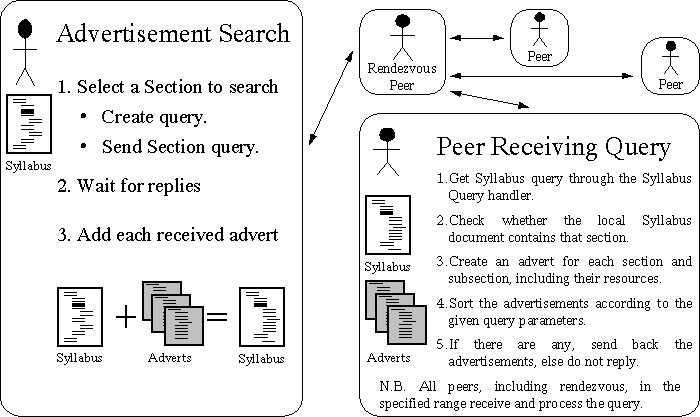
When a user requires help, the user selects the most syllabus related section and then invokes a command to search for adverts regarding that section. Upon invocation, the system issues a search amongst all the remote users for adverts about that selected section. The following diagram gives a brief description of how the searching peer ends up in receiving a number of adverts from the remote users.
|
|
Through the above shown methodology, the searching peer is guaranteed to receive back all the resources and sub-sections of a particular section before going through the next step of asking a teacher. Section and resource adverts as such are not useful since they do not provide any real help to the difficulties of the user. Still, they help the user to identify the correct section for which he should retrieve advertisements or ask a question. Once the user has searched for a particular section, he may invoke a mechanism to download a particular resource identified by its advertisement or else create a new help session with a teacher under the selected section.
The most important functionality of the whole system is the interaction mechanism between two users, between a student and a teacher. Apart from creating new help sessions, which are then stored for later use, the mechanism for connecting two peers is also used when one of the peers requests the other to download a remotely available resource. In the following paragraphs we will give a description of how this interaction between two peers over a P2P network is made possible.
Similarly to the resource advertisement discovery scheme, the user must first select the section about which he is to ask the question. This enhances the system's maintenance since all new help sessions are automatically created in the most suitable section. Once the user selects the most appropriate section and invokes the Ask mechanism, the system prepares itself for a new interaction session.
Connecting and Load Balancing
The first interaction between the on-line remote peers and the local user enables the searching peer's system to compare the different peers availability. The following information is requested and compared; Peer availability,Verification of section help, Current peer status and load and credential verification and validation. The same request is sent over to all the known helping peers of that section. When the system completes the first contact process, the system waits until either a number of remote peers have confirmed the request or a timeout for receiving peers occurs. Once the system decides to continue with its process, any further replies are ignored. Using the load balancing policy, where the least loaded user is the most preferred peer, the system sorts out all the peers according to their load. At this time, the system is ready to contact a very limited set of remote users for the second time.
|
|
The second contact is required to prompt the remote user with the local user's first question and preferred media type. The first user to confirm the question will be given the right to answer the local user's question. When a single remote peer, referred to as the server peer is selected, the asking peer, better referred to as the client peer, starts a new process. This new process on the client side creates two new communication channels, called pipes, and sends the pipes' advertisements together with some other shared information over to the server peer. After the two pipes are connected to each other, the two processes, running in parallel on different hosts, create the new media type instance.
Whilst all media types may have different types of interfaces and control, all media instances use exactly the same number of methods and references to communicate effectively both with the local system and more importantly with the remote peer media instance.
|
|
The system considers various types of security, ranging from secure transits of data over the network to peer access rights. Although the proposed system included several types of security measures, due to the lack of time, we developed only the basic framework to implement them. Hence, even though the system does not implement any real security policy, these measures can be easily implemented and added to the system because all the necessary framework has been completed.
File Encryption and Certification Framework - Through a simple loading and saving framework, one can easily apply a file or data encryption mechanism to encrypt and decrypt all files accessed and saved on the peer's disk.
Data Transfer Security - All information transferred from one peer to another via a JXTA unicast secure pipe is guaranteed to be safe.
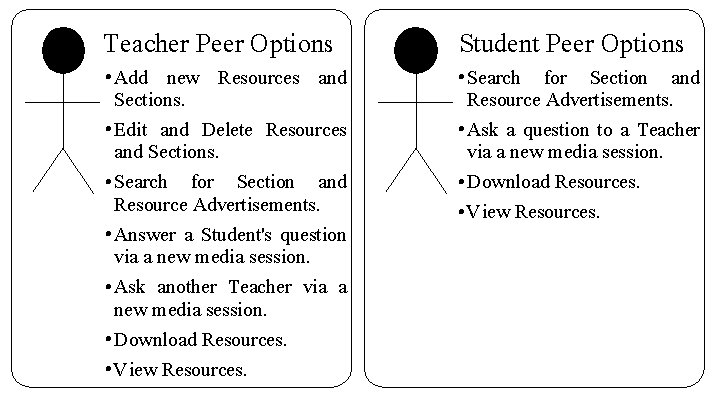
Peer Rights - The Rights document defines all the access rights of the current peer. Since the system's group of users can be divided into three subsets, principally students, teachers and supervisors, we defined a flexible document which defines the rights of each user.
Peer Activity - An XML document which keeps a log of all the activities that the system performs.
JXTA Credentials - Credentials, as defined by JXTA, are very similar to authentication certificates. The reason behind these certificates is to authenticate and verify peers.
Supervisors - The network requires some type of authoritative peers who administer the whole logical network. Although the supervisor peers with absolute rights were not implemented, nevertheless we have built a suitable framework to support the necessary supervising operations.
Although the system as such can be deployed in a real school environment, the system was not built with that sole target. Instead, it was developed to create an almost complete framework for future implementations of support systems. To date, the system completed several major segments of future support systems and these include the XML manipulation library of classes, the Syllabus definition, resource advertisements, peer to peer networking using JXTA, load balancing, operation controllers and more. Apart from the completed segments, the project report explored a number of possible enhancements, including security over peer to peer networks, user rights, certification, management and control of users, plug-in concepts for new media development and deployment, GUI designs and others. In all cases, these enhancements were either catered for by providing a suitable framework or at least discussed in some length in the project report.
Advertisement Distribution - Peers connected to the system's virtual private network are able to share all their sections and resources with all the other peers.
Helpful Peer Search - Currently peers who are able to help out on a particular section are discovered through the normal syllabus advertisements.
Resource Download - Whenever the user requests to download a resource, the system is either already knowledgeable of a number of peers who own that resource or else it issues a section search to discover more peers owning that resource in that section.
Load Balancing - All on-line peers who are able to help us are sorted according to their load, thus balancing the load across the whole network of peers. This solution successfully distributes the number of requests amongst the users.
Interaction Session Media Types - The system provides a number of media types which enable the user to share information through different mediums. All the default and extra media types enable such communication, and, due to the open API used, new types of media can be implemented and plugged into the system.
XML documents - The whole system, starting from the large Syllabus Documents to the smallest packets sent over the network use XML. All data stored in the system has an XML document or node structure.
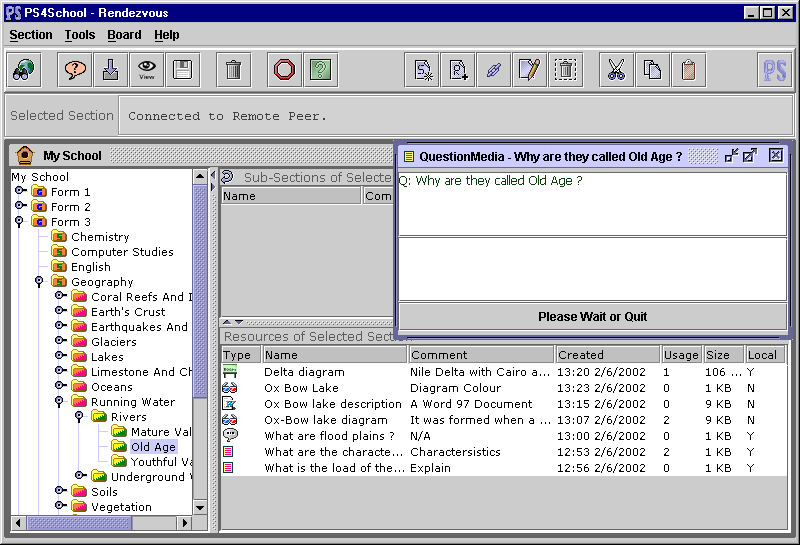
Graphical User Interface - The end-users of the system, being a teacher or a student requires a suitable GUI display which is both user-friendly and easy to use. The current implementation attempts to do so, and most of the users found the GUI helpful and intuitive.
Security - Although this project considered security issues from the first design stages, due to the vast project area, the system currently implements only the necessary framework for security.
JXTA library separation - All direct JXTA related classes and methods can be easily identified and replaced by a similar library which is able to perform the same type of job.
Interestingly enough, following a brief description of our project on the JXTA development discussion group, a Technologist for Sun Microsystems Global Education and Research Group contacted us since the project was very relevant to their current research area where a community of users have access to a set of web services all related to educational matter.
The principle aims set out for this project were met. The system successfully enables students and teachers to interact together in a secure environment and all the information is automatically stored in the most appropriate section for later student use. Through this system students are now able to ask their questions and almost instantaneously get the answer. Furthermore, the system successfully provides all the necessary framework for future support systems development projects.