
|
|
|---|

Assignment #1
1. What is a spreadsheetprogram? How does it differ from a word processing program?
*A program allows user to enter calculation, manipulate and analyzes data such as numbers and text.
A word processing program that allows you to create professional looking documents such as lectures, resumes and reports including being able to revise them easily.
2. What is the difference between a worksheet and a workbook?
*A worksheet is a single sheet whereas a workbook is multiple worksheets represented by tads at the bottom of the excel screen.
3. How do you copy and move cell contents?
*To copy:
a) use the edit command on the menu bar, click (copy) and move the arrow to where the contents are to be copied and click (paste)
b) use the copy and paste icon the standard toolbar.
c) Using the fill hand method-first, move the mouse pointer to the lower right corner of the selected cell. Then, after the mouse pointer changes to a cross-hair symbol, hold down the left mouse button and to copy.
*To move:
a) use the edit command on the menu bar and click (cut) click the destination where the contents are to be move, using the command on the menu bar again, click (paste)
b) Use the cut and paste icon on the standard toolbar.
4. How do you use the fillhandle to copycontents of cells and to create a sequence? What type of sequences can be created using the fill handle?
*The file handle is the small black square located in the lower right corner of the heavy border around the active cell.
a) With the appropriate cell active, point over the fill handle unit the pointer changes into a cross-symbol. Hold the left mouse button.
b) Click and drag the fill handle to select the paste area.
c) Release the mouse button. The cell being copied is called the copy area. The range of cells receiving the copy is called the paste area.
*To create a sequence using fill handle:
Use can automatically fill in several types of series by:
a) selecting cell and dragging the fill handle or
b) By using the series command
- Point to (Fill) on the Edit command on the menu bar.
- Click Series.
Excel is able to create Time, Auto fill and Linear growth series.
5. How do you createcustomheaders and footers?
*The Headers is the text that you want printed at the top of each page in a worksheet. The footer is the information that user wants to print at the bottom of every worksheet. Using the view command on the menu bar can create the custom headers and footers.
a) Click view and choose the header and footer options.
b) In the small window shown, point and click custom header as desire.
c) Another window will be displayed and the user can choose the suitable items from the icons shown to be displayed at the left corner, middle, and the right corner of the page.
6. What is a relative celladdressreference? How do you change a relativereference to an absolutereference? What is a mixedcelladdress reference?
*When a user copy a cell reference is called a relative cell a relative cell address reference. For example, cell A2.
Absolute reference is for keeping a cell reference constant when it copies a formula or function user can change a relative reference to absolute reference by entering a dollar sing before any column letter or row numbers to keep constant in the formulas to copy example $d$5.
Mixed cell address reference is cell reference with only one-dollar sign before either the column or the row. $N2 or N$8.
7. What is the formula bar? What is the name box?
*Formula bar is suitable below the standard and also displayed in it. Excel also displays the active cell reference in box on the left side of the formula bar called the name box.
8. What is the different between erasing the content of a column and deleting the column?
*Erasing the content of the column meant just erasing the cell content, while deleting column, means deleting whole content in the cell including the column and its format such as the style, front and gridlines .
9. How will you freeze a part of the worksheet?
*Freezing a part of worksheet is a useful technique for viewing large worksheet that extend beyond the window.
a) To complete this task, use the freezing panes command on the under the window command the menu bar.
b) Click the cell below the part to be freeze and to freeze.
c) Click the window command on the menu bar. While, a histogram dose not have any gaps between the bars.
10. What is the maximum number of significant digits possible in MS Excel?
*The maximum number of significant digits possible in the ms excel is 15.
11. What is the difference between a bar chart and a histogram?
*A bar chart is a column chart, which provide gaps between the bars, while, a histogram dose not have any gaps between the bars.
12.How will you put the error bars in the x-y plot? Explain using sample data. (hint: See Help facility in Excel)
Putting error bars in the x-y plot is done by selecting the range.
a) Point the arrow to the chart wizard button on the standard and formatting toolbar and click it.
b) In the chart wizard-step 1 of 4- chart Type dialog box, click the next button twice.
c) In the chart wizard- Step of 4 chart option dialog box, choose the data range to be plotted. Then, click next button.
d) In the chart wizard-step 4of , 4 chart location dialog box , click the location for the chart to appear and then point the finish button and click it.
13. Use of Help facilities in Excel:-
You have seen the usage of some simple functions such as log, exp and sin in Excel. Go through the Help facilities in Excel and study several different types of functions. Explain the use of at least one uncommon function with a suitable example
*IMOCOS; it is used to return the cosine of a complex number in (x+y I or x+y J)
Text format syntax: IMCOS (NUMBER) in umber for which you want the cosine.
Example 1-formula description (result)
2-i mos (1+1) cosine of the 1+i(0.988898i)
.
14. Calculation using Formulas:
Select any formula (as complicated as possible) from any one of your textbooks. Use Excel to calculate this formula, by entering the constants and the variables separately. (For example:
i. Gas constant = … units
ii. Temperature = …. units
iii. Pressure = .. units
iv. Voulme = formula)
Formula (P.E=mgh)
m(kg) |
h(m) |
g |
P.E=mgh |
22 |
2 |
10 |
239360 |
24 |
4 |
10 |
960 |
26 |
6 |
10 |
1560 |
27 |
8 |
10 |
2160 |
28 |
10 |
10 |
2800 |
30 |
12 |
10 |
3600 |
34 |
16 |
10 |
5440 |
36 |
18 |
10 |
6480 |
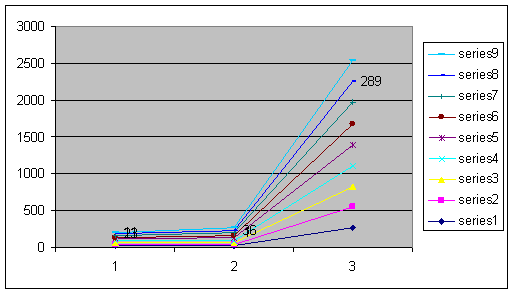
15. Multiplot:-
A |
B |
X |
Y |
11 |
23 |
22 |
275 |
11 |
23 |
24 |
277 |
11 |
23 |
26 |
279 |
11 |
23 |
28 |
281 |
11 |
23 |
30 |
283 |
11 |
23 |
32 |
285 |
11 |
23 |
34 |
287 |
11 |
23 |
36 |
289 |
u11 |
23 |
38 |
291 |
16. Solving Simultaneous Equations:
Write a set of five equations with five variables (eq. p, q, r, s, t and u) and solve them using Excel. Verify your answer by back substitution.
a=25 |
|
|
|
|
b=19 |
|
|
|
|
c=54 |
|
|
|
|
e=33 |
|
|
|
|
equation: |
|
|
|
|
1)2a+b+3c-4d+e=22 |
|
|
|
|
2)a+b-c+5d+2e=254 |
|
|
|
|
3)a-b+c-2d+2e=12 |
|
|
|
|
4)7a+2b- |
|
|
|
|
3c+4d=285 |
c+4d+e=285 |
|
||
5)3a+3b+2c-5d |
c-5d-e=49 |
|
|
|
coefficient matrix(5*5) |
|
|
||
2 |
1 |
3 |
-4 |
|
1 |
1 |
-1 |
5 |
|
1 |
-1 |
1 |
-2 |
|
7 |
2 |
-3 |
4 |
|
3 |
3 |
2 |
-5 |
|
constant vector solution vector |
|
|
||
1 |
22 |
30 |
|
|
2 |
245 |
7 |
|
|
2 |
-12 |
49 |
|
|
1 |
285 |
50 |
|
|
-1 |
-49 |
8 |
|
|
determinant of coefficient matrix |
|
|||
|
334 |
|
|
|
|
a coefficient matrix |
|
|
|
22 |
1 |
3 |
-4 |
1 |
254 |
1 |
-1 |
5 |
2 |
-12 |
-1 |
1 |
-2 |
2 |
285 |
2 |
-3 |
4 |
1 |
-49 |
3 |
2 |
-5 |
-1 |
b coefficient matrix |
|
|
|
|
2 |
22 |
3 |
-4 |
1 |
1 |
254 |
-1 |
5 |
2 |
1 |
-12 |
1 |
-2 |
2 |
7 |
285 |
-3 |
4 |
1 |
3 |
-49 |
2 |
-5 |
-1 |
c coefficient matrix |
|
|
|
|
2 |
1 |
22 |
-4 |
1 |
1 |
1 |
254 |
5 |
2 |
1 |
-1 |
-12 |
-2 |
2 |
7 |
2 |
285 |
4 |
1 |
3 |
3 |
-49 |
-5 |
-1 |
d coefficient matrix |
|
|
|
|
2 |
1 |
3 |
22 |
1 |
1 |
1 |
-1 |
254 |
2 |
1 |
-1 |
1 |
-12 |
2 |
7 |
2 |
-3 |
285 |
1 |
3 |
3 |
2 |
-49 |
-1 |
d coefficient matrix |
|
|
|
|
2 |
1 |
3 |
22 |
1 |
1 |
1 |
-1 |
254 |
2 |
1 |
-1 |
1 |
-12 |
2 |
7 |
2 |
-3 |
285 |
1 |
3 |
3 |
2 |
-49 |
-1 |
coefficient matrix |
|
|
|
|
2 |
1 |
3 |
-4 |
22 |
1 |
1 |
-1 |
5 |
254 |
1 |
-1 |
1 |
-2 |
-12 |
7 |
2 |
-3 |
4 |
285 |
3 |
3 |
2 |
-5 |
-49 |
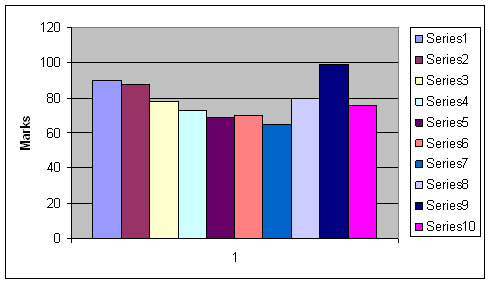
18-CRADES DISTRIBUTION:-
Student |
Mark |
Grade |
a |
90 |
B |
b |
88 |
B |
c |
78 |
C |
d |
73 |
C |
e |
69 |
D |
f |
70 |
D |
g |
65 |
D |
h |
80 |
C |
i |
99 |
A |
k |
76 |
C |
l |
69 |
D |
19-COMPUTERIZATION OF THE LAB PEPORT:-
P |
R |
T |
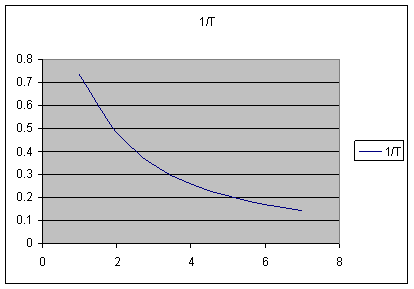
1/T |
3 |
22 |
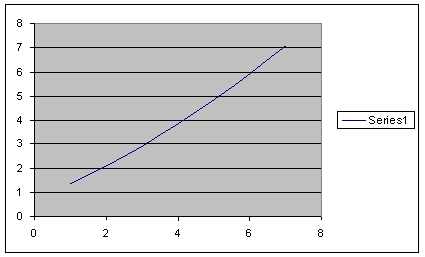
1.363636 |
0.733333 |
4 |
23 |
2.086957 |
0.479167 |
5 |
24 |
2.916667 |
0.342857 |
6 |
25 |
3.84 |
0.260417 |
7 |
26 |
4.846154 |
0.206349 |
8 |
27 |
5.925926 |
0.16875 |
9 |
28 |
7.071429 |
0.141414 |