The Comic Edit
| Main | About Comic Edit | Works | Download | Manual | Contact | Links |
|
|
The Comic Edit | Main | About Comic Edit | Works | Download | Manual | Contact | Links | |
|
Technical Information The software is designed for Windows. It's a single
file that needs no installation program and does not depend upon
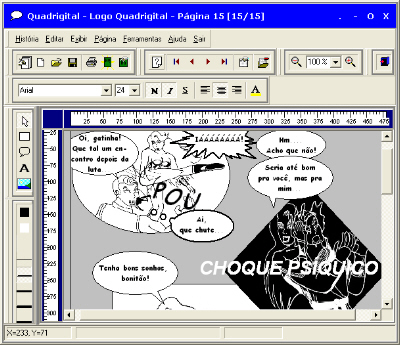
others components to run. MAIN FEATURES: - Workspace for building a comic page: The Workspace simulates the size of a real page [4x6", and so on]. This way, the user builds on the screen exactly what is going to be printed [what you see is what you get]. The size of the paper can also be modified freely, in case the artist is drawing a comic book designed to be put on the web. - Manual and Automatic Page Layout Building: The Panel tool allows the artist to build his own page layout and, at any moment, to move and resize them around the page. Each panel can load a image .JPG or .BMP, which allows the artist to make various separated drawings and joining them together on the same page. Also, there's a tool to build the page using an automatic layout tool, which fasten up the comic building. - Ready-made Balloon Tool: The Balloon Tool allows the user to create his regular balloons by using the ready-made Balloons that come inside with the Comic Edit. Once a balloon is created on the page, it can be resized and moved freely through the page. Also, you can write down your text, edit the font, choosing the shape of the balloon and the shape and direction of the balloon arrow.
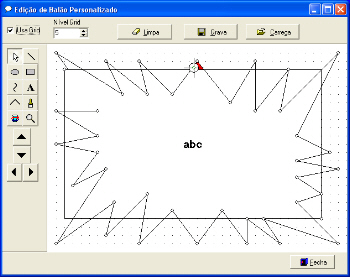
Notice, on the example above, that it is also possible to create free-text around the page. - Balloon Constructor: Apart from using ready-made balloons, you can create your own custom balloon, using a powerful vector-editor. The balloon is calculated according to the size of it, avoiding the "resizing deformation".
- Printing Management:The Comic Printing operation is done easily, by simpling clicking a button, and then, choosing exactly what pages should be printed. - Comic-Book Organization: For a comic-book story be build on a computer, various files of different source should be used: the original art [the images, right after they were scanned], the images with the digital treatment [when they are colorized, the brightness adjusted or some other effects] and the edited page. The Software allows the user to organize these files in specific folders: original art, comic pages generated by the software, and HTML converted pages. The Comic Edit works with files in the format *.HQ. This means that, by opening a file of that kind, all the pages of the comic-book will be opened automatically. - Image-Referece Process: The images used in the comic-book are image-refereced. This means that any modification made on the images are reflected in your comic-book. This allows the user to build your comic-book while still working on the images, like adjusting brightness, adding effects and so on...
- Drawing Paper: The Comic Edit allows the artist to print a special paper, used by professional drawers to build the comic page. This Drawing Paper comes with ruler markers and optional margin. These markers are excellent for building the panels quickly and efficiently. - HTML Generator: Develop your work through the Internet, by generating your comic-book in HTML format automatically. - Image Generator: This valuable tool will change the pages in the comic editor into universal image format [BMP or JPEG]. |