Creating
a new ringing tone
When you enter this function, the tone that you created previously is shown, if
available. To enter a new or edit an existing tone:
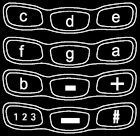
- Enter the desired notes. For example,
press  for note f. The phone plays each note after it is entered (unless
the phone tones are off).
for note f. The phone plays each note after it is entered (unless
the phone tones are off).
- To adjust the characteristics of the note, do as follows:
- To edit the notes, do as follows:
- After you have completed the note, press
 (Options), choose one of the functions below, and press
(OK).
(Options), choose one of the functions below, and press
(OK).
Play: Plays back the notes to the left of the cursor.
Save: Allows you to name the tone and add it to the ringing
tone list.
Tempo: Allows you to select the desired tempo for the tone
(in beats per minute).
Send: Allows you to send the tone to another phone.
Clear screen: Deletes all the notes from the display.
Receiving a ringing tone
When somebody sends you a ringing tone, you will hear a message tone and
the relevant text will be displayed.
To play, save or erase the tone, press
(Options), choose the desired fuction, and press
(OK).
|
 shortens
(-) and
shortens
(-) and  lengthens (+) the duration of the note or rest. The default
duration is 1/4. The duration is shown in front of the note,
e.g. 16d denotes a note d with duration 1/16.
lengthens (+) the duration of the note or rest. The default
duration is 1/4. The duration is shown in front of the note,
e.g. 16d denotes a note d with duration 1/16.
 inserts a rest (i.e. pause) of the same duration as the previous
note. The default duration of a rest is one quarter note (1/4).
The rest is indicated by the - character.
inserts a rest (i.e. pause) of the same duration as the previous
note. The default duration of a rest is one quarter note (1/4).
The rest is indicated by the - character.
 sets the octave for new notes. The octave is shown as a number
after the note (e.g. e1).
sets the octave for new notes. The octave is shown as a number
after the note (e.g. e1).
 makes the note sharp (indicated by # in front of the note), e.g.
#f. The pitch selection is not available for notes e and b.
makes the note sharp (indicated by # in front of the note), e.g.
#f. The pitch selection is not available for notes e and b.
 and
and  move the cursor right and left, respectively.
 deletes a note or a rest to the left.