| IDE interface |
|
|
|
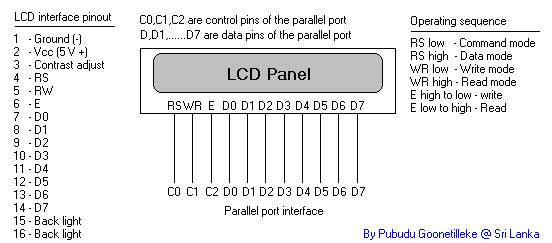
This is a simple interface that I have implemented to test the LCD device when I got it for the first time. I simply used the documentation provided in the issue of Everyday Practical Electronics magazine, February 1997. LCD can be easily controlled with any device. If you are using Micro Controllers then it is very easy to use. You can get the free samples of Micro Controllers from MicroChip and Maxim Dallas companies. I have provided the software (with source codes) that I have developed with Delphi 6. If you want to try it simply connect the LCD panel as in the above diagram to the PC parallel port, connect pin 1 and pin 2 to power supply, connect pin 3 to ground for maximum contrast and run the software.
Parallel port information can be taken
at beyond logic site. |
|
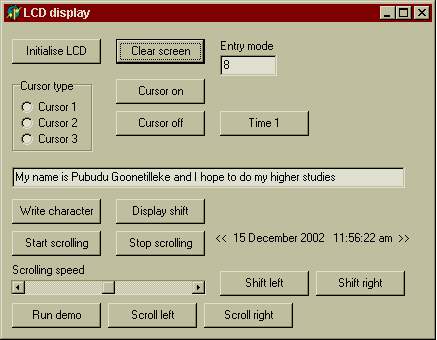
First click on initialize LCD and
Clear screen. Now type anything in the text box or click on Run demo or Time 1. You should get text messages on the LCD. This is a very cheap project that you can develop at home for fun. |
|
Software developed for this experiment. If you need further assistance let me know. Some times you may need to slow down the commanding speeds to the LCD device to perform its proper operation, then you have to edit my source code and compile it again. But if you still don't get the correct output, then this software may not be compatible with this LCD device However writing routines to any LCD panel is as simple as this project. Unfortunately my LCD panel does not have a back light. But connecting the pin 15 and 16 to the power supply you can turn on the back light if available. (Check for the Anode and Kathode of pin 15 and 16.). Application software is written
in Delphi 6. This is a very good language for such activities and you can learn
more about Delphi from the site
Torry. |
18th January 2003 - Pubudu Goonetilleke