PS-Trainer - Microsoft Project HelpMap
Tipps & Tricks für MS Project Project Management - Seite von PS-Trainer Homepage von PS-Trainer -
an PS-Trainer
Diese Seite enthält Original-Material von Microsoft, überarbeitet
durch PS-Trainer.
Dieses Diagramm hilft bei der Erstellung eines Projektplanes mit
MS Project. Da derzeit in Training vorwiegend englisch-sprachige Versionen von
MS Project eingesetzt werden, sind alle Kommentare englisch.
Microsoft® Project makes it easy to get started even if you
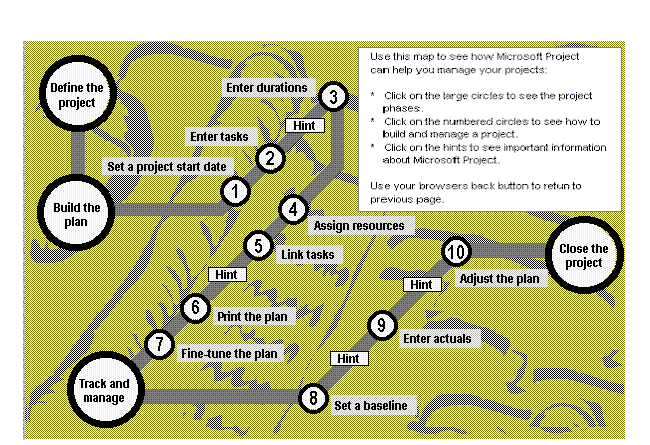
are new to project management software. The Microsoft Project Map, shown below,
illustrates the evolution of a project and how Microsoft Project can help.
Microsoft Project helps you manage projects in a variety of ways, including:
Learning Tools
Get help, tips and messages from the Microsoft Office Assistant. Use the GanttChartWizard
to quickly format Gantt charts.
Ease of Use
Enter values in tables quickly by selecting your values from spin box controls
and drop-down lists in Microsoft Project tables. Use AutoCorrect to quickly
replace commonly misspelled words.
Correct the spelling in your file using the improved spell checking features.
Search for specific text in a particular field and replace it with the text
you want.
Scheduling Features
Schedule your tasks based on the data that you enter for the tasks, constraints,
relationships, resources, assignments, calendars, and so forth. Automatically
spread or split tasks to solve over-allocation problems.
Tracking
Track actual work and progress. Compare current scheduled information against
a saved baseline.
Reporting
Choose from a variety of views and reports to present your project information.
Workgroup
As project manager, communicate with resources about their assignments and
progress using electronic mail or over the World Wide Web.
Import/Export
Save to and open files from a variety of file formats.
Customization
Use Visual Basic® for Applications to design macros and build custom solutions
in Microsoft Project or in combination with other applications.