PS-Trainer C - Entwicklung
Thema: Conversion, Cast, Umwandlung von Daten und Typen
Homepage von PS-Trainer - C-Entwicklung - Bibliotheken - an PS-Trainer
PS-Trainer PS-Trainer

Fundamental Types Fundamental Types in C++
Type Cast A type cast provides a method for explicit conversion of the type of an object in a specific situation.
Type Cast Operator, Type-Cast Conversions, Cast Operators, Demotion of Integers, Casting Integers to Floating-Point Values, Conversions from Unsigned Integral Types, Explicit Type Conversion Operator, Ambiguity Resolution, Casting and Class Hierarchy, reinterpret_cast Operator, static_cast Operator, dynamic_cast Operator, Conversion Functions,
Data Conversion Routines These routines convert data from one form to another
STRICT type checking Defining the STRICT symbol enables features that enable you to write more portable code.
Functions That Require Casts Some functions have generic return types or parameters (any number of types, depending on the context).
sizeof Operator
The sizeof keyword gives the amount of storage, in bytes, associated with a variable or a type (including aggregate types).
_ltoa, _ltow Convert a long integer to a string.
_itoa, _i64toa, _ui64toa, _itow, _i64tow, _ui64tow Convert an integer to a string.
_ultoa, _ultow
Convert an unsigned long integer to a string.
_fcvt
Converts a floating-point number to a string.
_gcvt Converts a floating-point value to a string, which it stores in a buffer.
_ecvt Converts a double number to a string.
atof, atoi, _atoi64, atol
Convert strings to double (atof), integer (atoi, _atoi64), or long (atol).
strtod, wcstod
strtol, wcstol
strtoul, wcstoul

Convert input string nptr to a double-precision value, a long-integer value, or an unsigned long-integer value, respectively.
strtol, wcstol
Convert strings to a long-integer value.
strtoul, wcstoul
Convert strings to an unsigned long-integer value.
strtod, wcstod
Convert strings to a double-precision value.
to Functions
Each of the to functions and its associated macro, if any, converts a single character to another character.
__toascii,
toupper, _toupper, towupper
tolower, _tolower, towlower


Fundamental Types
Fundamental types in C++ are divided into three categories: "integral," "floating," and "void."

Integral types are capable of handling whole numbers.
Floating types are capable of specifying values that may have fractional parts.

The void type describes an empty set of values.
No variable of type void can be specified — it is used primarily to declare functions that return no values or to declare "generic" pointers to untyped or arbitrarily typed data. Any expression can be explicitly converted or cast to type void. However, such expressions are restricted to the following uses:
An expression statement. (See Expressions.)
The left operand of the comma operator. (See Comma Operator for more information.)
The second or third operand of the conditional operator (? :). (See Expressions with the Conditional Operator for more information.)

The following table explains the restrictions on type sizes. These restrictions are independent of the Microsoft implementation.

Fundamental Types of the C++ Language
Category Type Contents
Integral char Type char is an integral type that usually contains members of the execution character set — in Microsoft C++, this is ASCII.

The C++ compiler treats variables of type char, signed char, and unsigned char as having different types. Variables of type char are promoted to int as if they are type signed char by default, unless the /J compilation option is used. In this case they are treated as type unsigned char and are promoted to int without sign extension.
  short Type short int (or simply short) is an integral type that is larger than or equal to the size of type char, and shorter than or equal to the size of type int.

Objects of type short can be declared as signed short or unsigned short. Signed short is a synonym for short.
  int Type int is an integral type that is larger than or equal to the size of type short int, and shorter than or equal to the size of type long.

Objects of type int can be declared as signed int or unsigned int. Signed int is a synonym for int.
  __intn Sized integer, where n is the size, in bits, of the integer variable. The value of n can be 8, 16, 32, or 64.
  long Type long (or long int) is an integral type that is larger than or equal to the size of type int.

Objects of type long can be declared as signed long or unsigned long.
Signed long
is a synonym for long.
Floating float Type float is the smallest floating type.
  double
Type double is a floating type that is larger than or equal to type float, but shorter than or equal to the size of type long double.
  long double Type long double is a floating type that is equal to type double.

The representation of long double and double is identical. However, long double and double are separate types.
Microsoft Specific:
Amount of storage required for fundamental types in Microsoft C++
Integral char
unsigned char
signed char
1 byte
  short
unsigned short
2 bytes
  int
unsigned int
4 bytes
  long
unsigned long
4 bytes
Floating float 4 bytes
  double
long double
8 bytes
END Microsoft Specific

Type Cast Operator: (type)
cast-expression :
unary-expression
( type-name ) cast-expression

A type cast provides a method for explicit conversion of the type of an object in a specific situation.

The compiler treats cast-expression as type type-name after a type cast has been made. Casts can be used to convert objects of any scalar type to or from any other scalar type. Explicit type casts are constrained by the same rules that determine the effects of implicit conversions. Additional restraints on casts may result from the actual sizes or representation of specific types.

Example
In the following example, the type cast operator converts the float value of 3.1 to an integer value of 3.

// Example of the type cast operator
float x = 3.1;
int i;
i = (int)x; // the value of i is now 3
Type-Cast Conversions
You can use type casts to explicitly convert types.

Syntax
cast-expression :
unary expression
( type-name ) cast-expression

type-name :
specifier-qualifier-list abstract-declarator opt


The type-name is a type and cast-expression is a value to be converted to that type. An expression with a type cast is not an l-value. The cast-expression is converted as though it had been assigned to a variable of type type-name. The conversion rules for assignments (outlined in Assignment Conversions) apply to type casts as well.

This table shows the types that can be cast to any given type (legal type casts):
Destination Types Potential Sources
Integral types Any integer type or floating-point type, or pointer to an object
Floating-point Any arithmetic type
A pointer to an object, or (void *) Any integer type, (void *), a pointer to an object, or a function pointer
Function pointer Any integral type, a pointer to an object, or a function pointer
A structure, union, or array None
Void type Any type

Void type: Any identifier can be cast to void type. However, if the type specified in a type-cast expression is not void, then the identifier being cast to that type cannot be a void expression. Any expression can be cast to void, but an expression of type void cannot be cast to any other type. For example, a function with void return type cannot have its return cast to another type.

Note that a void * expression has a type pointer to void, not type void. If an object is cast to void type, the resulting expression cannot be assigned to any item. Similarly, a type-cast object is not an acceptable l-value, so no assignment can be made to a type-cast object.

Microsoft Specific

A type cast can be an l-value expression as long as the size of the identifier does not change. For information on l-value expressions, see L-Value and R-Value Expressions.
END Microsoft Specific
You can convert an expression to type void with a cast, but the resulting expression can be used only where a value is not required. An object pointer converted to void * and back to the original type will return to its original value.
Cast Operators
A type cast provides a method for explicit conversion of the type of an object in a specific situation.

Syntax
cast-expression :
unary-expression
( type-name ) cast-expression

The compiler treats cast-expression as type type-name after a type cast has been made.
Casts can be used to convert objects of any scalar type to or from any other scalar type.
Explicit type casts are constrained by the same rules that determine the effects of implicit conversions, discussed in Assignment Conversions. Additional restraints on casts may result from the actual sizes or representation of specific types.

See Storage of Basic Types for information on actual sizes of integral types. For more information on type casts, see Type-Cast Conversions

Demotion of Integers
ANSI 3.2.1.2
The result of converting an integer to a shorter signed integer, or the result of converting an unsigned integer to a signed integer of equal length, if the value cannot be represented

When a long integer is cast to a short, or a short is cast to a char, the least-significant bytes are retained.

For example, this line
short x = (short)0x12345678L;
assigns the value 0x5678 to x, and this line
char y = (char)0x1234;
assigns the value 0x34 to y.

When signed variables are converted to unsigned and vice versa, the bit patterns remain the same.
For example, casting –2 (0xFE) to an unsigned value yields 254 (also 0xFE).

Casting Integers to Floating-Point Values
ANSI 3.2.1.3
The direction of truncation when an integral number is converted to a floating-point number that cannot exactly represent the original value

When an integral number is cast to a floating-point value that cannot exactly represent the value, the value is rounded (up or down) to the nearest suitable value.

For example, casting an unsigned long (with 32 bits of precision) to a float (whose mantissa has 23 bits of precision) rounds the number to the nearest multiple of 256. The long values 4,294,966,913 to 4,294,967,167 are all rounded to the float value 4,294,967,040.

Conversions from Unsigned Integral Types
An unsigned integer is converted to a shorter unsigned or signed integer by truncating the high-order bits, or to a longer unsigned or signed integer by zero-extending (see Table below).

When the value with integral type is demoted to a signed integer with smaller size, or an unsigned integer is converted to its corresponding signed integer, the value is unchanged if it can be represented in the new type.
However, the value it represents changes if the sign bit is set, as in the following example.
int j;
unsigned short k = 65533;

j = k;
printf( "%hd\n", j ); /* Prints -3 */


If it cannot be represented, the result is implementation-defined. See Type-Cast Conversions for information on the Microsoft C compiler's handling of demotion of integers. The same behavior results from integer conversion or from type casting the integer.

Unsigned values are converted in a way that preserves their value and is not representable directly in C. The only exception is a conversion from unsigned long to float, which loses at most the low-order bits. Otherwise, value is preserved, signed or unsigned. When a value of integral type is converted to floating, and the value is outside the range representable, the result is undefined. (See Storage of Basic Types for information about the range for integral and floating-point types.)


This table summarizes conversions from unsigned integral types.
Conversions from Unsigned Integral Types
From To Method
unsigned char char Preserve bit pattern; high-order bit becomes sign bit
unsigned char short Zero-extend
unsigned char long Zero-extend
unsigned char unsigned short Zero-extend
unsigned char unsigned long Zero-extend
unsigned char float Convert to long; convert long to float
unsigned char double Convert to long; convert long to double
unsigned char long double Convert to long; convert long to double
unsigned short char Preserve low-order byte
unsigned short short Preserve bit pattern; high-order bit becomes sign bit
unsigned short long Zero-extend
unsigned short unsigned char Preserve low-order byte
unsigned short unsigned long Zero-extend
unsigned short float Convert to long; convert long to float
unsigned short double Convert to long; convert long to double
unsigned short long double Convert to long; convert long to double
unsigned long char Preserve low-order byte
unsigned long short Preserve low-order word
unsigned long long Preserve bit pattern; high-order bit becomes sign bit
unsigned long unsigned char Preserve low-order byte
unsigned long unsigned short Preserve low-order word
unsigned long float Convert to long; convert long to float
unsigned long double Convert directly to double
unsigned long long double Convert to long; convert long to double

Microsoft Specific ®
For the Microsoft 32-bit C compiler, the unsigned int type is equivalent to the unsigned long type. Conversion of an unsigned int value proceeds in the same way as conversion of an unsigned long. Conversions from unsigned long values to float are not accurate if the value being converted is larger than the maximum positive signed long value.
END Microsoft Specific
Explicit Type Conversion Operator
C++ allows explicit type conversion using a syntax similar to the function-call syntax.
A simple-type-name followed by an expression-list enclosed in parentheses constructs an object of the specified type using the specified expressions.

The following example shows an explicit type conversion to type int:
int i = int( d );

The following example uses a modified version of the Point class defined in Function-Call Results.

#include <iostream.h>

class Point
{
public:
// Define default constructor.
Point() { _x = _y = 0; }
// Define another constructor.
Point( int X, int Y ) { _x = X; _y = Y; }

// Define "accessor" functions as
// reference types.
unsigned& x() { return _x; }
unsigned& y() { return _y; }
void Show() { cout << "x = " << _x << ", "
<< "y = " << _y << "\n"; }
private:
unsigned _x;
unsigned _y;
};

void main()
{
Point Point1, Point2;

// Assign Point1 the explicit conversion
// of ( 10, 10 ).
Point1 = Point( 10, 10 );

// Use x() as an l-value by assigning an explicit
// conversion of 20 to type unsigned.
Point1.x() = unsigned( 20 );
Point1.Show();

// Assign Point2 the default Point object.
Point2 = Point();
Point2.Show();
}


The output from this program is:
x = 20, y = 10
x = 0, y = 0


Although the preceding example demonstrates explicit type conversion using constants, the same technique works to perform these conversions on objects.
The following example code fragment demonstrates this:
int i = 7;
float d;
d = float( i );


Explicit type conversions can also be specified using the "cast" syntax.
The previous example, rewritten using the cast syntax, is:
d = (float)i;

Both cast and function-style conversions have the same results when converting from single values.
However, in the function-style syntax, you can specify more than one argument for conversion. This difference is important for user-defined types.
Consider a Point class and its conversions in this example:
struct Point
{
Point( short x, short y ) { _x = x; _y = y; }
...
short _x, _y;
};
...
Point pt = Point( 3, 10 );


The preceding example, which uses function-style conversion, shows how to convert two values (one for x and one for y) to the user-defined type Point.

Important Use the explicit type conversions with care, since they override the C++ compiler's built-in type checking.

Syntax
cast-expression:
unary-expression
( type-name ) cast-expression

The cast notation must be used for conversions to types that do not have a simple-type-name (pointer or reference types, for example). Conversion to types that can be expressed with a simple-type-name can be written in either form. See Type Specifiers for more information about what constitutes a simple-type-name.


Type definition within casts is illegal.
Ambiguity Resolution
To perform explicit conversions from one type to another, you must use casts, specifying the desired type name.
Some type casts result in syntactic ambiguity.
The following example function-style type cast is ambiguous:
char *aName( String( s ) );

It is unclear whether it is a function declaration or an object declaration with a function-style cast as the initializer: It could declare a function returning type char * that takes one argument of type String, or it could declare the object aName and initialize it with the value of s cast to type String.

If a declaration can be considered a valid function declaration, it is treated as such.
Only if it cannot possibly be a function declaration — that is, if it would be syntactically incorrect — is a statement examined to see if it is a function-style type cast. Therefore, the compiler considers the statement to be a declaration of a function and ignores the parentheses around the identifier s.
On the other hand, the statements:
char *aName( (String)s );

and
char *aName = String( s );

are clearly declarations of objects, and a user-defined conversion from type String to type char * is invoked to perform the initialization of aName.

Casting and Class Hierarchy

The C++ language provides that if a class is derived from a base class containing virtual functions, a pointer to that base class type can be used to call the implementations of the virtual functions residing in the derived class object. A class containing virtual functions is sometimes called a "polymorphic class."

Since a derived class completely contains the definitions of all the base classes from which it is derived, it is safe to cast a pointer up the class hierarchy to any of these base classes. Given a pointer to a base class, it might be safe to cast the pointer down the hierarchy. It is safe if the object being pointed to is actually of a type derived from the base class. In this case, the actual object is said to be the "complete object." The pointer to the base class is said to point to a "subobject" of the complete object.

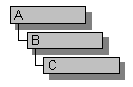
For example, consider the class hierarchy shown here:

Class Hierarchy

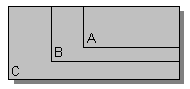
An object of type C could be visualized as shown here:

Class C with B Subobject and A Subobject

Given an instance of class C, there is a B subobject and an A subobject. The instance of C, including the A and B subobjects, is the "complete object."

Using run-time type information, it is possible to check whether a pointer actually points to a complete object and can be safely cast to point to another object in its hierarchy. The dynamic_cast operator can be used to make these types of casts. It also performs the run-time check necessary to make the operation safe.

reinterpret_cast Operator
The reinterpret_cast operator allows any pointer to be converted into any other pointer type.
It also allows any integral type to be converted into any pointer type and vice versa. Misuse of the reinterpret_cast operator can easily be unsafe. Unless the desired conversion is inherently low-level, you should use one of the other cast operators.

Syntax
reinterpret_cast < type-id > ( expression )

The reinterpret_cast operator can be used for conversions such as char* to int*, or One_class* to Unrelated_class*, which are inherently unsafe.

The result of a reinterpret_cast cannot safely be used for anything other than being cast back to its original type. Other uses are, at best, nonportable.

The reinterpret_cast operator cannot cast away the const, volatile, or __unaligned attributes. See const_cast Operator for information on removing these attributes.

The reinterpret_cast operator converts a null pointer value to the null pointer value of the destination type.

static_cast Operator
The expression static_cast < type-id > ( expression ) converts expression to the type of type-id based solely on the types present in the expression. No run-time type check is made to ensure the safety of the conversion.

Syntax
static_cast < type-id > ( expression )

The static_cast operator can be used for operations such as converting a pointer to a base class to a pointer to a derived class. Such conversions are not always safe.
For example:
class B { ... };
class D : public B { ... };

void f(B* pb, D* pd)
{
D* pd2 = static_cast<D*>(pb); // not safe, pb may
// point to just B

B* pb2 = static_cast<B*>(pd); // safe conversion
...
}

In contrast to dynamic_cast, no run-time check is made on the static_cast conversion of pb. The object pointed to by pb may not be an object of type D, in which case the use of *pd2 could be disastrous. For instance, calling a function that is a member of the D class, but not the B class, could result in an access violation.

The dynamic_cast and static_cast operators move a pointer throughout a class hierarchy. However, static_cast relies exclusively on the information provided in the cast statement and can therefore be unsafe.
For example:
class B { ... };
class D : public B { ... };

void f(B* pb)
{
D* pd1 = dynamic_cast<D*>(pb);
D* pd2 = static_cast<D*>(pb);
}


If pb really points to an object of type D, then pd1 and pd2 will get the same value.
They will also get the same value if pb == 0.

If pb points to an object of type B and not to the complete D class, then dynamic_cast will know enough to return zero. However, static_cast relies on the programmer's assertion that pb points to an object of type D and simply returns a pointer to that supposed D object.

Consequently, static_cast can do the inverse of implicit conversions, in which case the results are undefined. It is left to the programmer to ensure that the results of a static_cast conversion are safe.

This behavior also applies to types other than class types.
For instance, static_cast can be used to convert from an int to a char.
However, the resulting char may not have enough bits to hold the entire int value. Again, it is left to the programmer to ensure that the results of a static_cast conversion are safe.

The static_cast operator can also be used to perform any implicit conversion, including standard conversions and user-defined conversions.
For example:
typedef unsigned char BYTE

void f()
{
char ch;
int i = 65;
float f = 2.5;
double dbl;

ch = static_cast<char>(i); // int to char
dbl = static_cast<double>(f); // float to double
...
i = static_cast<BYTE>(ch);
...
}


The static_cast operator can explicitly convert an integral value to an enumeration type. If the value of the integral type does not fall within the range of enumeration values, the resulting enumeration value is undefined.

The static_cast operator converts a null pointer value to the null pointer value of the destination type.

Any expression can be explicitly converted to type void by the static_cast operator. The destination void type can optionally include the const, volatile, or __unaligned attribute.

The static_cast operator cannot cast away the const, volatile, or __unaligned attributes. See const_cast Operator for information on removing these attributes.

dynamic_cast Operator
The expression dynamic_cast<type-id>( expression ) converts the operand expression to an object of type type-id. The type-id must be a pointer or a reference to a previously defined class type or a "pointer to void". The type of expression must be a pointer if type-id is a pointer, or an l-value if type-id is a reference.

Syntax
dynamic_cast < type-id > ( expression )

If type-id is a pointer to an unambiguous accessible direct or indirect base class of expression, a pointer to the unique subobject of type type-id is the result.

Example:

class B { ... };
class C : public B { ... };
class D : public C { ... };

void f(D* pd)
{
C* pc = dynamic_cast<C*>(pd); // ok: C is a direct base class
// pc points to C subobject of pd

B* pb = dynamic_cast<B*>(pd); // ok: B is an indirect base class
// pb points to B subobject of pd
...
}


This type of conversion is called an "upcast" because it moves a pointer up a class hierarchy, from a derived class to a class it is derived from. An upcast is an implicit conversion.

If type-id is void*, a run-time check is made to determine the actual type of expression. The result is a pointer to the complete object pointed to by expression.

Example:

class A { ... };
class B { ... };

void f()
{
A* pa = new A;
B* pb = new B;
void* pv = dynamic_cast<void*>(pa);
// pv now points to an object of type A
...
pv = dynamic_cast<void*>(pb);
// pv now points to an object of type B
}


If type-id is not void*, a run-time check is made to see if the object pointed to by expression can be converted to the type pointed to by type-id.

If the type of expression is a base class of the type of type-id, a run-time check is made to see if expression actually points to a complete object of the type of type-id. If this is true, the result is a pointer to a complete object of the type of type-id.
Example:

class B { ... };
class D : public B { ... };

void f()
{
B* pb = new D; // unclear but ok
B* pb2 = new B;

D* pd = dynamic_cast<D*>(pb); // ok: pb actually points to a D
...
D* pd2 = dynamic_cast<D*>(pb2); //error: pb2 points to a B, not a D
// pd2 == NULL
...
}


This type of conversion is called a "downcast" because it moves a pointer down a class hierarchy, from a given class to a class derived from it.

In cases of multiple inheritance, possibilities for ambiguity are introduced.
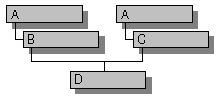
Consider the class hierarchy shown here:

Class Hierarchy Showing Multiple Inheritance

A pointer to an object of type D can be safely cast to B or C. However, if D is cast to point to an A object, which instance of A would result ? This would result in an ambiguous casting error. To get around this problem, you can perform two unambiguous casts.
Example:

void f()
{
D* pd = new D;
A* pa = dynamic_cast<A*>(pd); // error: ambiguous
B* pb = dynamic_cast<B*>(pd); // first cast to B
A* pa2 = dynamic_cast<A*>(pb); // ok: unambiguous
}


Further ambiguities can be introduced when you use virtual base classes.
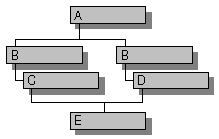
Consider the class hierarchy shown here:

Class Hierarchy Showing Virtual Base Classes

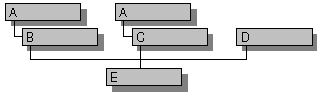
In this hierarchy, A is a virtual base class. See Virtual Base Classes for the definition of a virtual base class. Given an instance of class E and a pointer to the A subobject, a dynamic_cast to a pointer to B will fail due to ambiguity. You must first cast back to the complete E object, then work your way back up the hierarchy, in an unambiguous manner, to reach the correct B object.

Consider the class hierarchy shown here:

Class Hierarchy Showing Duplicate Base Classes

Given an object of type E and a pointer to the D subobject, to navigate from the D subobject to the left-most A subobject, three conversions can be made. You can perform a dynamic_cast conversion from the D pointer to an E pointer, then a conversion (either dynamic_cast or an implicit conversion) from E to B, and finally an implicit conversion from B to A.
Example:

void f(D* pd)
{
E* pe = dynamic_cast<E*>(pd);
B* pb = pe; // upcast, implicit conversion
A* pa = pb; // upcast, implicit conversion
}


The dynamic_cast operator can also be used to perform a "cross cast." Using the same class hierarchy, it is possible to cast a pointer, for example, from the B subobject to the D subobject, as long as the complete object is of type E.

Considering cross casts, it is actually possible to do the conversion from a pointer to D to a pointer to the left-most A subobject in just two steps. You can perform a cross cast from D to B, then an implicit conversion from B to A.
Example:

void f(D* pd)
{
B* pb = dynamic_cast<B*>(pd); // cross cast
A* pa = pb; // upcast, implicit conversion
}


A null pointer value is converted to the null pointer value of the destination type by dynamic_cast.

When you use dynamic_cast < type-id > ( expression ), if expression cannot be safely converted to type type-id, the run-time check causes the cast to fail.
Example:

class A { ... };
class B { ... };

void f()
{
A* pa = new A;
B* pb = dynamic_cast<B*>(pa); // fails, not safe;
// B not derived from A
...
}


The value of a failed cast to pointer type is the null pointer. A failed cast to reference type throws a bad_cast exception.

Conversion Functions
In conversion by constructors, objects of one type can be implicitly converted to a particular class type. This section describes a means by which you can provide explicit conversions from a given class type to another type. Conversion from a class type is often accomplished using conversion functions. Conversion functions use the following syntax:

Syntax
conversion-function-name:
operator conversion-type-name ()
conversion-type-name:
type-specifier-list ptr-operatoropt

The following example specifies a conversion function that converts type Money to type double:
class Money
{
public:
Money();
operator double() { return _amount; }
private:
double _amount;
};


Given the preceding class declaration, the following code can be written:
Money Account;
...
double CashOnHand = Account;


The initialization of CashOnHand with Account causes a conversion from type Account to type double.

Conversion functions are often called "cast operators" because they (along with constructors) are the functions called when a cast is used.
The following example uses a cast, or explicit conversion, to print the current value of an object of type Money:
cout << (double)Account << endl;

Conversion functions are inherited in derived classes. Conversion operators hide only base-class conversion operators that convert to exactly the same type. Therefore, a user-defined operator int function does not hide a user-defined operator short function in a base class.

Only one user-defined conversion function is applied when performing implicit conversions. If there is no explicitly defined conversion function, the compiler does not look for intermediate types into which an object can be converted.

If a conversion is required that causes an ambiguity, an error is generated. Ambiguities arise when more than one user-defined conversion is available or when a user-defined conversion and a built-in conversion exist.
The following example illustrates a class declaration with a potential ambiguity:
#include <string.h>

class String
{
public:
// Define constructor that converts from type char *.
String( char *s ) { strcpy( _text, s ); }
// Define conversion to type char *.
operator char *() { return _text; }
int operator==( const String &s )
{ return !strcmp( _text, s._text ); }
private:
char _text[80];
};

int main()
{
String s( "abcd" );
char *ch = "efgh";

// Cause the compiler to select a conversion.
return s == ch;
}

In the expression s == ch, the compiler has two choices and no way of determining which is correct. It can convert ch to an object of type String using the constructor and then perform the comparison using the user-defined operator ==. Or it can convert s to a pointer of type char * using the conversion function and then perform a comparison of the pointers.

Because neither choice is "more correct" than the other, the compiler cannot determine the meaning of the comparison expression, and it generates an error.


Data Conversion
These routines convert data from one form to another. Generally these routines execute faster than conversions you might write. Each routine that begins with a to prefix is implemented as a function and as a macro. See Choosing Between Functions and Macros for information about choosing an implementation.
abs
Find absolute value of integer
atof Convert string to float
atoi, _atoi64 Convert string to int
atol Convert string to long
_ecvt Convert double to string of specified length
_fcvt Convert double to string with specified number of digits following decimal point
_gcvt Convert double number to string; store string in buffer
_itoa, _i64toa, _itow, _i64tow Convert int to string
labs Find absolute value of long integer
_ltoa, _ltow Convert long to string
_mbbtombc Convert 1-byte multibyte character to corresponding 2-byte multibyte character
_mbcjistojms Convert Japan Industry Standard (JIS) character to Japan Microsoft (JMS) character
_mbcjmstojis Convert JMS character to JIS character
_mbctohira Convert multibyte character to 1-byte hiragana code
_mbctokata Convert multibyte character to 1-byte katakana code
_mbctombb Convert 2-byte multibyte character to corresponding 1-byte multibyte character
mbstowcs Convert sequence of multibyte characters to corresponding sequence of wide characters
mbtowc Convert multibyte character to corresponding wide character
strtod, wcstod Convert string to double
strtol, wcstol Convert string to long integer
strtoul, wcstoul Convert string to unsigned long integer
strxfrm, wcsxfrm Transform string into collated form based on locale-specific information
__toascii Convert character to ASCII code
tolower, towlower, _mbctolower Test character and convert to lowercase if currently uppercase
_tolower Convert character to lowercase unconditionally
toupper, towupper, _mbctoupper Test character and convert to uppercase if currently lowercase
_toupper Convert character to uppercase unconditionally
_ultoa, _ultow Convert unsigned long to string
wcstombs Convert sequence of wide characters to corresponding sequence of multibyte characters
wctomb Convert wide character to corresponding multibyte character
_wtoi Convert wide-character string to int
_wtol Convert wide-character string to long


Using STRICT to Improve Type Checking
Defining the STRICT symbol enables features that require you to be more careful in declaring and using types. This may sound like a burden, but it is actually an aid to writing more portable code. This extra care will also reduce the time you spend debugging. Enabling STRICT redefines certain data types so that the compiler won’t permit assignment from one type to another without an explicit cast. This is especially helpful with Windows code. Errors in passing data types are reported at compile time instead of causing fatal errors at run time.

When STRICT is defined, WINDOWS.H type definitions change as follows:
Specific handle types are defined so as to be mutually exclusive; for example, you won’t be able to pass an HWND where an HDC type argument is required. Without STRICT, all handles are defined as integers, so the compiler doesn’t prevent you from using one type of handle where another type is expected.
All callback function types (dialog procedures, window procedures, and hook procedures) are defined with full prototypes. This prevents you from declaring callback functions with incorrect parameter lists.
Parameter and return value types that should use a generic pointer are declared correctly as LPVOID instead of as LPSTR or other pointer type.
The COMSTAT structure is now declared according to the ANSI standard.
Making Your Application STRICT Compliant
Some source code that in the past compiled successfully might produce error messages when you enable STRICT type checking. The following sections describe the minimal requirements you need to follow, where applicable, to make sure your code compiles when STRICT is enabled. There are other steps not strictly required but recommended, especially if you want to produce portable code. These are covered in General Requirements

The principal requirement is that you must declare correct handle types and function pointers instead of relying on more general types such as unsigned int and FARPROC. You cannot use one handle type where another is expected. This requirement also means that you may have to change function declarations and use more type casts.

For best results, the generic HANDLE type should not be used except where necessary. Consult Using Function Pointers

Always declare function pointers with the proper function type (such as DLGPROC or WNDPROC) rather than FARPROC. You’ll need to cast function pointers to and from the proper function type when using MakeProcInstance, FreeProcInstance, and other functions that take or return a FARPROC, as shown in the following code:

BOOL CALLBACK DlgProc(HWND hwnd, UINT msg, WPARAM wParam,
LPARAM lParam);DLGPROC lpfnDlg;lpfnDlg = (DLGPROC)MakeProcInstance(DlgProc, hinst);...FreeProcInstance((FARPROC)lpfnDlg);

Making Best Use of STRICT Type Checking
To get the most benefit from STRICT type checking, there are other guidelines you should follow in addition to those in Making Your Application STRICT Compliant. Your code will be more portable in future versions of Windows if you make the following changes:
Change  To
HANDLE   A specific handle such as HINSTANCE, HMODULE, HGLOBAL, HLOCAL, and so on
WORD   UINT, except where you want a 16-bit value even when the platform is 32 bits
WORD   WPARAM, where wParam is declared
LONG   LPARAM or LRESULT as appropriate

Any time you need an integer data type, you should declare it as UINT except where a 16-bit value is specifically required (as in a structure or parameter). For even if a variable never exceeds the range of a 16-bit integer, it can be more efficiently handled by the processor if it is 32 bits.

The types WPARAM, LPARAM, LRESULT, and void * are “polymorphic data types”: they hold different kinds of data at different times, even when STRICT type checking is enabled. To get the benefit of type checking, you should cast values of these types as soon as possible. Note that message crackers (as well as the Microsoft Foundation Classes) automatically recast wParam and lParam for you in a portable way.

Take special care to distinguish HMODULE and HINSTANCE types. Even with STRICT enabled, they are defined as the same base type. Most kernel module management functions use HINSTANCE types, but there are a few functions that return or accept only HMODULE types.

Replace the WORD cast by HWND cast
Source code written for 16-bit Windows often uses the type WORD interchangeably with types such as HWND and HANDLE. For example, the typecast (WORD) might be used to cast a data type to a handle:

hWnd = (WORD) SendMessage( hWnd, WM_GETMDIACTIVATE, 0, 0 );

This code compiles correctly with a 16-bit compiler, because both the WORD type and handles are 16 bits. However, the code does not compile correctly with a 32-bit compiler, because handles are 32 bits while the WORD type is still 16 bits.

To make this example portable, replace the WORD cast by HWND cast, as shown:

hWnd = (HWND) SendMessage( hWnd, WM_GETMDIACTIVATE, 0, 0 );

To write portable code, examine each WORD cast and WORD definition in your code, and revise as follows:
If a variable or expression is to hold a handle, replace WORD with the appropriate handle type, such as HWND, HPEN, or HINSTANCE. Avoid using a generic handle type.
If a variable or expression is a graphics coordinate or some other integer value that has increased from 16 to 32 bits, replace WORD with UINT.
Maintain use of the WORD type only if the data type needs to be 16 bits for all versions of Windows (usually because it is a function argument or structure member).

UINT is defined to be the natural integer size for both the 16-bit and 32-bit environments. The 32-bit platforms, especially RISC, handle 32-bit data more efficiently than 16-bit data.


Functions That Require Casts

Some functions have generic return types or parameters. For example, a function like SendMessage returns data that may be any number of types, depending on the context. When you see any of these functions in your source code, make sure that you use the correct type cast and that it is as specific as possible.

The following table summarizes these functions:
LocalLock Cast result to the proper kind of data pointer.
GlobalLock Cast result to the proper kind of data pointer.
GetWindowWord Cast result to appropriate data type.
GetWindowLong Cast result to appropriate data type
SetWindowWord Cast argument as it is passed to function.
SetWindowLong Cast argument as it is passed to function.
SendMessage Cast result to appropriate data type; cast to UINT before casting to a handle type.
DefWindowProc See comment for SendMessage.
SendDlgItemMessage See comment for SendMessage.

When you call SendMessage, DefWindowProc, or SendDlgItemMessage, you should first cast the result to type UINT. You need to take similar steps for any function that returns LRESULT or LONG, where the result contains a handle. This is necessary for writing portable code because the size of a handle is either 16 bits or 32 bits depending on the version of Windows. The (UINT) cast ensures proper conversion.

The following code shows an example in which SendMessage returns a handle to a brush:
HBRUSH hbr;hbr = (HBRUSH)(UINT)SendMessage(hwnd, WM_CTLCOLOR, ..., ...);

_fcvt
Converts a floating-point number to a string.
char *_fcvt( double value, int count, int *dec, int *sign );

Function Required Header Compatibility
_fcvt <stdlib.h> Win 95, Win NT

Remarks
The _fcvt function converts a floating-point number to a null-terminated character string. The value parameter is the floating-point number to be converted. _fcvt stores the digits of value as a string and appends a null character ('\0'). The count parameter specifies the number of digits to be stored after the decimal point. Excess digits are rounded off to count places. If there are fewer than count digits of precision, the string is padded with zeros.

Only digits are stored in the string. The position of the decimal point and the sign of value can be obtained from dec and sign after the call. The dec parameter points to an integer value; this integer value gives the position of the decimal point with respect to the beginning of the string. A zero or negative integer value indicates that the decimal point lies to the left of the first digit. The parameter sign points to an integer indicating the sign of value. The integer is set to 0 if value is positive and is set to a nonzero number if value is negative.

_ecvt and _fcvt use a single statically allocated buffer for the conversion. Each call to one of these routines destroys the results of the previous call.

Subject: Data Conversion Routines | Floating-Point Support Routines
Keywords: See also atof, _ecvt, _gcvt
Return Value
_fcvt returns a pointer to the string of digits. There is no error return.

Parameters
value Number to be converted
count Number of digits after decimal point
dec Pointer to stored decimal-point position
sign Pointer to stored sign indicator

Example
/* FCVT.C: This program converts the constant
* 3.1415926535 to a string and sets the pointer
* *buffer to point to that string.
*/

#include <stdlib.h>
#include <stdio.h>

void main( void )
{
int decimal, sign;
char *buffer;
double source = 3.1415926535;

buffer = _fcvt( source, 7, &decimal, &sign );
printf( "source: %2.10f buffer: '%s' decimal: %d sign: %d\n",
source, buffer, decimal, sign );
}


Output
source: 3.1415926535 buffer: '31415927' decimal: 1 sign: 0


_ltoa, _ltow
Convert a long integer to a string.
char *_ltoa( long value, char *string, int radix );
wchar_t *_ltow( long value, wchar_t *string, int radix );

Routine Required Header Compatibility
_ltoa <stdlib.h> Win 95, Win NT
_ltow <stdlib.h> Win 95, Win NT

Remarks
The _ltoa function converts the digits of value to a null-terminated character string and stores the result (up to 33 bytes) in string. The radix argument specifies the base of value, which must be in the range 2 – 36. If radix equals 10 and value is negative, the first character of the stored string is the minus sign (–).
_ltow is a wide-character version of _ltoa; the second argument and return value of _ltow are wide-character strings. Each of these functions is Microsoft-specific.

Generic-Text Routine Mappings
TCHAR.H _UNICODE & _MBCS _MBCS _UNICODE
Routine Not Defined Defined Defined
_ltot _ltoa _ltoa _ltow

Subject: Data Conversion Routines
Keywords: See also _itoa, _ultoa
Return Value
Each of these functions returns a pointer to string. There is no error return.

Parameters
value Number to be converted
string String result
radix Base of value

Example
/* ITOA.C: This program converts integers of various
* sizes to strings in various radixes.
*/

#include <stdlib.h>
#include <stdio.h>

void main( void )
{
char buffer[20];
int i = 3445;
long l = -344115L;
unsigned long ul = 1234567890UL;

_itoa( i, buffer, 10 );
printf( "String of integer %d (radix 10): %s\n", i, buffer );
_itoa( i, buffer, 16 );
printf( "String of integer %d (radix 16): 0x%s\n", i, buffer );
_itoa( i, buffer, 2 );
printf( "String of integer %d (radix 2): %s\n", i, buffer );

_ltoa( l, buffer, 16 );
printf( "String of long int %ld (radix 16): 0x%s\n", l,
buffer );

_ultoa( ul, buffer, 16 );
printf( "String of unsigned long %lu (radix 16): 0x%s\n", ul,
buffer );
}


Output
String of integer 3445 (radix 10): 3445
String of integer 3445 (radix 16): 0xd75
String of integer 3445 (radix 2): 110101110101
String of long int -344115 (radix 16): 0xfffabfcd
String of unsigned long 1234567890 (radix 16): 0x499602d2


_itoa, _i64toa, _ui64toa, _itow, _i64tow, _ui64tow
Convert an integer to a string.
char *_itoa( int value, char *string, int radix );
char *_i64toa( __int64 value, char *string, int radix );
char * _ui64toa( unsigned _int64 value, char *string, int radix );
wchar_t * _itow( int value, wchar_t *string, int radix );
wchar_t * _i64tow( __int64 value, wchar_t *string, int radix );
wchar_t * _ui64tow( unsigned __int64 value, wchar_t *string, int radix );


Routine Required Header Compatibility
 _itoa <stdlib.h> Win 95, Win NT
 _i64toa <stdlib.h> Win 95, Win NT
 _ui64toa <stdlib.h> Win 95, Win NT
 _itow <stdlib.h> Win 95, Win NT
 _i64tow <stdlib.h> Win 95, Win NT
 _ui64tow <stdlib.h> Win 95, Win NT

Remarks
The _itoa, _i64toa, and _ui64toa function convert the digits of the given value argument to a null-terminated character string and stores the result (up to 17 bytes) in string. If radix equals 10 and value is negative, the first character of the stored string is the minus sign ( – ).
_itow, _i64tow, and _ui64tow are wide-character versions of _itoa, _i64toa, and _ui64toa respectively.

Generic-Text Routine Mappings
TCHAR.H _UNICODE & _MBCS _MBCS _UNICODE
Routine Not Defined Defined Defined
_itot _itoa _itoa _itow

Subject: Data Conversion Routines
Keywords: See also _ltoa, _ultoa
Return Value
Each of these functions returns a pointer to string. There is no error return.

Parameters
value Number to be converted
string String result
radix Base of value; must be in the range 2 – 36

Example
/* ITOA.C: This program converts integers of various
* sizes to strings in various radixes.
*/

#include <stdlib.h>
#include <stdio.h>

void main( void )
{
char buffer[20];
int i = 3445;
long l = -344115L;
unsigned long ul = 1234567890UL;

_itoa( i, buffer, 10 );
printf( "String of integer %d (radix 10): %s\n", i, buffer );
_itoa( i, buffer, 16 );
printf( "String of integer %d (radix 16): 0x%s\n", i, buffer );
_itoa( i, buffer, 2 );
printf( "String of integer %d (radix 2): %s\n", i, buffer );

_ltoa( l, buffer, 16 );
printf( "String of long int %ld (radix 16): 0x%s\n", l,
buffer );

_ultoa( ul, buffer, 16 );
printf( "String of unsigned long %lu (radix 16): 0x%s\n", ul,
buffer );
}


Output
String of integer 3445 (radix 10): 3445
String of integer 3445 (radix 16): 0xd75
String of integer 3445 (radix 2): 110101110101
String of long int -344115 (radix 16): 0xfffabfcd
String of unsigned long 1234567890 (radix 16): 0x499602d2


atof, atoi, _atoi64, atol
Convert strings to double (atof), integer (atoi, _atoi64), or long (atol).
double atof( const char *string );
int atoi( const char *string );
__int64 _atoi64( const char *string );
long atol( const char *string );

Routine Required Header Compatibility
 atof <math.h> and <stdlib.h> ANSI, Win 95, Win NT
 atoi <stdlib.h> ANSI, Win 95, Win NT
 _atoi64 <stdlib.h> Win 95, Win NT
 atol <stdlib.h> ANSI, Win 95, Win NT

Remarks
These functions convert a character string to a double-precision floating-point value (atof), an integer value (atoi and _atoi64), or a long integer value (atol).
The input string is a sequence of characters that can be interpreted as a numerical value of the specified type.
The output value is affected by the setting of the LC_NUMERIC category in the current locale.
For more information on the LC_NUMERIC category, see setlocale. The longest string size that atof can handle is 100 characters. The function stops reading the input string at the first character that it cannot recognize as part of a number. This character may be the null character ('\0') terminating the string.

The string argument to atof has the following form:
[whitespace] [sign] [digits] [.digits] [ {d | D | e | E }[sign]digits]

A whitespace consists of space and/or tab characters, which are ignored; sign is either plus (+) or minus ( – ); and digits are one or more decimal digits. If no digits appear before the decimal point, at least one must appear after the decimal point. The decimal digits may be followed by an exponent, which consists of an introductory letter ( d, D, e, or E) and an optionally signed decimal integer.

atoi, _atoi64, and atol do not recognize decimal points or exponents. The string argument for these functions has the form:
[whitespace] [sign]digits
where whitespace, sign, and digits are exactly as described above for atof.

Generic-Text Routine Mappings
TCHAR.H _UNICODE & _MBCS _MBCS _UNICODE
Routine Not Defined Defined Defined
_ttoi atoi atoi _wtoi
_ttol atol atol _wtol

Subject: Data Conversion Routines | Floating-Point Support Routines | Locale Routines
Keywords: See Also _ecvt, _fcvt, _gcvt, setlocale, strtod, wcstol, strtoul
Return Value
Each function returns the double, int, __int64 or long value produced by interpreting the input characters as a number. The return value is 0 (for atoi and _atoi64), 0L (for atol), or 0.0 (for atof) if the input cannot be converted to a value of that type. The return value is undefined in case of overflow.

Parameter
string String to be converted

Example
/* ATOF.C: This program shows how numbers stored
* as strings can be converted to numeric values
* using the atof, atoi, and atol functions.
*/

#include <stdlib.h>
#include <stdio.h>

void main( void )
{
char *s; double x; int i; long l;

s = " -2309.12E-15"; /* Test of atof */
x = atof( s );
printf( "atof test: ASCII string: %s\tfloat: %e\n", s, x );

s = "7.8912654773d210"; /* Test of atof */
x = atof( s );
printf( "atof test: ASCII string: %s\tfloat: %e\n", s, x );

s = " -9885 pigs"; /* Test of atoi */
i = atoi( s );
printf( "atoi test: ASCII string: %s\t\tinteger: %d\n", s, i );

s = "98854 dollars"; /* Test of atol */
l = atol( s );
printf( "atol test: ASCII string: %s\t\tlong: %ld\n", s, l );
}


Output
atof test: ASCII string: -2309.12E-15 float: -2.309120e-012
atof test: ASCII string: 7.8912654773d210 float: 7.891265e+210
atoi test: ASCII string: -9885 pigs integer: -9885
atol test: ASCII string: 98854 dollars long: 98854


strtoul, wcstoul
Convert strings to an unsigned long-integer value.
unsigned long strtoul( const char *nptr, char **endptr, int base );
unsigned long wcstoul( const wchar_t *nptr, wchar_t **endptr, int base );

Routine Required Header Compatibility
 strtoul <stdlib.h> ANSI, Win 95, Win NT
 wcstoul <stdlib.h> or <wchar.h> ANSI, Win 95, Win NT

Remarks
Each of these functions converts the input string nptr to an unsigned long.
strtoul stops reading the string nptr at the first character it cannot recognize as part of a number. This may be the terminating null character, or it may be the first numeric character greater than or equal to base. The LC_NUMERIC category setting of the current locale determines recognition of the radix character in nptr; for more information, see setlocale. If endptr is not NULL, a pointer to the character that stopped the scan is stored at the location pointed to by endptr. If no conversion can be performed (no valid digits were found or an invalid base was specified), the value of nptr is stored at the location pointed to by endptr.
wcstoul is a wide-character version of strtoul; its nptr argument is a wide-character string. Otherwise these functions behave identically.

Generic-Text Routine Mappings
TCHAR.H _UNICODE & _MBCS _MBCS _UNICODE
Routine Not Defined Defined Defined
_tcstoul strtoul strtoul wcstoul

strtoul expects nptr to point to a string of the following form:
[whitespace] [{+ | –}] [0 [{ x | X }]] [digits]

A whitespace may consist of space and tab characters, which are ignored; digits are one or more decimal digits. The first character that does not fit this form stops the scan.
If base is between 2 and 36, then it is used as the base of the number. If base is 0, the initial characters of the string pointed to by nptr are used to determine the base.
If the first character is 0 and the second character is not 'x' or 'X', the string is interpreted as an octal integer; otherwise, it is interpreted as a decimal number. If the first character is '0' and the second character is 'x' or 'X', the string is interpreted as a hexadecimal integer. If the first character is '1' through '9', the string is interpreted as a decimal integer.
The letters 'a' through 'z' (or 'A' through 'Z') are assigned the values 10 through 35; only letters whose assigned values are less than base are permitted. strtoul allows a plus (+) or minus (–) sign prefix; a leading minus sign indicates that the return value is negated.

Subject: Data Conversion Routines, Locale Routines | strtod Functions Overview
Keywords: See Also strtod, strtol, atof, localeconv, setlocale
Return Value
strtoul returns the converted value, if any, or ULONG_MAX on overflow. strtoul returns 0 if no conversion can be performed. wcstoul returns values analogously to strtoul. For both functions, errno is set to ERANGE if overflow or underflow occurs.

Parameters
nptr Null-terminated string to convert
endptr Pointer to character that stops scan
base Number base to use

Example
/* STRTOD.C: This program uses strtod to convert a
* string to a double-precision value; strtol to
* convert a string to long integer values; and strtoul
* to convert a string to unsigned long-integer values.
*/

#include <stdlib.h>
#include <stdio.h>

void main( void )
{
char *string, *stopstring;
double x;
long l;
int base;
unsigned long ul;
string = "3.1415926This stopped it";
x = strtod( string, &stopstring );
printf( "string = %s\n", string );
printf(" strtod = %f\n", x );
printf(" Stopped scan at: %s\n\n", stopstring );
string = "-10110134932This stopped it";
l = strtol( string, &stopstring, 10 );
printf( "string = %s", string );
printf(" strtol = %ld", l );
printf(" Stopped scan at: %s", stopstring );
string = "10110134932";
printf( "string = %s\n", string );
/* Convert string using base 2, 4, and 8: */
for( base = 2; base <= 8; base *= 2 )
{
/* Convert the string: */
ul = strtoul( string, &stopstring, base );
printf( " strtol = %ld (base %d)\n", ul, base );
printf( " Stopped scan at: %s\n", stopstring );
}
}

Output
string = 3.1415926This stopped it
strtod = 3.141593
Stopped scan at: This stopped it

string = -10110134932This stopped it strtol = -2147483647 Stopped scan at: This stopped itstring = 10110134932
strtol = 45 (base 2)
Stopped scan at: 34932
strtol = 4423 (base 4)
Stopped scan at: 4932
strtol = 2134108 (base 8)
Stopped scan at: 932


_ecvt
Converts a double number to a string.
char *_ecvt( double value, int count, int *dec, int *sign );

Routine Required Header Compatibility
 _ecvt <stdlib.h> Win 95, Win NT

Remarks
The _ecvt function converts a floating-point number to a character string. The value parameter is the floating-point number to be converted. This function stores up to count digits of value as a string and appends a null character ('\0'). If the number of digits in value exceeds count, the low-order digit is rounded. If there are fewer than count digits, the string is padded with zeros.
Only digits are stored in the string. The position of the decimal point and the sign of value can be obtained from dec and sign after the call. The dec parameter points to an integer value giving the position of the decimal point with respect to the beginning of the string. A 0 or negative integer value indicates that the decimal point lies to the left of the first digit. The sign parameter points to an integer that indicates the sign of the converted number. If the integer value is 0, the number is positive. Otherwise, the number is negative.
_ecvt and _fcvt use a single statically allocated buffer for the conversion. Each call to one of these routines destroys the result of the previous call.

Subject: Data Conversion Routines | Floating-Point Support Routines
Keywords: See Also atof, _fcvt, _gcvt

Return Value
_ecvt returns a pointer to the string of digits. There is no error return.

Parameters
value Number to be converted
count Number of digits stored
dec Stored decimal-point position
sign Sign of converted number

Example
/* ECVT.C: This program uses _ecvt to convert a
* floating-point number to a character string.
*/

#include <stdlib.h>
#include <stdio.h>

void main( void )
{
int decimal, sign;
char *buffer;
int precision = 10;
double source = 3.1415926535;

buffer = _ecvt( source, precision, &decimal, &sign );
printf( "source: %2.10f buffer: '%s' decimal: %d sign: %d\n",
source, buffer, decimal, sign );
}

Output
source: 3.1415926535 buffer: '3141592654' decimal: 1 sign: 0


to Functions
Each of the to functions and its associated macro, if any, converts a single character to another character.

__toascii
toupper, _toupper, towupper
tolower, _tolower, towlower


Routine Macro Description
__toascii __toascii Converts c to ASCII character
tolower tolower Converts c to lowercase if appropriate
_tolower _tolower Converts c to lowercase
towlower None Converts c to corresponding wide-character lowercase letter
toupper toupper Converts c to uppercase if appropriate
_toupper _toupper Converts c to uppercase
towupper None Converts c to corresponding wide-character uppercase letter

To use the function versions of the to routines that are also defined as macros, either remove the macro definitions with #undef directives or do not include CTYPE.H. If you use the /Za compiler option, the compiler uses the function version of toupper or tolower. Declarations of the toupper and tolower functions are in STDLIB.H.

The __toascii routine sets all but the low-order 7 bits of c to 0, so that the converted value represents a character in the ASCII character set. If c already represents an ASCII character, c is unchanged.

The tolower and toupper routines:
a re dependent on the LC_CTYPE category of the current locale (tolower calls isupper and toupper calls islower).
Convert c if c represents a convertible letter of the appropriate case in the current locale and the opposite case exists for that locale. Otherwise, c is unchanged.

The _tolower and _toupper routines:
a re locale-independent, much faster versions of tolower and toupper.
Can be used only when isascii(c) and either isupper(c) or islower(c), respectively, are true.
Have undefined results if c is not an ASCII letter of the appropriate case for converting.

The towlower and towupper functions return a converted copy of c if and only if both of the following conditions are true. Otherwise, c is unchanged.
c is a wide character of the appropriate case (that is, for which iswupper or iswlower, respectively, is true).
There is a corresponding wide character of the target case (that is, for which iswlower or iswupper, respectively, is true).

Subject: Data Conversion Routines | Locale Routines
Keywords: See Also is Routines

Example
/* TOUPPER.C: This program uses toupper and tolower to
* analyze all characters between 0x0 and 0x7F. It also
* applies _toupper and _tolower to any code in this
* range for which these functions make sense.
*/

#include <conio.h>
#include <ctype.h>
#include <string.h>

char msg[] = "Some of THESE letters are Capitals\r\n";
char *p;

void main( void )
{
_cputs( msg );

/* Reverse case of message. */
for( p = msg; p < msg + strlen( msg ); p++ )
{
if( islower( *p ) )
_putch( _toupper( *p ) );
else if( isupper( *p ) )
_putch( _tolower( *p ) );
else
_putch( *p );
}
}

Output
Some of THESE letters are Capitals
sOME OF these LETTERS ARE cAPITALS


__toascii
Converts characters.

int __toascii( int c );
Routine Required Header Compatibility
 __toascii <ctype.h> Win 95, Win NT

Remarks
The __toascii routine converts the given character to an ASCII character.

Subject: Data Conversion Routines
Keywords: to Functions.
Return Value
__toascii converts a copy of c if possible, and returns the result. There is no return value reserved to indicate an error.

Parameter
c Character to convert

Example
/* TOUPPER.C: This program uses toupper and tolower to
* analyze all characters between 0x0 and 0x7F. It also
* applies _toupper and _tolower to any code in this
* range for which these functions make sense.
*/

#include <conio.h>
#include <ctype.h>
#include <string.h>

char msg[] = "Some of THESE letters are Capitals\r\n";
char *p;

void main( void )
{
_cputs( msg );

/* Reverse case of message. */
for( p = msg; p < msg + strlen( msg ); p++ )
{
if( islower( *p ) )
_putch( _toupper( *p ) );
else if( isupper( *p ) )
_putch( _tolower( *p ) );
else
_putch( *p );
}
}

Output
Some of THESE letters are Capitals
sOME OF these LETTERS ARE cAPITALS


strtod, strtol, strtoul Functions
strtod, wcstod
strtol, wcstol
strtoul, wcstoul


Remarks
The strtod, strtol, and strtoul functions convert nptr to a double-precision value, a long-integer value, or an unsigned long-integer value, respectively.
The input string nptr is a sequence of characters that can be interpreted as a numerical value of the specified type. Each function stops reading the string nptr at the first character it cannot recognize as part of a number. This may be the terminating null character. For strtol or strtoul, this terminating character can also be the first numeric character greater than or equal to base.

For all six functions in the strtod group, the current locale's LC_NUMERIC category setting determines recognition of the radix character in nptr; for more information, see setlocale. If endptr is not NULL, a pointer to the character that stopped the scan is stored at the location pointed to by endptr. If no conversion can be performed (no valid digits were found or an invalid base was specified), the value of nptr is stored at the location pointed to by endptr.
strtod expects nptr to point to a string of the following form:
[whitespace] [sign] [digits] [.digits] [ {d | D | e | E}[sign]digits]

A whitespace may consist of space or tab characters, which are ignored; sign is either plus (+) or minus (–); and digits are one or more decimal digits. If no digits appear before the radix character, at least one must appear after the radix character. The decimal digits can be followed by an exponent, which consists of an introductory letter (d, D, e, or E) and an optionally signed integer. If neither an exponent part nor a radix character appears, a radix character is assumed to follow the last digit in the string. The first character that does not fit this form stops the scan.

The strtol and strtoul functions expect nptr to point to a string of the following form:
[whitespace] [{+ | –}] [0 [{ x | X }]] [digits]

If base is between 2 and 36, then it is used as the base of the number. If base is 0, the initial characters of the string pointed to by nptr are used to determine the base.
If the first character is 0 and the second character is not 'x' or 'X', the string is interpreted as an octal integer; otherwise, it is interpreted as a decimal number. If the first character is '0' and the second character is 'x' or 'X', the string is interpreted as a hexadecimal integer. If the first character is '1' through '9', the string is interpreted as a decimal integer.
The letters 'a' through 'z' (or 'A' through 'Z') are assigned the values 10 through 35; only letters whose assigned values are less than base are permitted. strtoul allows a plus (+) or minus (–) sign prefix; a leading minus sign indicates that the return value is negated.

wcstod, wcstol, and wcstoul are wide-character versions of strtod, strtol, and strtoul, respectively; the nptr argument to each of these wide-character functions is a wide-character string. Otherwise, each of these wide-character functions behaves identically to its single-byte–character counterpart.

Subject: Data Conversion Routines | Floating-Point Support Routines | Locale Routines
Keywords: See Also atof, localeconv, setlocale

Return Value
strtod returns the value of the floating-point number, except when the representation would cause an overflow, in which case the function returns +/–HUGE_VAL. The sign of HUGE_VAL matches the sign of the value that cannot be represented. strtod returns 0 if no conversion can be performed or an underflow occurs.
strtol returns the value represented in the string nptr, except when the representation would cause an overflow, in which case it returns LONG_MAX or LONG_MIN. strtoul returns the converted value, if any, or ULONG_MAX on overflow. Each of these functions returns 0 if no conversion can be performed.
wcstod, wcstol, and wcstoul return values analogously to strtod, strtol, and strtoul, respectively.
For all six functions in this group, errno is set to ERANGE if overflow or underflow occurs.

Parameters
nptr Null-terminated string to convert
endptr Pointer to character that stops scan
base Number base to use

Example
/* STRTOD.C: This program uses strtod to convert a
* string to a double-precision value; strtol to
* convert a string to long integer values; and strtoul
* to convert a string to unsigned long-integer values.
*/

#include <stdlib.h>
#include <stdio.h>

void main( void )
{
char *string, *stopstring;
double x;
long l;
int base;
unsigned long ul;
string = "3.1415926This stopped it";
x = strtod( string, &stopstring );
printf( "string = %s\n", string );
printf(" strtod = %f\n", x );
printf(" Stopped scan at: %s\n\n", stopstring );
string = "-10110134932This stopped it";
l = strtol( string, &stopstring, 10 );
printf( "string = %s", string );
printf(" strtol = %ld", l );
printf(" Stopped scan at: %s", stopstring );
string = "10110134932";
printf( "string = %s\n", string );
/* Convert string using base 2, 4, and 8: */
for( base = 2; base <= 8; base *= 2 )
{
/* Convert the string: */
ul = strtoul( string, &stopstring, base );
printf( " strtol = %ld (base %d)\n", ul, base );
printf( " Stopped scan at: %s\n", stopstring );
}
}


Output
string = 3.1415926This stopped it
strtod = 3.141593
Stopped scan at: This stopped it

string = -10110134932This stopped it strtol = -2147483647 Stopped scan at: This stopped itstring = 10110134932
strtol = 45 (base 2)
Stopped scan at: 34932
strtol = 4423 (base 4)
Stopped scan at: 4932
strtol = 2134108 (base 8)
Stopped scan at: 932


strtod, wcstod
Convert strings to a double-precision value.
double strtod( const char *nptr, char **endptr );
double wcstod( const wchar_t *nptr, wchar_t **endptr );

Each of these functions converts the input string nptr to a double.

Routine Required Header Compatibility
 strtod <stdlib.h> ANSI, Win 95, Win NT
 wcstod <stdlib.h> or <wchar.h> ANSI, Win 95, Win NT

Remarks
The strtod function converts nptr to a double-precision value. strtod stops reading the string nptr at the first character it cannot recognize as part of a number. This may be the terminating null character.
wcstod is a wide-character version of strtod; its nptr argument is a wide-character string. Otherwise these functions behave identically.

Generic-Text Routine Mappings
TCHAR.H _UNICODE & _MBCS _MBCS _UNICODE
Routine Not Defined Defined Defined
_tcstod strtod strtod wcstod

The LC_NUMERIC category setting of the current locale determines recognition of the radix character in nptr; for more information, see setlocale. If endptr is not NULL, a pointer to the character that stopped the scan is stored at the location pointed to by endptr. If no conversion can be performed (no valid digits were found or an invalid base was specified), the value of nptr is stored at the location pointed to by endptr.

strtod expects nptr to point to a string of the following form:
[whitespace] [sign] [digits] [.digits] [ {d | D | e | E}[sign]digits]
A whitespace may consist of space and tab characters, which are ignored; sign is either plus (+) or minus (–); and digits are one or more decimal digits. If no digits appear before the radix character, at least one must appear after the radix character. The decimal digits can be followed by an exponent, which consists of an introductory letter (d, D, e, or E) and an optionally signed integer. If neither an exponent part nor a radix character appears, a radix character is assumed to follow the last digit in the string. The first character that does not fit this form stops the scan.

Subject: Data Conversion Routines | Floating-Point Support Routines | Locale Routines | strtod Functions Overview
Keywords: See Also strtol, strtoul, atof, localeconv, setlocale
Return Value
strtod returns the value of the floating-point number, except when the representation would cause an overflow, in which case the function returns +/–HUGE_VAL. The sign of HUGE_VAL matches the sign of the value that cannot be represented. strtod returns 0 if no conversion can be performed or an underflow occurs.
wcstod returns values analogously to strtod. For both functions, errno is set to ERANGE if overflow or underflow occurs.

Parameters
nptr Null-terminated string to convert
endptr Pointer to character that stops scan

Example
/* STRTOD.C: This program uses strtod to convert a
* string to a double-precision value; strtol to
* convert a string to long integer values; and strtoul
* to convert a string to unsigned long-integer values.
*/

#include <stdlib.h>
#include <stdio.h>

void main( void )
{
char *string, *stopstring;
double x;
long l;
int base;
unsigned long ul;
string = "3.1415926This stopped it";
x = strtod( string, &stopstring );
printf( "string = %s\n", string );
printf(" strtod = %f\n", x );
printf(" Stopped scan at: %s\n\n", stopstring );
string = "-10110134932This stopped it";
l = strtol( string, &stopstring, 10 );
printf( "string = %s", string );
printf(" strtol = %ld", l );
printf(" Stopped scan at: %s", stopstring );
string = "10110134932";
printf( "string = %s\n", string );
/* Convert string using base 2, 4, and 8: */
for( base = 2; base <= 8; base *= 2 )
{
/* Convert the string: */
ul = strtoul( string, &stopstring, base );
printf( " strtol = %ld (base %d)\n", ul, base );
printf( " Stopped scan at: %s\n", stopstring );
}
}

Output
string = 3.1415926This stopped it
strtod = 3.141593
Stopped scan at: This stopped it

string = -10110134932This stopped it strtol = -2147483647 Stopped scan at: This stopped itstring = 10110134932
strtol = 45 (base 2)
Stopped scan at: 34932
strtol = 4423 (base 4)
Stopped scan at: 4932
strtol = 2134108 (base 8)
Stopped scan at: 932


_gcvt
Converts a floating-point value to a string, which it stores in a buffer.
char *_gcvt( double value, int digits, char *buffer );

Routine Required Header Compatibility
 _gcvt <stdlib.h> Win 95, Win NT

Remarks
The _gcvt function converts a floating-point value to a character string (which includes a decimal point and a possible sign byte) and stores the string in buffer. The buffer should be large enough to accommodate the converted value plus a terminating null character, which is appended automatically. If a buffer size of digits + 1 is used, the function overwrites the end of the buffer. This is because the converted string includes a decimal point and can contain sign and exponent information. There is no provision for overflow. _gcvt attempts to produce digits digits in decimal format. If it cannot, it produces digits digits in exponential format. Trailing zeros may be suppressed in the conversion.

Subject: Data Conversion Routines | Floating-Point Support Routines
Keywords: See Also atof, _ecvt, _fcvt
Return Value
_gcvt returns a pointer to the string of digits. There is no error return.

Parameters
value Value to be converted
digits Number of significant digits stored
buffer Storage location for result

Example
/* _GCVT.C: This program converts -3.1415e5
* to its string representation.
*/

#include <stdlib.h>
#include <stdio.h>

void main( void )
{
char buffer[50];
double source = -3.1415e5;
_gcvt( source, 7, buffer );
printf( "source: %f buffer: '%s'\n", source, buffer );
_gcvt( source, 7, buffer );
printf( "source: %e buffer: '%s'\n", source, buffer );
}


Output
source: -314150.000000 buffer: '-314150.'
source: -3.141500e+005 buffer: '-314150.'


sizeof Operator
sizeof expression

The sizeof keyword gives the amount of storage, in bytes, associated with a variable or a type (including aggregate types).

When applied to a structure type or variable, sizeof returns the actual size, which may include padding bytes inserted for alignment. When applied to a statically dimensioned array, sizeof returns the size of the entire array. The sizeof operator cannot return the size of dynamically allocated arrays or external arrays.

Keywords: For related information, see Operators.
The expression is either an identifier or a type-cast expression (a type specifier enclosed in parentheses).

Example
// Example of the sizeof keyword
int i = sizeof( int );


struct align_depends {
char c;
int i;
};
int size = sizeof(align_depends); // The value of size depends on
// the value set with /Zp or
// #pragma pack

int array[] = { 1, 2, 3, 4, 5 }; // sizeof( array ) is 20
// sizeof( array[0] ) is 4
int sizearr = // Count of items in array
sizeof( array ) / sizeof( array[0] );


strtol, wcstol
Convert strings to a long-integer value.
long strtol( const char *nptr, char **endptr, int base );
long wcstol( const wchar_t *nptr, wchar_t **endptr, int base );

Routine Required Header Compatibility
 strtol <stdlib.h> ANSI, Win 95, Win NT
 wcstol <stdlib.h> or <wchar.h> ANSI, Win 95, Win NT

Remarks
The strtol function converts nptr to a long. strtol stops reading the string nptr at the first character it cannot recognize as part of a number. This may be the terminating null character, or it may be the first numeric character greater than or equal to base.
wcstol is a wide-character version of strtol; its nptr argument is a wide-character string. Otherwise these functions behave identically.

Generic-Text Routine Mappings
TCHAR.H _UNICODE & _MBCS _MBCS _UNICODE
Routine Not Defined Defined Defined
_tcstol strtol strtol wcstol

The current locale's LC_NUMERIC category setting determines recognition of the radix character in nptr; for more information, see setlocale. If endptr is not NULL, a pointer to the character that stopped the scan is stored at the location pointed to by endptr. If no conversion can be performed (no valid digits were found or an invalid base was specified), the value of nptr is stored at the location pointed to by endptr.

strtol expects nptr to point to a string of the following form:
[whitespace] [{+ | –}] [0 [{ x | X }]] [digits]

A whitespace may consist of space and tab characters, which are ignored; digits are one or more decimal digits. The first character that does not fit this form stops the scan.
If base is between 2 and 36, then it is used as the base of the number. If base is 0, the initial characters of the string pointed to by nptr are used to determine the base.
If the first character is 0 and the second character is not 'x' or 'X', the string is interpreted as an octal integer; otherwise, it is interpreted as a decimal number. If the first character is '0' and the second character is 'x' or 'X', the string is interpreted as a hexadecimal integer. If the first character is '1' through '9', the string is interpreted as a decimal integer.
The letters 'a' through 'z' (or 'A' through 'Z') are assigned the values 10 through 35; only letters whose assigned values are less than base are permitted.

Subject: Data Conversion Routines | Locale Routines | strtod Functions Overview
Keywords: See Also strtod, strtoul, atof, localeconv, setlocale
Return Value
strtol returns the value represented in the string nptr, except when the representation would cause an overflow, in which case it returns LONG_MAX or LONG_MIN. strtol returns 0 if no conversion can be performed. wcstol returns values analogously to strtol. For both functions, errno is set to ERANGE if overflow or underflow occurs.

Parameters
nptr Null-terminated string to convert
endptr Pointer to character that stops scan
base Number base to use

Example
/* STRTOD.C: This program uses strtod to convert a
* string to a double-precision value; strtol to
* convert a string to long integer values; and strtoul
* to convert a string to unsigned long-integer values.
*/

#include <stdlib.h>
#include <stdio.h>

void main( void )
{
char *string, *stopstring;
double x;
long l;
int base;
unsigned long ul;
string = "3.1415926This stopped it";
x = strtod( string, &stopstring );
printf( "string = %s\n", string );
printf(" strtod = %f\n", x );
printf(" Stopped scan at: %s\n\n", stopstring );
string = "-10110134932This stopped it";
l = strtol( string, &stopstring, 10 );
printf( "string = %s", string );
printf(" strtol = %ld", l );
printf(" Stopped scan at: %s", stopstring );
string = "10110134932";
printf( "string = %s\n", string );
/* Convert string using base 2, 4, and 8: */
for( base = 2; base <= 8; base *= 2 )
{
/* Convert the string: */
ul = strtoul( string, &stopstring, base );
printf( " strtol = %ld (base %d)\n", ul, base );
printf( " Stopped scan at: %s\n", stopstring );
}
}

Output
string = 3.1415926This stopped it
strtod = 3.141593
Stopped scan at: This stopped it

string = -10110134932This stopped it strtol = -2147483647 Stopped scan at: This stopped itstring = 10110134932
strtol = 45 (base 2)
Stopped scan at: 34932
strtol = 4423 (base 4)
Stopped scan at: 4932
strtol = 2134108 (base 8)
Stopped scan at: 932


_ultoa, _ultow
Convert an unsigned long integer to a string.
char *_ultoa( unsigned long value, char *string, int radix );
wchar_t *_ultow( unsigned long value, wchar_t *string, int radix );

Routine Required Header Compatibility
 _ultoa <stdlib.h> Win 95, Win NT
 _ultow <stdlib.h> or <wchar.h> Win 95, Win NT

Remarks
The _ultoa function converts value to a null-terminated character string and stores the result (up to 33 bytes) in string. No overflow checking is performed. radix specifies the base of value; radix must be in the range 2 – 36.
_ultow is a wide-character version of _ultoa.

Generic-Text Routine Mappings
TCHAR.H _UNICODE & _MBCS _MBCS _UNICODE
Routine Not Defined Defined Defined
_ultot _ultoa _ultoa _ultow

Subject: Data Conversion Routines
Keywords: See Also _itoa, _ltoa
Return Value
Each of these functions returns a pointer to string. There is no error return.

Parameters
value Number to be converted
string String result
radix Base of value

Example
/* ITOA.C: This program converts integers of various
* sizes to strings in various radixes.
*/

#include <stdlib.h>
#include <stdio.h>

void main( void )
{
char buffer[20];
int i = 3445;
long l = -344115L;
unsigned long ul = 1234567890UL;

_itoa( i, buffer, 10 );
printf( "String of integer %d (radix 10): %s\n", i, buffer );
_itoa( i, buffer, 16 );
printf( "String of integer %d (radix 16): 0x%s\n", i, buffer );
_itoa( i, buffer, 2 );
printf( "String of integer %d (radix 2): %s\n", i, buffer );

_ltoa( l, buffer, 16 );
printf( "String of long int %ld (radix 16): 0x%s\n", l,
buffer );

_ultoa( ul, buffer, 16 );
printf( "String of unsigned long %lu (radix 16): 0x%s\n", ul,
buffer );
}


Output
String of integer 3445 (radix 10): 3445
String of integer 3445 (radix 16): 0xd75
String of integer 3445 (radix 2): 110101110101
String of long int -344115 (radix 16): 0xfffabfcd
String of unsigned long 1234567890 (radix 16): 0x499602d2


Homepage von PS-Trainer - C-Entwicklung - Bibliotheken - an PS-Trainer

Aktuelle Daten dieser Seite Letzte Änderung:
  Geocities


Hosted by www.Geocities.ws

1