| I have been in many
groups who have had graphic pixel size restriction but they do not understand
the concept of graphic pixel size vs file size in kbs. There is a big
difference. Usually these groups limit the graphic size to 350x350 pixels is
not taking in with regards to the actual kb file size. It is not so
much the graphic size but the kb files size that may speed up or slowdown
the downloading of emails, web pages, etc. By optimizing your
graphics, you can have a larger graphics to display. We would much
rather view your nice designs without them being squished up in a small
size that one could not see the details. We want to see Large and Details of your great creativity!
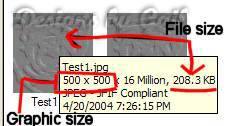
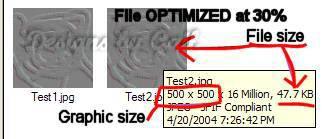
1. Maximim graphic file size is 600 pixels on the largest end. Example: 600x500 or 500x600 not 600x700 or 700x600, and so on.) I want you to send in the results of your graphics in a larger size. Up to 600 x 600 around that area size is OK. Do not send in tiny graphics for example a frame that is around 300 x 300, we can not see if it has been done correctly. If the tut writer says resize to for example 75%, don't do it unless it is extremely large. Sending large graphics is OK in this group. Watch how some members have sent theirs in. Use your common sense judgment where as backgrounds, pixels, or similar graphics that are usually smaller in graphic size. Do not enlarge them. Many graphics file sizes are TOO big. I have stated in the rules and guidelines about graphic size and file size. File size is not the graphic size itself, it is the kb file size. It is a requirement in this group that your graphic files have to be optimized before you post. I'm seeing graphics that are very small and have a kb files size over 100 that should be larger and optimized. You can view your graphic size and file sizes in your PSP browser with viewing your graphics. Optimizing your files will not change the appearance of you graphic. It is not only a must but is requested that you optimize at about 30%, no higher. This is not only for us to view and critique if needed, but for consideration of those who are on Dial-up. Follow the examples below. Graphics are resized smaller than actual size for show. These two files below has a graphic size of 500 x 500 Pixels File # 1 is not optimized. File # 2 is optimized at 30%. See the differences. I want the files to look similar to but not exactly like the second one in the picture. See the difference between 208.3 KB and 47.7 KB.....that is the file size. That is what I am concerned with.
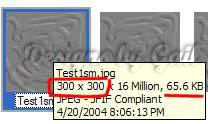
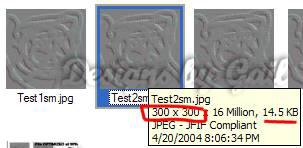
These two files below has a
graphic size of 300x 300 pixels.
File # 1 is not optimized.
File # 2 is optimized at 30%. See the differences. I want
the files to look similar to but not exactly like the second one in
the picture. See the difference between 65.6 KB and 14.5 KB.....that
is the file size. That is what I am concerned with.
Please continue on to Part 2 for more detailed explanation on how to optimize your graphics here. *** You are welcome to share this information with other groups but please give credit where credit is due. Thank you.
This page was designed by me Gail, aka Ms. PSP Lady on June 29, 2004 © This tutorial was first written by me Gail, aka Ms. PSP Lady on April 20, 2004 © This page was last updated on Saturday October 28, 2006 This page is hosted by Geocities, get it here. |