Last updated: 15 October 2006
If you have any questions or want to tell me what you think of this FAQ, or want to tell me about an area I haven’t covered, please use this form. Thank you!
What firmware versions are there?
The firmware versions compared
How can I tell what firmware I have?
How do I update my firmware to the latest?
Should I use the update that’s for my country?
What is a firmware downgrader?
Could downgrading wreck my PSP?
Will there be downgraders for later versions?
What is the WAB Version Changer?
What are some examples of homebrew software?
What do I need to use homebrew?
I have a homebrew, how do I use it?
What is the GTA homebrew exploit?
How else does region coding apply to my games?.
Can I use a USB wi-fi dongle and save getting a router?
I don’t know my WEP / WPA / SSID etc
What do I need to use LocationFree?
Could I use this to stream MP3s?
USB cable / Transferring to your PSP
How do I transfer MP3 music/video/photos?
Where do I download games for my PSP?
What is the infra-red port for?
I get a blue screen / settings are corrupt
Firmware is basically the software that controls your PSP. The firmware is responsible for the menus you see when you turn the PSP on (Settings, Video, Game, etc.). It wouldn’t be too wrong to think of the firmware as being the PSP’s operating system, like you may have Windows as your computer’s operating system.
Occasionally, Sony may release a new firmware which fixes problems and sometimes adds new features. Each firmware is given a number which increases with the release of a new firmware; this is the firmware’s version number.
1.0 was the original firmware that came with early Japanese PSP models when it was released there in December of 2004.
1.5 (Mar 2005?) was first seen with American PSPs when it was released there. It tried to fix the “problem” that allowed people to run homebrew software on their PSPs.
1.51 and 1.52 were minor revisions that tried to again fix the homebrew “problem.”
2.0 (Jul 2005) was the first major update, introduced just before the PSP was made available in the UK, that added a web browser and support for the Wi-Fi Protected Access (WPA) encryption method for wireless networks. 2.0 also introduced customisable theme colours and background wallpaper.
2.01 was a minor update that aimed to prevent people from using the firmware downgrader.
2.5 (Oct 2005) introduced LocationFree, one of Sony’s technologies.
2.6 (Nov 2005) is the latest firmware as of writing, and added support for RSS podcasts.
This table looks at the differences between the various versions.
|
Version |
1.0 |
1.5 |
1.51 & 1.52 |
2.0 |
2.01 |
2.5 |
2.6 |
|
Allows homebrew? |
Yes |
Yes* |
No |
Partially** |
No |
No |
No |
|
Web browser? |
No*** |
No*** |
No |
Yes |
Yes |
Yes |
Yes |
|
Supports UMD Music? |
No |
Yes |
Yes |
Yes |
Yes |
Yes |
Yes |
|
LocationFree |
No |
No |
No |
No |
No |
Yes |
Yes |
|
RSS Channels |
No |
No |
No |
No |
No |
No |
Yes |
|
WPA TKIP encryption |
No |
No |
No |
Yes |
Yes |
Yes† |
Yes |
* With KXploit.
** With 2.0 EBOOT Loader.
*** No official browser included, though homebrew “ripped” browsers are available.
† Version 2.5 also adds WPA AES.
Go to Settings;
Go to System Settings;
Choose System Information.
There are a few ways:
You should upgrade whenever you want the new features provided by that update. Upgrading doesn’t break your games.
If you upgrade, there is no way to go back to your old firmware unless there is a working downgrader for the version you are upgrading to.
For example, if you upgrade to 2.6 from 2.0, you cannot go back to 2.0 unless there is a downgrader for 2.6 that works. As of late, there isn’t.
If you are using a firmware that supports homebrew, currently 1.0, 1.5 and partially 2.0, you should NOT upgrade if you want to continue using homebrew unless you know you can downgrade, as the update will prevent you from using the homebrew.
Generally, yes. All firmware versions are localised so if you install a Japanese update onto a US PSP, the PSP will still be in English if that’s what it was set to. That’s still not a reason to do it, but it shouldn’t cause too much harm. It may, however, void your warranty, so be careful.
It has been said that upgrading e.g. a US PSP with Japanese firmware will change its region code. I’m not sure if this is true—I haven’t tried it.
I’m sceptical since region coding is usually (and should always) be set in hardware and not through the upgradable and replaceable firmware. That said, user reports suggest that it can be done.
A firmware downgrader is intended to let you go back to a previous firmware, something you should not normally be allowed to do. At the moment, there is only one working downgrader that lets you go back to version 1.5 from 2.0.
The sole purpose of firmware downgraders is to allow the use of homebrew.
The 2.0 firmware downgrader can be easily sourced from Google. If you decided to downgrade, be sure you read the instructions carefully and only get the downgrader from a site you believe you can trust.
Potentially, yes. Modifying the firmware of any electronic device is inherently risky though as long as the downgrader has been well-tested and you minimise the potential for risks (keep the battery charged and the PSP plugged in) then you should be quite safe.
In the future, there may be downgraders for 2.01 and 2.5. Each new firmware adds more restrictions and higher walls to overcome. We’re unlikely to see a downgrader for 2.6 anytime soon, and future releases will presumably be even more secure.
This is a piece of homebrew that is designed to circumvent the requirement by UMD games of firmware versions that don’t allow homebrew. Basically, it tricks the PSP into thinking it is running a newer firmware than it actually is, allowing you to play games that require 2.0 on 1.5 systems.
The WAB version changer does not work with newer games such as GTA Liberty City Stories—to play these games you have to be running an allowed firmware.
Homebrew, like the name, is software brewed (written) at home by ordinary programmers. Homebrew can be classified as any software for the PSP not written by Sony or one of their game developers.
The main homebrew software for the PSP are emulators. Emulators let you run games from classic systems like the Sega MegaDrive (Genesis) etc on the PSP.
Other notable homebrew includes PDA software, a calendar and a text editor.
Firstly, you need a firmware that can run homebrew. This means 1.0 or 1.5. 2.0 can run some types of homebrew but support is not extensive.
If you have firmware 2.0 and want to have a full homebrew experience, you could use a firmware downgrader.
As of writing, firmware 1.51, 1.52, 2.01, 2.5 or 2.6 cannot be used for “full” homebrew. The reason for this is that Sony cannot control homebrew and therefore do not authorise it. Newer firmware includes provisions to stop people running homebrew software.
If you have 1.51 or 1.52, the only way to get homebrew would be to upgrade to 2.0 and then downgrade to 1.5. You won’t lose any features from going to 1.5 from 1.51 or 1.52.
How you exactly use each homebrew is specific to the homebrew you are using. Most will have instructions, check the website.
KXploit is a software application for the PC designed to facilitate using homebrew on firmware 1.5. It is not needed for any other firmware.
This allows some homebrew to function on firmware 2.0. Only certain homebrew software is supported and support is incomplete. It may eventually offer support for newer firmware (2.01, 2.5 and perhaps 2.6) but this is not available at the moment.
Homepage: http://fanjita.org/
In early 2006, the homebrew developers at Fanjita.org announced they have simple homebrew games working on firmware 2.6 through specially formed save games for the Grand Theft Auto: Liberty City Stories game.
At present, this can only be used to run very simple games (such as Tetris), but this method is being developed and may lead to greater homebrew possibilities on later firmwares.
Most homebrew is not illegal unless its development has been made possible through reverse engineering. That said, some amount of reverse engineering is usually permitted by law. I’m not a legal expert and this is a grey area to say the least.
The use of emulator software to play games if do you not own the original game (and sometimes even if you do) is usually illegal. It does not matter how old the game is or if it does not make any money anymore; copyright lasts for many decades before it expires.
Yes, and apparently it seems quite a trivial task. There has been malicious code posing as a firmware update that merely deletes two files from the PSP’s internal flash memory, rendering it unable to boot the next time it is used. As far as I’m aware, all homebrew has write access to the flash mem and therefore any homebrew could potentially damage it.
Take a look at the box your PSP came with. On the side will be a globe and a number. This is your region code. Every country in the world has a region code. For example, the UK is 2 and the US is 1. Some countries share region codes (Japan is also region 2 like the UK.)
The aim is region coding is restrict games and movies sold in one country from being used on PSPs from other countries.
Let’s say you buy an UMD movie in the UK (region 2). You can only watch that movie on a UK PSP or a PSP that is region 2. You cannot, for example, use it on a US PSP because it is from a different region.
At the moment, only UMD movies and UMD music is region coded. Games are not region coded and will run on any PSP, though keep in mind that if you buy games from abroad you will need to understand the language they are in.
Region 0 is called regionfree or regionless. UMDs that are region free will run/play on any PSP.
If you want to multiplay with friends who have PSPs, you must all be running the same region game otherwise your PSPs may not find each other.
For example, you must all be running region 2 (the region itself is unimportant but you must all be running the same one.)
See my howto on this:
http://sengo.com/showpost.php?p=77802&postcount=1
Generally, no. The only USB method I know of is PSP Wi-Fi MAX. I can’t recommend it because I haven’t used it. A retailer I know of is play.com.
This information is specific to your network and can be changed/accessed in your router config.
Don’t try to access other people’s networks without permission, it is illegal.
LocationFree (LF) was introduced in 2.5. LF is a technology by Sony for making your media (TV, your DVDs, music and other videos) available to you anywhere around your home or anywhere in the world with an Internet connection.
The purpose of LF on the PSP is to be able to access this around your house using the PSP’s wi-fi connection.
See http://12.155.226.67/flash.html.
You need a LocationFree base station. You may also need a router (wireless or wired.) As far as I know, the base station is only available in the US.
The cost is $350.
RSS podcast support was added in 2.6. A podcast is basically an internet radio show in MP3 format broadcast for the public. There are podcasts about virtually every topic, but since podcasting is technical, the podcast scene is dominated by technology shows.
In 2.6, you can now listen to podcasts distributed through RSS. You will need a wi-fi connection since streaming is used.
Yes. See this thread:
http://sengo.com/showthread.php?t=7240
You need a mini A-to-B USB cable, a computer and a Memory Stick large enough to hold what you want to store.
eBay is your best bet. If you have a digital camera or basically anything that supports USB transfer (newer phones, Nokia N-Gage etc.) then you will probably already have one.
Go to USB Connection on the Settings menu and plug your cable in. A new drive will appear on Windows systems.
The partitions on your memory stick may be damaged. This can especially happen if you use the memory stick in devices other than PSPs (e.g. Sony digital cameras.)
If you have important saved games, you should copy them to another stick using the copy option on the PSP. Then format the memory stick on the PSP.
If it still doesn’t work, you will need to use a card reader and use partitioning software to delete any existing partitions and reformat the memory stick using the PC.
You will need mass storage device drivers. Windows 98 and earlier do not have these drivers built in and Sony do not offer a driver specifically for the PSP (mainly because Windows 98 is falling into disuse) so you will need to try various drivers and hope they work.
It’s all explained well in the PSP manual (PDF format).
Yes, but you need firmware 2.6 and a wireless connection to activate WMA support.
They either aren’t in the correct format or aren’t in the correct folder. Videos need to be in MPEG4 format with an .mp4 extension. If they aren’t that format you will need to convert (transcode) them. Software to do this includes PSP Video 9 and imtoo.
The ceramic white PSP was released in Japan in September 2005. Currently, it is only available there though many Japanese retailers will export to other countries. As such, all white PSPs are region 2. Most will come with the newer firmware versions (2.0, 2.01).
Improvements over the original black unit include:
The GIGA pack was released in November 2005 and includes a 1 GB Memory Stick and a PSP stand for an increased cost. In the UK, the pack costs around £205.
Most GIGA packs will come with at least firmware 2.5.
Please don’t ask about this on the forum. If you’re posting on an Internet forum then you’re probably smart enough to know that downloading games for free is illegal, and discussion of it is not allowed on the forum.
Officially, it has no purpose yet. There is a piece of homebrew that lets you use it to transfer files between PSPs.
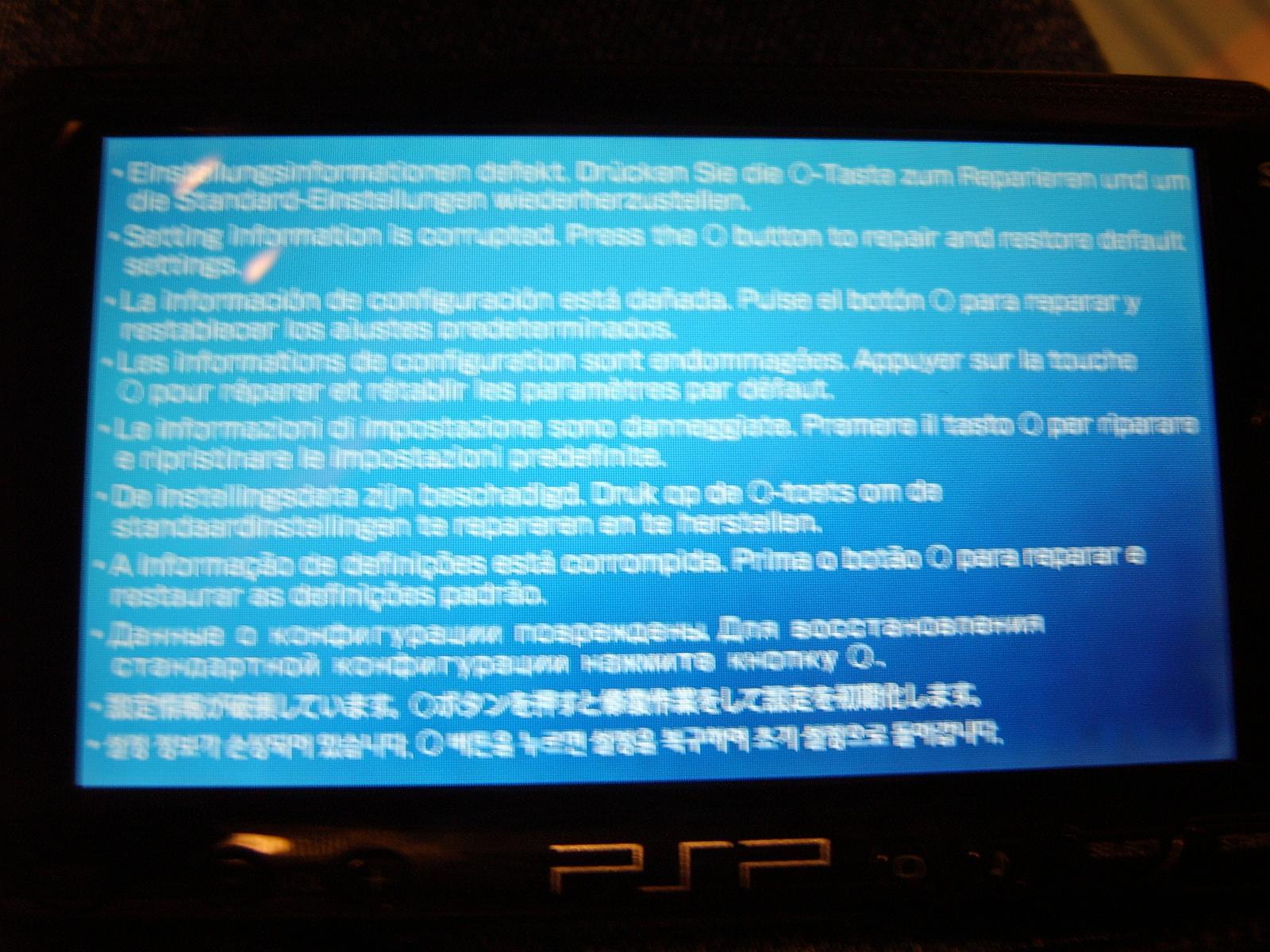
Some people have been having a blue screen in multiple languages saying the following:
Setting information is corrupted. Press the O button to repair and restore default settings.
Your PSP will then reset and you will be taken back to the “Initial Setup” screen as when you got your PSP.
Apparently the cause for this message is turning the PSP off or putting it into sleep mode when it is reading/writing the memory stick or when the Internet browser is loading a page. Therefore, you should exit the internet browser and make sure the red memory stick lamp is not flashing before you turn off your PSP.
This text is licensed under the GNU Free Documentation License. You may use it on other sites / forums. You don’t have to, but a link back to here would be much appreciated. I want to know how to improve it, and your feedback is welcome here. Thank you.