 |
 |
 |
| First of all, make sure you have the required things for doing this. Those are: A PS2 with a Network Adapter A Juno or NetZero account And Dial Guard (the program used to give you the information needed to get online with a Juno or Netzero account) |
| The first step, if not already done, is to download Dial Guard. You can download it here. Note that this program is in a .ZIP file, make sure you have an unzipping program such as WinZip to open the file. Now I am assuming you have already installed the Network Adapter on your PS2, if you haven't, do so now. If you need assistance, consult the manual that came with it, or the instructional video on the Start-Up Disc. WARNING: Do not install the Network Adapter without first completly powering down the PS2, doing so will cause permanant damage to the console. After you have unzipped Dial Guard, open the file named Dialguard.exe. It will appear as if nothing has happened, but look down in your system tray, you will see small icon indicating that the program is running in the backround. This can be seen in Fig. 1. |
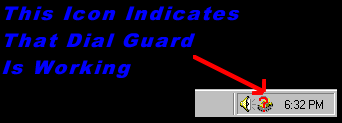 |
| Fig. 1 |
| Now close Juno down. Make sure that Dial Guard is still running, then open Juno up again. Input your password and click Web. When it attempts to dial out, a small screen will pop up in the upper left hand corner of your screen. You will want to make sure you write down the Username and Passowrd that you will see. It should look something like Fig. 2, except with your info in it, which is different then mine. The required fields to take down have been marked in purple by me, make sure you write them down! |
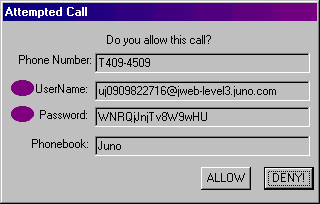 |
| Fig. 2 |
| Now just go into the setup screen of the Start-Up Disc that came with the Network Adapter and enter in the information in their respective places. Note that the "-level3" is not needed, just the jweb.juno.com will work fine. Also, make sure that you have checked and gotten the right access numbers. If you need help finding where your current access numbers are, use Fig. 3 as a "map" to where they are located withing Juno. |
| Also, if needed, the DNS numbers for Juno are as follows: DNS1: 198.6.1.98 DNS2: 198.6.100.172 |
| I was told by another PS2 user that this procedure should work for NetZero, yet I can neither confirm nor deny this, as I do not own the said program. If you know this works, please e-mail me so I can tell people for sure. I know from personal experience that this will work on a Dreamcast. Just make sure you put in those DNS numbers. If anyone else got online with another program, please e-mail me with the details, as I will give you credit and put them on the site for people to find easier. Thank you. |
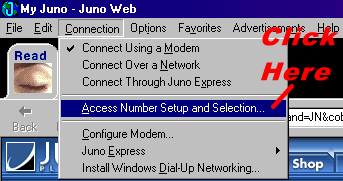 |
| Fig. 3 |
 |
 |