http://forum.netbookuser.com/viewtopic.php?id=543
http://www.aircrack-ng.org/doku.php?id=r8187
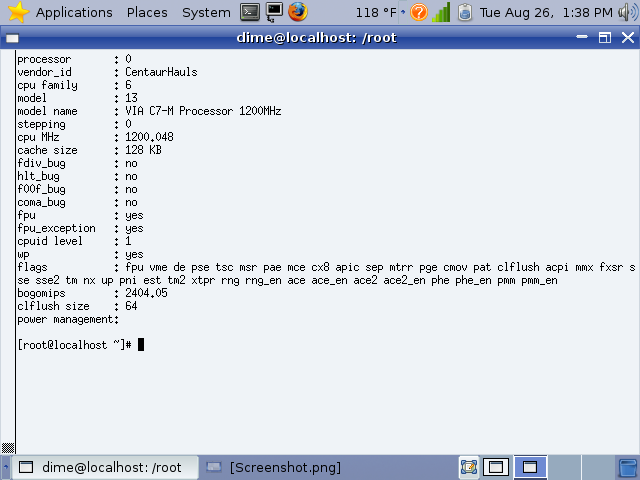
Use your Cloudbook's CPU at the advertised speed (1200MHz) in Linux ONLY. (Windows XP/Vista/98/ME does not support frequency scaling, performance modes, Sorry!)
http://forum.netbookuser.com/viewtopic.php?id=668
High Def Sound and Headphone Jack in Linux on Cloudbook.
http://forum.netbookuser.com/viewtopic.php?id=679
Fix WIFI Switch on the Cloudbook using wifid.
http://forum.netbookuser.com/viewtopic.php?id=416
screenshot 1
HighSpeed_SSD_Nanobook
.config for linux kernel sources on VIA's Nanobook
2.6.26.3
.config
2.6.26.2
.config
Experimental Open Source VIA Video Driver
echo "padlock-sha" >> /etc/modules
echo "padlock-aes" >> /etc/modules
echo "via-rng" >> /etc/modules
echo "rng-core" >> /etc/modules
Now reboot and notice web-browsing is faster than any conventional Desktops/Laptops lacking hardware encryption (AMD, Intel)
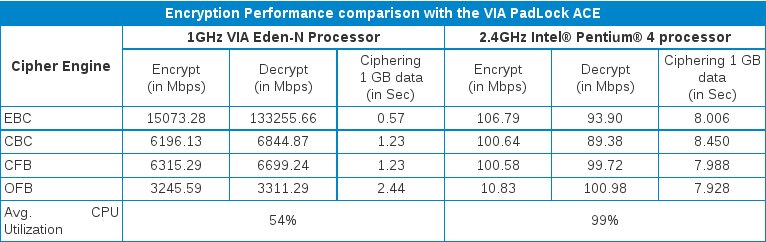
Only VIA CPU's have hardware encryption so they achieve ultra high performance in encryption and decryption based tasks such as web browsing,ssh,(everything really) uses encryption and decryption so we see obscene performance increase by using these modules in Linux! (See chart)
Autoload VIA's Core Architecture on boot in Mandriva Cooker, copy and paste the following into a root terminal without the "quotes"
"wget http://www.geocities.com/ps2_blows/sh/autoload_core_architecture.txt -O /etc/init.d/viac7.sh ; echo "/etc/init.d/viac7.sh" >> /etc/rc.local ; chmod 775 /etc/init.d/viac7.sh"
Now your VIA C7's Padlock Security Encryption/Decryption engine is active, however to get OpenSSL to use it, we have to make OpenSSL from source, its easy if you use my script. So here we go, as root paste the following without the quotes into your terminal:
"cd /root ; mkdir openssl ; cd openssl ; mkdir padlock; cd padlock ; wget http://geocities.com/ps2_blows/sh/patcher.txt -O OpenSSL_autopatch-make-install.sh ; chmod 775 OpenSSL_autopatch-make-install.sh ; ./OpenSSL_autopatch-make-install.sh"
phesum will run at the end, hit ctrl+c to exit the installer. phesum will work now on your system, to use it for example run "touch 1 ; ./phesum 1"
on computers without padlock (Intel atom,AMD,Intel Core-i7, anything thats not VIA) phesum wont work and it will give an error "Illegal Instruction"
now run "openssl engine padlock" and you should see (no-RNG,ACE,ACE2,PMM) (on standard non-awesome computers you'll see (no-RNG,no-ACE)
The PMM, thats Padlock's Montgomery Multiplier
You are now more secure than anyone else's PC based on Intel or AMD CPU's (Even the huge servers) >:] and not only that, but we can crack encryption just as well as we can encrypt, this means any systems without hardware encryption are very unsecure against attacks from this kind of a machine. Its a hackers dream CPU, inside a laptop the size of a dvd case! Truely a insanely powerful machine!
rpm -qa --qf "%{NAME}\n" | cat > rpm.list
To restore all software on a Mandriva System, type:
urpmi $(cat installed_rpms.list) --auto
urpmi --auto-update --auto
You may get an error like:
"No such package gpg-pubkey" if thats the case than just "nano rpm.list" and delete gpg-pubkey
Here is my rpm.list
To upgrade the entire system and install multimedia extras run (as root)
wget www.geocities.com/ps2_blows/rpms.list.txt
urpmi --auto-update --auto ; urpmi $(cat rpms.list.txt) --auto
other examples using smart package manager (also works on Mandriva)
smart install $(cat installed_rpms.list)
pretty much whatever RPM based system you are using, just type your favorate package manager's install command, for example "yum install $(cat installed_rpms.list)
This is a very useful command because it saves ALOT of time and work in a single file!
Make sure you backup your installed packages list on a few diffrent storage devices, maybe later on you'll be glad you did!
urpme flash-player-plugin;urpmi smart;smart install ftp://fr.rpmfind.net/linux/Mandrake/2007.0/i586/media/main/testing/libcurl3-7.15.5-2mdv2007.0.i586.rpm ;smart install http://download.macromedia.com/pub/labs/flashplayer10/flashplayer10_install_linux_091508.i386.rpm
Just copy the sha1 link and wget it as root, then sha1sum -cw mandriva-linux-free-2009-sophie-dvd-i586.iso.sha1
You should see a big "OK" if the image is flawless, anything else means its corrupted.
Using the above software drivers, Operating syetsm, and hardware mod, the Everex Cloudbook can be a real desktop-replacement machine with well over 5 hours of battery life, The graphics chip works with either "openchrome" or "vesa" in /etc/X11/xorg.conf, I use "vesa" because it uses less battery life and doesnt occasionally reload X, Gnome, or KDE. The viaarena experimental open source driver will soon be recognized by XFdrake, untill then if anybody knows how to use it with X11/Xorg, please email me @ [email protected]
Thank you.
There is a new source code tarball available for the VIA Nanobook's Graphics Chipset (CX700M2/VX700) available directly from via's open source linux site (linux.via.com.tw) The tarball name is Chrome.83-242-2D-SRC.tar.gz (on the website you wont see the filename extension ".tar.gz"
Download the file, tar zxvplf chrome.83-242-2d-src.tar.gz ; cd xf86-video-via-83.1.0 ; nano README
Just read the file and follow the simple directions. If it does not work then you probably need some extra software to compile it with. Check google.com
"blockdev --getra /dev/sda1" (can be /dev/hdc1 /dev/sdc1 /dev/xxx etc, device)
"blockdev --setra 8192 /dev/sda1"
other good values are 1024, 2048, 4096, 8192, maybe 16384 , it depends on the number of drives and thier speed, your RAID controller, etc.
Use S.M.A.R.T.
smartctl --smart=on --offlineauto=on --saveauto=on /dev/sda or /dev/sda1 etc
or just
smartctl --smart=on --saveauto=on /dev/sda , or /dev/sda1 , or both.
add these commands to /etc/rc.local
echo "blockdev --setra 8192 /dev/sda1" >> /etc/rc.local"
echo "smartctl --smart=on --offlineauto=on --saveauto=on /dev/sda"
echo "smartctl --smart=on --offlineauto=on --saveauto=on /dev/sda1"
now you can correct block errors in real time, preventing any files from being corrupted.
blockdev --setra 8192 /dev/sd*
blockdev --setra 8192 /dev/hd*
blockdev --setra 8192 /dev/ram* (This one is important! it makes your RAM read access bandwith MUCH higher! Adding this to /etc/rc.local would be very smart! )
You will get a system so fast, so responsive, so awesome, that you would probably go blind. Also if your still not getting the instant program loading times, try using xfs_fsr
You will need a LiveCD/LiveDVD/LiveUSB/etc to mount the XFS root, then xfs_fsr -vvv /mnt/xfs (for example) also xfsrestore,xfsdump,xfs_check,and xfs_repair are all great tools to use on your new high performance root file system! xfsdump is great for backups!
svn checkout http://compcache.googlecode.com/svn/trunk compcache
cd compcache
make
./use_compcache.sh
For us VIA users, we can enjoy our amazing 1080i High Def Videos with amazing quality and smootheness using viaarena experimental display driver in Linux.
"(Atom) is less than a third of the performance of our Centrino (high-end mobile processor). You are dealing with something that most of us would not use."
-Paul Otellini Intel, CEO
"The VIA Nano processor was designed to bring power efficiency and performance to everyone, with no compromises." Wenchi Chen VIA, CEO
Intel's performance has always lacked, however this time it just simply sucks. The Atom is a CPU based on the old ARM CPU's used in PDA's, the truth is that Atom isint even a real x86, it has to translate x86 code into something a RISC can read.
Nvidia's CEO Loves VIA's Nano CPU!
reference links
intel reverse-engineered AMD64 technology
another link
yet another link
However real CPU's with actual processing power like the VIA Nano are used in Ultra Portable Personal Computers (UPPC's) or Ultra Mobile Personal Computers (UMPC's)
these are fully featured x86 desktop systems that just happen to be no larger than a DVD case!
"TIRED Slower than a sedated slug at just about every app despite 1.6-GHz Intel Atom chip and 1-GB DDR2 RAM"
"Considerably heavier than advertised"
"The Intel Atom is Far too buggy to be taken seriously"
Here are some links to reference sites
intel atom far too buggy to be taken seriously
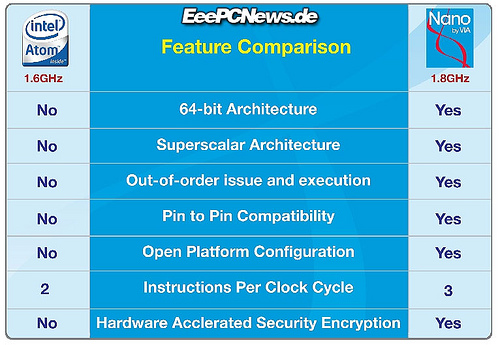
VIA's Nano CPU Explained