Proud Assamese -
Proud of the Aadarsha Ratne Internet Font!
Yes, I am a proud Assamese. Proud of our humane millennia-old civilization around the middle path of the great Brahmaputra at the eastern corner of India, proud of our culture, our sensitive lyrics, our folk songs and stories, our humanity-embracing thinkers starting with Sankardeva and Jyotiprasad to Homen Borgohain, our store of literature that touch the agony and ecstasy of Assamese existence layered over the universal human backdrop -- everything. In spite of a few hundred barbaric thugs that could kill people at will by bombs and guns, just to satisfy their monetary urges of parasitic existence in an essentially inimical neighbor country. In spite of another few thousand of jingoist parasites who live off the income of some of the innocent non-Assamese.
Yes, I am proud of the Assamese language as well, its sweet sounds and alphabets. So, naturally I am proud also of the great Aadarsha Ratne Internet (ARI) font developed by Rabin Deka, a great son of Assam now working in the USA, which enables us to type fluently and nicely in Assamese. But I don't like the present version of this font, but rather the Dec 13, 2000 version which is not currently being hosted by Mr. Deka. So I decide, out of my own free will, to host this version of the Assamese ARI font myself. Yes, you may just click here to download this version. While using this font, please take care to obey the restrictions urged by the developer, i.e., please use it free only for Internet/ E-mail purpose. With best wishes!
-- A proud Assamese.
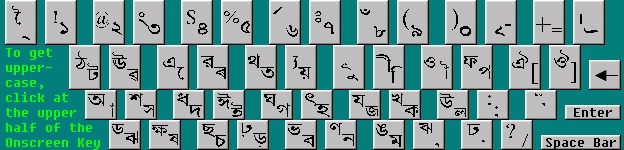
The Keyboard Assignments in ARI Font (Cut from an Image within the Shabda-Brahma Package)
Common Questions and Answers about the Aadarsha Ratne Internet (ARI) Font:
How to install a downloaded font such as ARI?
The downloaded file is generally in a 'zip' archive file. Extract that file to
get the actual font file (mostly a 'ttf' - true type font file), such as
the ARIN231.ttf file in case of Aadarsha Ratne Internet. Now open
the Control Panel of Windows (via Settings, in case of Windows XP)
and choose its Classic View or icon-wise view (depending on whether
you're in Windows XP or Windows 7), then open Fonts. In case of Windows
XP, click at File menu and then at Install New Font, then
locate the font ('ttf') file in its disk drive and then click OK. In case of
Windows 7, simply copy the 'ttf' font-file and paste that into the Fonts
folder found within the Control Panel.
After installing, how to actually write using ARI?
In every word-processor, from Notepad to Microsoft Word, there is a option for
defining the font for the text to be written. Just use that option, as one does
in case of choosing the Arial font instead of the predefined Times
New Roman one. For clarity in display and printing with ARI, choose a
large enough font-size, say the 13 point size in Microsoft Word.
How to write the Assamese/Bengali conjunct consonants (juktakshar-s)
using ARI?
In case of Microsoft Word, you can use the 'Insert Symbol' option available from
the Insert menu. You'll see the 'Juktakshar-s' there (if not, change the font
mentioned within the dialog box to Aadarsha Ratne Internet) -- may click at the
desired one and then click the Insert button. The free Shabda-Brahma
package (developed by another Assamese programmer) even uses a letter-joining
facility to conveniently obtain the Juktakshar-s, based on the rules of
Assamese/Bengali grammar.
Are the ARI-generated Assamese text readable by someone who
doesn't have the ARI font installed?
Unfortunately, no. The Microsoft Word documents, the web-pages, the
presentations, even most PDF documents having written ARI-based text aren't
readable by someone who doesn't have the ARI font installed in the receiving
computer. To make the document readable everywhere, one needs to convert the
text into images (i.e., pictures), say by using 'Microsoft Office Document Image
Writer' or by using the 'Print Screen' key in the keyboard, then to recreate the
document using these images. Alternatively, packages such as Adobe PageMaker
(with the help of Adobe Acrobat Distiller) can create transferable PDF
documents.