

|
|




|
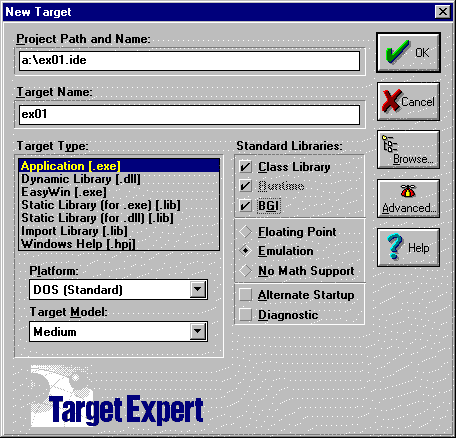
This is a step by step procedure that will tell you how to create a project file under Borland C++ version 4.5 for classes CADM231 and CADM331. 1. To create a new project click on the icon 2. The following window appears.
3. In this window click on the button Browse
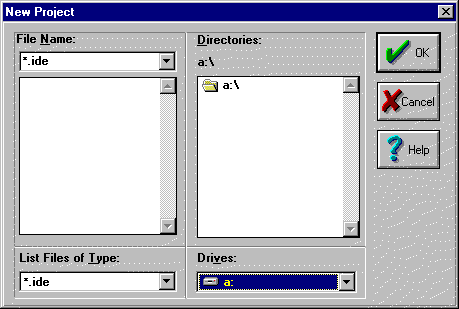
4. The "New Project" window appears.
5. From the role down button select the drive were you want the project to be. 6. Select the directory. 7. Type a name that you select for the project. Note that the project name should have some meaning to you and should be unique. Also, by default the executable file that you create will have the project name. 8. After you click OK, the menu "New Target" appears again with "Project Path and Name" and "Target Name" modified. If you wish the executable file to be named differently than the project name, you can do so by changing the name in window "Target Name". 9. Set the project according to image in step 2. Target type: Application [.exe] Standard Libraries: Class Library, BGI Platform: DOS [standard] Target Model: Medium 10. Click on the "Advanced" button.
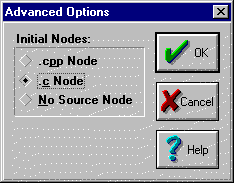
11. In the Advanced Option menu select the appropriate node. If you will be programming in C then select the radio button ".c Node" otherwise select ".cpp Node" if you will be programming in C++ and then click OK.
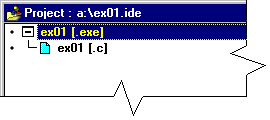
12. Click OK again to close the New Target menu. At the button of the screen the project window will come up.
13. Click on the icon 14. Select the Libraries from the role down menu "List Files of Type:". Then double click on the "cadgraph.lib" file to add it to your project.
15. Repeat steps 13 and 14 till you include all the files you intend to add to your project. 16. Double click on the file you would like to edit or highlight it by using the keyboard arrows and press Enter. 17. After you write your program use one of the following icons to compile or run your program.
Note: If you have any suggestions you can do so in the lab hours or sending me and e-mail. All images are taken form Borland C++ 4.5 compiler, and it is copyrighted by it's owner. |



 to add
library files or C programs you created.
to add
library files or C programs you created.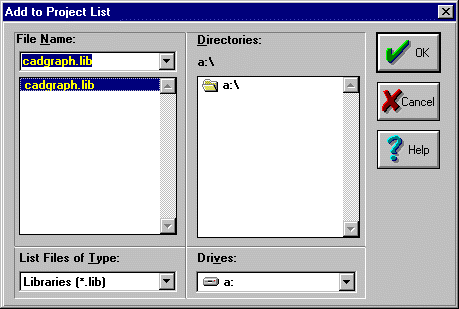
 Compile the
active file.
Compile the
active file. Bring all
targets up-to-date by compiling and linking, as necessary.
Bring all
targets up-to-date by compiling and linking, as necessary. Rebuild all
files.
Rebuild all
files. Make and run
the current program.
Make and run
the current program.