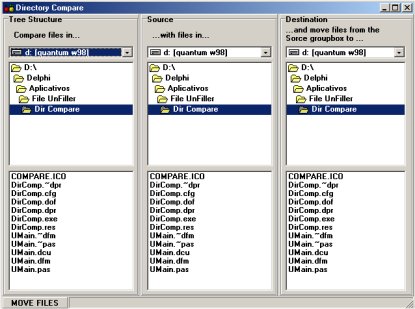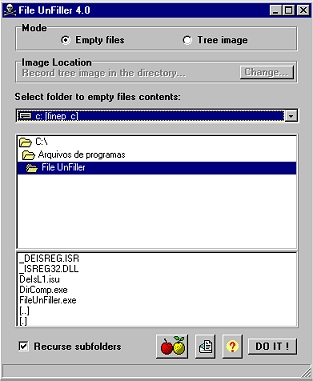
File Unfiller is an application that creates a directory tree image with "empty" files on it. You can use it just to record information about your HD directories structure, the file contents on a CD or to manipulate your files, based on the created image, through the included Directory Compare application. This version now includes a Generate Tree Image option, besides the old default behavior of empty the files.
The first step is to choose between the "Empty files" or "Tree image" options. The basic difference is that the first option is a destructive process, while the last one is not. The "Empty files" option will just empty the ORIGINAL files in the source tree (destructive) while the "Tree image" option will generate this tree of empty files in another directory you specify. Both options will end with a "fake files" tree created from the original tree. I call it "fake" because each file in this generated image tree will be empty, ie will have a 1 byte size. Of course it will become useless as a data file, but you can use the tree structure to manage your original files. Just read the following example:
I'm that kind of music-crazy-guy, and for this reason I have a big collection of MP3 files in my HD. I just made an upgrade at my home Internet connection, and now it's so fast I simply download files faster than I can listen to them. The only solution is bring the files to my office HD in a rewritable CD and listen to them while I "work" :) This way I can classify them, putting every file in different directories by style, and deleting the corrupted ones or just the bad music (there's so much of those in the Net). After I have made this file management, I'll need to tranfer this directory structure back to my home HD, where I really store my music files. But I don't have a CD recorder in my office, and it would be a waste of space and work to record again the files in the CD since I already got the same ones at home. So what I need is only the directory structure made in office, with all the files contained in each folder.
With this application I can create a tree image of the branch where my files are, and at home I can use the Directory Compare application included with File UnFiller to move the files on the original branch to the apropriate location. For example, you can use the compare software to compare the files in your original directory with the ones in the \to_delete folder you created "at office", and move all the files in the original directory that also exist in the \to_delete branch to a new location. Later you just need to delete all the files moved to this new location, regardless of the files names. Instead of looking file by file to see if it was present in the \to_delete directory and then deleting it, you can just automatize this process.
After using this application, you will still have the tree with the files in their branches, but each file will be empty, with just a 1 byte size (of course they will become useless). If you have chosen the "Tree image" option, you will keep your original real files tree intact, and create a fake files tree in another location. If you have chosen the "Empty files" option, your real files tree will be replaced with the image tree (fake files). After you use File UnFiller, all the files created will have 1 byte size (please note that it may take more space from your HD because of a cluster matter). This way you can easily send them via email or diskette to your home, and still use the compare facility featured in the Directory Compare application. If you compact these pseudo files in a archive you won't even have the cluster problem, and a tree with 1000 files will have less than 1 Kbyte !
Of course you can use the "Empty files" option maliciously, running it in the My Documents folder of your "friend" machine and ruining his life, but this is up to you. All I can do is warning you two times before the program drops the bomb !
Please note this software may not run properly in the root or operating system directories.
Feel free to find new uses for it, as having a list of music files you've already downloaded, don't want to do it again, but that are too terrible to reside in your HD. You can do the same with image files, videos, or just backup your HD tree structure. If you find an interesting use for it, just let me know at [email protected]
It's good to tell you this software is freeware, so you can use and distribute it freely, as long as you don't modify it. It may be also considered as dinnerware. It means if you really liked the program and found it useful you can just pay me a dinner. Or if you are a young sexy lady you can simply come to Brazil to dinner with me (not necessary to pay it). If this is impossible, you can just send me your sexy lady picture or just drop me a line at [email protected]
Finally, it's not necessary to say I'm not
responsible for any damage this software can cause to your system (and
it really can !), so please be very careful when using it !
Jan/2003