
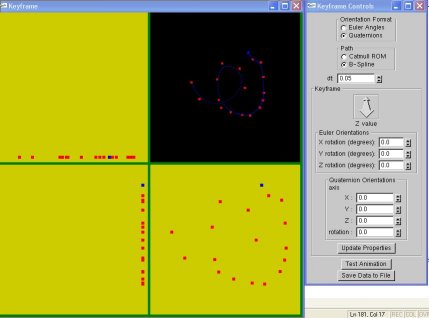

2. Select the keyframe control points by mouse clicks on the lower right window.
3. When a control point is in a "selected" state, the keyframe data can be entered. You can enter the X,Y,Z angles for Euler rotations, and an axis and associated angle of rotation for quaternions. You can change the Z value for the point, since by default all points get added on the XY plane with Z=-10.
Note that the camera is looking in the -Z axis, so increasing Z makes the object come closer.
4. You can select more than one control point, in that case key data entered applies to all of them. If you click on or "near" the point, that point gets selected. By default the most recently added point is selected. You can deselect selected control points by clicking on them again.
5. To delete the last point added, press d. To clear the screen and start new press c.
6. Once done, click animate for preview.
7. To save the animation click the save button.