Requirements:
Microsoft Windows 2000 or XP (please note that Kruptos has not yet been tested with Windows Vista). You will also need the Microsoft .Net framework for the installation procedure.
Features and Benifits:
Kruptos 2 is Free, quick to download, simple to install and very easy to use. Based on public domain encryption algorithm. The algorithm has not been modified in any way. Absolutely no backdoors, hidden keys or any other method of decoding encrypted data without the correct key, So if you lose your password, you lose your data!
Ideal for secure transportation of files on portable storage devices, such as portable hard drives, USB storage keys.
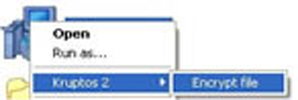
Kruptos 2 uses Windows Explorer plug-in which allows you to encrypt/decrypt/shred using the power of standard Microsoft Windows Explorer. It integrates into Windows Explorer and allows you to work with your important files using Explorer's context menu. You can even decrypt a file and have Kruptos 2 automatically open it and the re-encrypt it when you have finished editing the file, all with a single button press!
With Kruptos you can produce self-extracting encrypted files. Self-extracting files are executable-programs (EXEs) that can contain encrypted files and the software necessary to decompress the contents. Users can decompress the contents. Users can decompress the contents of a self-extracting file simply by running it like any other program. All that is needed is the correct password.
Kruptos 2 allows you to thoroughly delete and remove files and all their traces from your drive in a secure way via "Shred", so they cannot be recovered by common undelete tools.
Are your filenames sensitives? With Kruptos you can obfuscate (disguise) the filename when you encrypt the file, what's more you can view the original filename at anytime by simply clicking on the file and selecting: view original filename.
Do you easily forget your passwords or have too many to remember? With Kruptos you can simply enter a password hint when encrypting your files, this hint can then be retrieved simply by right- clicking the file and selecting : View Hint.
Kruptos 2 is 100% clean, which means it does not contain any form of malware, including but not limited to spyware, viruses, trojans and backdoors. |